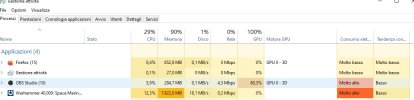
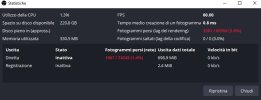
Your system is still overloaded & your ethernet is still throwing non-zero errors.
Running that 2k monitor @ 144HZ isn't helping, as it is placing additional load on your GPU. Run it @ 60HZ until you eliminate the rendering lag.
10:11:55.344: name=ASUS MG279
10:11:55.344: pos={0, 0}
10:11:55.344: size={2560, 1440}
10:11:55.344: attached=true
10:11:55.344: refresh=144
First log:
0:20:54.612: [rtmp stream: 'adv_stream'] Connecting to RTMP URL rtmp://ingest.global-contribute.live-video.net/app...
10:20:54.642: [rtmp stream: 'adv_stream'] Interface: Realtek PCIe 2.5GbE Family Controller (ethernet, 1000↓/1000↑ mbps)
10:20:54.642: [rtmp stream: 'adv_stream'] Interface has non-zero error counters (1/0 errors, 1/0 discards)
10:20:55.421: [rtmp stream: 'adv_stream'] Connection to rtmp://ingest.global-contribute.live-video.net/app (52.223.192.154) successful
10:20:55.421: [rtmp stream: 'adv_stream'] New socket loop enabled by user
10:20:55.422: [rtmp stream: 'adv_stream'] Socket send buffer is 65536 bytes
10:36:37.098: Output 'adv_stream': Number of lagged frames due to rendering lag/stalls: 20185 (35.7%)
10:36:37.098: Output 'adv_stream': Number of dropped frames due to insufficient bandwidth/connection stalls: 6628 (14.5%)
10:36:37.099: Video stopped, number of skipped frames due to encoding lag: 20215/56499 (35.8%)