

thank you for the recommended settings, did everything you said and 99% of the video seems fine. It seems like it dropped a frame around 0:26/0:27 and when running around the first pillar at 0:29 a few times. Video linkTry setting your main monitor to either 60 or 120 instead of 144.
Colors may look off too using the sRGB color space, Rec. 709 should produce better results.
I also noticed you're using CBR. The P5 Preset is mapped, no 4090 to test the dual encoders but I know that Preset is too slow for 60FPS on the 3000 series. P4 or lower must be used.
You are using an out of date browser. It may not display this or other websites correctly.
You should upgrade or use an alternative browser.
You should upgrade or use an alternative browser.
I will pay you if you fix my microstutters when recording, not in game.
- Thread starter Faz8
- Start date
rockbottom
Active Member
YW!
Did disabling HAGS help with Shadowplay?
Just remember, next NVMe you get, make sure it has DRAM so it can easily handle heavy workloads without getting throttled.
Did disabling HAGS help with Shadowplay?
Just remember, next NVMe you get, make sure it has DRAM so it can easily handle heavy workloads without getting throttled.
Shadowplay still persist having the small microstutters unfortunately. OBS too as I said earlier, but only once throughout the whole video. Do you think theres anything I can do to get a completely stutter free experience?YW!
Did disabling HAGS help with Shadowplay?
Just remember, next NVMe you get, make sure it has DRAM so it can easily handle heavy workloads without getting throttled.
Will do, thank you!
just did another test recording with OBS, issue is there again. Seems like I just got lucky with the previous recording :/YW!
Did disabling HAGS help with Shadowplay?
Just remember, next NVMe you get, make sure it has DRAM so it can easily handle heavy workloads without getting throttled.
video link
Attachments
rockbottom
Active Member
Other than a memory leak, log looks clean. Shadowplay still stuttering points us back to the driver or the GPU itself.
That’s the thing, the video I just linked is from my OBS recording :/Other than a memory leak, log looks clean. Shadowplay still stuttering points us back to the driver or the GPU itself.
rockbottom
Active Member
Hurry up & wait for the next driver....
Hey Faz8, i was just reading through your post, i have similar issue, but at higher framerate, while playing rocket league (haven't tested any other games), with good hardware and nobody helped me find a solution to this problem on this forum, so i started trying many different recording softwares, i had stutters in all of them, some had bigger/less stutters than others, shadowplay also, until I tried recording my gameplay with bandicam and i get 0 stutters. Bad thing is, that u can only record 10 min at a time with free version and u have watermark on the top of the video. I'm still looking through obs threads to see, if anyone has similar issues as i have, because nobody helped me find solution and idk if anyone will help you either. I even thought about upgrading my pc parts, but idk if it will help with this issue, looking that u have the latest hardware and still have stutters. I'm thinking of purchasing lifetime bandicam license, so i can have unlimited minutes of recording time and watermark removed, but still, it doesn't have same features as obs, which i need, like recording some overlays in the background + recording gameplay at the same time. Maybe try to record with bandicam to see, if u still get stutters. I think issue is in OBS, but idk what is the issue and how to fix it.
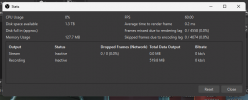
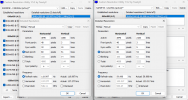
I did a DDU and installed nvidia drivers WITHOUT geforce experience this time. Here is a link to Analyzer, attached is a screenshot of the OBS stats of this recording. I also attached a screenshot of CRU showing both my monitors.
The duplicate frames STILL happen
The duplicate frames STILL happen
Attachments
rockbottom
Active Member
That blows! Can't do any further troubleshooting for you but safe to say it's NOT an OBS issue.
I finally updated from 28.0.3 to 29.0.2, all good. Still running W10 21H2, Nvidia 522.30
I finally updated from 28.0.3 to 29.0.2, all good. Still running W10 21H2, Nvidia 522.30
really unfortunate :/ glad to hear you're all fine. Thanks again for all the previous help.That blows! Can't do any further troubleshooting for you but safe to say it's NOT an OBS issue.
I finally updated to from 28.0.3 to 29.0.2, all good. Still running W10 21H2, Nvidia 522.30
Did you fix your issue yet ? I think I’m experiencing the same here, 13900k+4090really unfortunate :/ glad to hear you're all fine. Thanks again for all the previous help.
sorta? I'm using display capture which has been much better, but still might give frame skips like 20 minutes after recording. It's a hit or missDid you fix your issue yet ? I think I’m experiencing the same here, 13900k+4090
We both have 4090s could it be this what’s causing the issue ? Which drivers are you using btw ?sorta? I'm using display capture which has been much better, but still might give frame skips like 20 minutes after recording. It's a hit or miss
latest nvidia oneWe both have 4090s could it be this what’s causing the issue ? Which drivers are you using btw ?
What do you think fixed your problem ? Because you reinstalled windows 10 but that didn’t seem to fix anything, and then you tried DDU right ?latest nvidia one