Audio Monitor

Audio Monitor 0.10.0

Hi, the plugin is great however signal is getting more and more delayed with time, thus going out of sync with my camera for example. Any idea how to fix it? Thanks
 
I'm having trouble updating the plugin for OBS 32.0.2. I first updated OBS, then tried installing the audio-monitor plugin, and kept getting the "Please update or remove these plugins" message from OBS. I manually removed audio-monitor.plugin from both `~/Library/Application Support/obs-studio/plugins` and `~/[my-user-account]/Library/Application Support/obs-studio/plugins` and tried reinstalling the plugin. The installer says it's successful, but the plugin doesn't appear in OBS, and I can't find a new plugin file anywhere. I've tried running the installer multiple times, but still nothing. Any ideas?
 
@dave42 is there an error indication in your OBS log file?
With the old version of the plugin installed, it gave errors (in the log file) on start-up. After removing that and running the installer for audio-monitor-0.10.0, there's no related error. It just doesn't seem to try to load audio-monitor at all. The only thing I see are errors attached to the sources where I'm using the audio-monitor filter:

15:57:28.036: Source ID 'audio_monitor' not found
15:57:28.037: Failed to create source 'Audio Monitor'!

Should the new plugin file end up somewhere other than `~/Library/Application Support/obs-studio/plugins`? The installer doesn't put anything there.

Alternately, is there a way for me to just download the 0.10.0 version of audio-monitor.plugin and just manually install it in the plugins folder?
 
Good evening everyone,

I can't find the folder or plugin to uninstall on my Mac either.

What should I do to resolve this issue?

Thanks so much to anyone who can help.
 
hi all
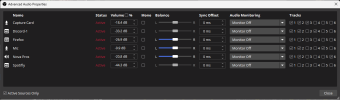
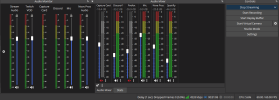
just need some help on getting media on a different track than my audio on my headset im just wondering how to do so because if i have the track muted you can still hear it on stream not sure what to do next
 

Attachments

  • obs audio 1.png
    obs audio 1.png
    41.8 KB · Views: 43
  • obs audio.png
    obs audio.png
    82 KB · Views: 38
Stupidly just updated OBS on Mac (Intel) to the latest version 32.0.4 and it's saying this plugin is incompatible :-(
I was just wondering if this will possibly get updated to work with the latest version at all?

Many thanks,

Mark
 
@markbowendesign the latest version of the plugin should be compatible with OBS 32.0.4. Can you try manually removing the old version from ~/Library/Application Support/obs-studio/plugins before installing the new version of the plugin?
 
Stupidly just updated OBS on Mac (Intel) to the latest version 32.0.4 and it's saying this plugin is incompatible :-(
I was just wondering if this will possibly get updated to work with the latest version at all?

Many thanks,

Mark
Actually it may be working now!
I just downloaded an older version of OBS Studio (well 4 actually until the plugin started working again (had to delete the plugin first from the hard drive) and now that it is working in 32.0.1 it appears like I can open 32.0.4 and it's working so excellent!!
Will test thoroughly first though but thank you so much for such an excellent plugin as this one.

Best wishes,

Mark
 
Hello all,

I've used this plugin for years and sometimes I get audio delay over time. I can't track down what is causing it as sometimes I go what seems forever without any issues and now this week I'm finding myself muting and unmuting the source to restart the filter and resync, but its only a matter of time before it drifts out of sync. Any clue on where to start looking for answers?

I'm using an internal capture card (CAM LINK PRO) and monitoring the audio via audio monitor filters so I have separate control of levels for myself and for my stream. I use two different headsets depending on the workflow. As such I've made audio monitors for both, and one for external speakers, so 3 audio monitor filters in total. My capture card is set to Monitor Off and I use the filters to monitor.

If I disable the audio monitor filters and change the capture card to monitor and output in OBS, there's no delay. Setting the filter to restart output on unmute fixes the delay til it delays again.

As far as I can tell this is only affecting my Astro A40 Mixamp pro wired headset. My Wireless Astro 50 and wired Realtech Ausio Speakers experiece no delay from the filters. OBS and plugins are updated.

Thanks for reading and any help you can provide. I love this filter as I really need to be able to adjust what I hear vs my recording/stream.

-K
 
...sometimes I get audio delay over time......muting and unmuting the source to restart the filter and resync, but its only a matter of time before it drifts out of sync. Any clue on where to start looking for answers?
If I disable the audio monitor filters and change the capture card to monitor and output in OBS, there's no delay. Setting the filter to restart output on unmute fixes the delay til it delays again.
As far as I can tell this is only affecting my Astro A40 Mixamp pro wired headset. My Wireless Astro 50 and wired Realtech Ausio Speakers experiece no delay from the filters. OBS and plugins are updated.
For a long time, OBS itself has had that exact problem with its own Monitor and a seemingly random set of sound cards. My best guess, and backed up by reading between the lines of some official responses, is that OBS doesn't actually handle audio correctly, per the operating systems' standards. Never has, really, and no one on the dev team seems to know enough about audio to fix it without breaking something else. So they don't.

When it drifts out of sync like this, I suspect it's because the sound card that it's running to has its own internal clock and does not use the computer's clock. Some do that, because they don't trust the computer's clock to have low enough jitter to avoid audible distortion, or because the guy that designed that device, just did it like that and no one else knew to question him, or whatever. Anyway, a lot of sound cards do that, and so the two independent clocks (computer and card) slowly drift out of sync with each other, even for the same nominal rate, with no way to prevent that.

In keeping with the networking mindset that the OBS devs do know well, the inevitable xruns that that creates (both full buffer and empty buffer) trigger an expansion of the buffer on the (wrong in this case) assumption that the connection is unreliable and it needs more time to get some resent samples and slot them in before they're needed.

That's great for streaming something over the internet, where your only connection to any of it is through that stream. But it's ABSOLUTELY NOT OKAY for a local live monitor! Amazingly, when I asked about that, the devs' answer was something like, "Why wouldn't it be like that? How else would it be done?" No understanding of local foldback whatsoever.

And yes, the fix is to disrupt the misbehaving audio stream, which resets the buffers, and let it drift all over again. Or, use a different audio device that doesn't have its own clock but takes it from the computer instead. If you must use a particular device, and it has this problem, then you might stick a virtual thing in between. Send OBS to that virtual thing, which is practically guaranteed to use the same clock, and then send that virtual thing to the device that you actually want. Essentially, let something else handle the clock drift correctly, because OBS doesn't.
 
Back
Top