Tuna

Tuna v1.9.11

It's called trying buddy... trying! I build things too, not plugins, but very similar web
You clearly don't know what you're talking about.
If you don't provide the necesary information to reproduce an issue that happens to you then the problem starts with you.

It takes nothing for a developer to have a quick think for a minute and suggest a few things, especially on a public forum of any type simply because it then may save them the hassle of repeating it 20 times privately.
And then again, you don't know what you're talking about.
 
I'm sorry if this has been asked before but I'm trying to do the following: use VLC window title to display the file name but have it across multiple lines, depending on the file name. e.g. if the file name is "item 1 - item 2 - item 3 - item 4" I'd want each item on it's separate line. Is there any way to achieve this? Ideally I'd just use metadata but I need to run VLC as it's own instance - not within OBS. Thanks for any tips.
 
I'm sorry if this has been asked before but I'm trying to do the following: use VLC window title to display the file name but have it across multiple lines, depending on the file name. e.g. if the file name is "item 1 - item 2 - item 3 - item 4" I'd want each item on it's separate line. Is there any way to achieve this? Ideally I'd just use metadata but I need to run VLC as it's own instance - not within OBS. Thanks for any tips.
With some work it's possible, but you probably won't like the work part... ;)

Tuna doesn't allow {filename} to work with VLC. So you gotta get creative.

Lets assume your "Items 1-4" = 1 is artist, 2 is title, 3 album, 4 copyright and you want it displayed as:

Artist
Title
Album
Copyright

Mp4s can have embedded metadata like mp3s. So you need to copy all the filename info into the metadata if you haven't already.
That's the fun work part. What I did was download mp3tag, point it to your video folder, select all, right click, Convert, Filename - Tag

I'm not gonna dive into this in depth, someone on a mp3tag site can explain it if you need help, basically play with the string, it will
show one of your files as an example, match %artist% to item 1, then your dash, %title% then dash, etc. If you do it right, it shows in the
box below whats going to be assigned to each tag from the example file shown.

Once you figure it all out, hit ok, and it'll transfer all video files filenames to the metadata. Much easier then by hand.

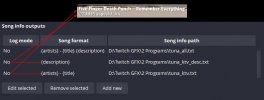
Now back in Tuna, asign/point {artist} to a single text file. Each metatag should be its own file, then make a text layer in your scene
for each text file. Now place them how you like and you have 4 items on their own lines. The attached picture is everything I explained
here just using 2 lines.

If one of your lines is something oddball that doesnt fit into a catagory, IE (artist, title, album, etc) You could always store it in "comment" or "description"

Hope this made sense to ya, and good luck putting it together.

 

Attachments

  • tuna_exmpl.jpg
    tuna_exmpl.jpg
    40.8 KB · Views: 119
I appreciate the reply but - and correct me if I'm wrong - I believe we're not quite on the same page. It looks to me like your soltuion is for the VLC player embedded in OBS as a source, but I need it to run as a standalone. Because of that I could only use the window title of the VLC process in Tuna.
In any case I've now got the plugin "Now Play in Texts" to do the things I want with VLC as a standalone, so my issue is solved. But I still appreciated Tuna during the time I used it!
 
I appreciate the reply but - and correct me if I'm wrong - I believe we're not quite on the same page. It looks to me like your soltuion is for the VLC player embedded in OBS as a source, but I need it to run as a standalone. Because of that I could only use the window title of the VLC process in Tuna.
In any case I've now got the plugin "Now Play in Texts" to do the things I want with VLC as a standalone, so my issue is solved. But I still appreciated Tuna during the time I used it!
standalone? well you are in the completely wrong side of the internet my friend
 
Having a wee issue with the album art.

Starts off loading fine, then 10 seconds into the song, it resaves to the cover.png file, but the album art is zoomed in, cutting off a portion of the album art.

Any help?
 
Hey all,

I installed tuna today and it was extremely easy to set up and use as someone coming over from snip. However, I also tried to export it to a portable OBS package and everything else was ok but tuna broke a bit. The images still appear but the text does not UNTIL I open regular OBS and it works on both programs. I'm assuming something to do with the text file is look for "OBS x.x.x - profile:" where the portable makes it say "OBS x.x.x - portable mode - profile:"?

Thankfully I'm not going anywhere with the portable package yet and I can make do with the regular version for now but I do potentially want to solely use portable mode.

Thanks.
 
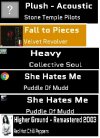
I've used the last three versions of Tuna and they've all worked great but, this one doesn't produce the cover art correctly most of the time. It's either the actual cover, a tiny chrome icon, or a tiny version of the cover or no cover at all.. My setup is the same, all that's changed is the version of the plugin. Are there any suggestions to fix this issue or do I need to go back to an older version?
 

Attachments

  • Tuna-Covers-Variations_Version 1.9.7-HEAD.jpg
    Tuna-Covers-Variations_Version 1.9.7-HEAD.jpg
    48.3 KB · Views: 151
  • Tuna_Settings.JPG
    Tuna_Settings.JPG
    73.5 KB · Views: 153
So far, tuna works great most of the time. I only have two issues:

1.) My OBS log is flooded with this: "[tuna] Failed to parse json response: Too many requests, Error: illegal value"

What is that and more importantly, how do I get rid of it?

2.) Tuna sometimes gets the correct spotify image but reduzes its size to 1/4 of what it usually is. Only pausing/playing again fixes it.
 
I use a media player called Potplayer, would it be possible to use Tuna with it? I dislike VLC for a few reasons, and I find Potplayer to be superior.
 
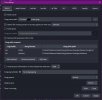
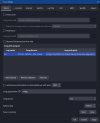
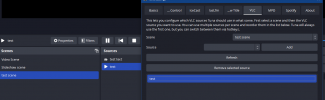
Hi im new to this Tool, its Very kool but Im trying to get the internal OBS VLC media source and Tuna to play nice. It seems to seems to edit the text file fine when the video in the source but when theres an audio file, I just get the Place holder text I set. I can not figure out why.

Ive edited the meta data, I've made sure the format was correct, Ive uninstalled and reinstalled, Ive closed OBS a few times. no dice.

Any help or advice? Did I find a bug or am I doing something wrong?


UPDATE: I closed OBS again, when I Opened it back up it was working the way I wanted.
 

Attachments

  • Basic settings Tuna.png
    Basic settings Tuna.png
    39.8 KB · Views: 168
  • test scne mp3 name.png
    test scne mp3 name.png
    13.3 KB · Views: 172
  • VLC tab.png
    VLC tab.png
    28.6 KB · Views: 156
Last edited:
Great plugin, few questions to polish last things:
1. For YT Music to work, the 1608 port can't be changed, right? I didn't see any way to change the port in YT Music.
2. Which services do lyrics work with? While the specific text fields specify in red they're not available, I can't find any info on this or how it works, except that they can be extracted from a tag (local files only then?)
3. \n (line break) is impossible in text output, right? So one file and source per line?
4. Which Twitch bots that support song requests are recommended for this? I assume it would be through web browser, if possible? Does any of them support progress (bar)? I
 
Last edited:
Hello, I am on Mac, and attempting to use Tuna. I have installed everything correctly, but when I try to add a path on the basics tab, nothing happens. I create a new file called Tuna.txt and the settings link to the file, then I edit the way I want the song to show (title by artists) click OK, and the Tuna settings window closes, OBS still runs, and when I reopen Tuna settings, there is no path saved on the basics tab as an output. How can I proceed?
 
Hi, I was testing OBS 30 beta 2 and got this error on the log:
14:57:28.597: [tuna] cURL failed while sending spotify command (HTTP error -1, cURL error 28: 'Timeout was reached'). Waiting 5 seconds before trying again
14:57:33.594: [tuna] cURL request timeout over.
It shows the rigth song, image and nothing else happens wrong, just the log entry.
Can't test it on 29 right now but I remember there wasn't any error message on it.

Also, when I open Spotify it changes the cover for the whatever song is showing on queue even when isn't playing. In the past the normal behaviour was to always show the placeholder image until you start playing.
Not a problem, I just have to play/stop a song before streaming and all is good.
 

Attachments

Back
Top