

You are using an out of date browser. It may not display this or other websites correctly.
You should upgrade or use an alternative browser.
You should upgrade or use an alternative browser.

VahsTheAdventurer
New Member
Hello @Exeldro this is one of my first posts, so I hope I am not too demanding. I have a question about the Replay Buffer, which currently requires Source Record to be recording to be functional. My question is, is there any possible way to use the Replay Buffer functionality with Source Record, without the plugin already making a recording? My issue is file space. I do not want the huge recording of the entire session, I only want the retroactive clips.
PS: I have hotkeys set up for Replay Buffer (separate from your plugin) and "Source Record - Save Replay" for the source I want, which is my webcam in a specific scene.
If there is any solution that can achieve this, it would be greatly appreciated. Thank you in advance.
PS: I have hotkeys set up for Replay Buffer (separate from your plugin) and "Source Record - Save Replay" for the source I want, which is my webcam in a specific scene.
If there is any solution that can achieve this, it would be greatly appreciated. Thank you in advance.
I'm having the same issue on my Mac. It will not allow me to install the plug-in.Hi is anybody else unable to download source record file, got a warning mircosoft defender detected a potiental risk with this download doesnt want me to download

lucky_graf
New Member
Hello guys, thanks for your work!
I want to share my experience with this plugin.
The replay buffer works pretty well for a few sources, but during a stream, I lost about half of the frames due to encoder issues. I tried using a different encoder specifically for streaming, but it didn’t help resolve the frame loss.
Could you please help with this?
My PC is Lenovo legion 5 with video card 3060, may it helps you to understands issues.
I want to share my experience with this plugin.
The replay buffer works pretty well for a few sources, but during a stream, I lost about half of the frames due to encoder issues. I tried using a different encoder specifically for streaming, but it didn’t help resolve the frame loss.
Could you please help with this?
My PC is Lenovo legion 5 with video card 3060, may it helps you to understands issues.

JediBMack
New Member
If you go into System Settings -> Privacy & Security and scroll down to the Security section, there should be a prompt to bypass Gatekeeper that says something like "'source-rec...versal.pkg'" was blocked to protect your Mac." There is a button there that says "Open Anyway" and it will prompt for an admin password.I'm having the same issue on my Mac. It will not allow me to install the plug-in.
After that, it should install normally.
ArdinOkira
New Member
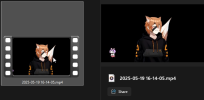
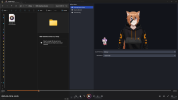
Is there a way to get source record to properly save video with a transparent background rather than a solid black one? I have my OBS and VTubeStudio set up so that OBS receives it as transparent. Even when looking at the filters and while on the source record filter in OBS it shows the source with a transparent background. I've tried several changes of settings in different places in OBS but none seem to let it export transparent which where the issue is. The file always exports with a black background in the video and I'm unsure why.
I've changed around encoder, video format, color format, color space, container format, ffmpeg output type, and video encoder trying to see if I could get it to but it seems to not work so far. I may just be missing something totally obvious but for now I'm unsure how to get a fully transparent source recorded.
I've changed around encoder, video format, color format, color space, container format, ffmpeg output type, and video encoder trying to see if I could get it to but it seems to not work so far. I may just be missing something totally obvious but for now I'm unsure how to get a fully transparent source recorded.
Attachments

michaelperfect
New Member
On OBS 31.0.6 (Mac OS Sequoia ARM), it works very well, and I find it very well made. Not too many features but still everything we need. I'd just like to understand better what the encoding settings at the bottom do, since I thought it just records the source, which in my world means, don't re-encode, just save to disk what's streamed without any new processing. Thanks !

ark2rez
New Member
Just started using this plugin to record my second monitor as a separate file.
The main OBS settings save my main desktop/monitor.
I have a second using source record.
Both the source record and main record have the same settings for output.
Both videos seem to have all the same size, codec, duration, etc...
The second monitor ends up over 3x as large in file size.
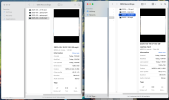
See screenshot. Main is 1.8g (Left side) while the source record is 7g (Right side).
Why is the source record video so large in file size?
The main OBS settings save my main desktop/monitor.
I have a second using source record.
Both the source record and main record have the same settings for output.
Both videos seem to have all the same size, codec, duration, etc...
The second monitor ends up over 3x as large in file size.
See screenshot. Main is 1.8g (Left side) while the source record is 7g (Right side).
Why is the source record video so large in file size?
Attachments
hi hi I'm new to obs in general so apologies if i'm not the smartest about thing. i have been having an issue i cant find anyone else talking about with source record, when i save my replay buffers i get 1 video for my main monitor and i source record my second monitor but the video of the second monitor has no audio whatsoever. there's only one channel on it that just says "1. Source Record - AAC - 2 Channel" does anyone know how to fix this so that i get audio on both files if possible?

InvSnarf
New Member
Having the same issue. I am using source record for a scene where I have my chat as a browser source overlayed on top of a color source that I key out later in editing. Those are then grouped together and the source record filter is set on the group so I get them correctly layered together.Just started using this plugin to record my second monitor as a separate file.
The main OBS settings save my main desktop/monitor.
I have a second using source record.
Both the source record and main record have the same settings for output.
Both videos seem to have all the same size, codec, duration, etc...
The second monitor ends up over 3x as large in file size.
See screenshot. Main is 1.8g (Left side) while the source record is 7g (Right side).
Why is the source record video so large in file size?
I thought I had set up my source record to be CQP 23 but it swapped back to a constant bitrate of 10k which has made these very simple sources inflate to be larger than the actual recordings that they accompany.
For reference, was playing a relatively low bitrate game, AM2R. 3 hour session, gameplay was recorded at a CQP of 20 on Slow for good quality, the file came out to be 12.71 GB. The accompanying "chat" file that was recorded along with it made a 14.69 GB file which is just a color source and chat on top. Is absolutely ridiculous!
I think I have a solution though. Go back to your source record filter and make sure that your encoder is set to "Variable Bitrate with Target Quality". I set my target at 25 (for those that do not know, higher is lower quality with the CQP encoder) and but the maximum bitrate to 8k and the preset also as Slow. Did a quick 1 minute recording to test the file sizes and came back with the primary recording being 9,744 KB and source record file being 2,401 KB. Huge improvement on my end and I am sure I could lower the max bitrate and target even lower for smaller file sizes as I am just using this for a chat overlay.
For your target case you might need different settings, but readjusting the encoding settings on the source record filter fixed this for me.
InvSnarf
New Member
Ran into this trying to record my chat overlay and needing a transparent background for editing later on.Is there a way to get source record to properly save video with a transparent background rather than a solid black one? I have my OBS and VTubeStudio set up so that OBS receives it as transparent. Even when looking at the filters and while on the source record filter in OBS it shows the source with a transparent background. I've tried several changes of settings in different places in OBS but none seem to let it export transparent which where the issue is. The file always exports with a black background in the video and I'm unsure why.
I've changed around encoder, video format, color format, color space, container format, ffmpeg output type, and video encoder trying to see if I could get it to but it seems to not work so far. I may just be missing something totally obvious but for now I'm unsure how to get a fully transparent source recorded.
OBS really does not like recording the type of file that can capture the transparent background, and even if you set up it the file would be astronomically large, talking around the neighborhood of 100gb/minute. Luckily there is a way to get around this with source record and that is to use a simple color source as a background as a layer under what you are trying to capture, and then group those together in OBS and set the source record on the Grouped object rather than the individual source.
See screen group for easier understanding.
Do not apply a filter to remove the background, you need the color source to be visible so that you can use a chroma-key filter later in editing to get a transparent background.
Since you are trying to use it for a VTubeStudio object, you might not need the color source as you are already applying a chromakey filter, just remove your chromakey filter and it should work. But, as you are trying to not have a visible background on your VTube model, I would suggest setting up your model as its own scene and applying your source record there. Then, on the scene you want your VTube model in, use Source Copy (another of Exeldro's plugins) and add the scene with your VTuber as a source to the scene where you want to be visible for stream and then apply a chroma filter to get your transparent background. This should allow you to source record with the background to be keyed out later on, while allowing you to have a transparent background for your stream.
evilTweedle
New Member
Hi. There's a contention between Source Record and the Aitum Vertical Plugin.
I'm using streamer.bot and I had previously been triggering the hotkey by name like this:
{
"requestType": "TriggerHotkeyByName",
"requestData": {
"hotkeyName": "ReplayBuffer.Save"
}
}
in an OBS Raw.
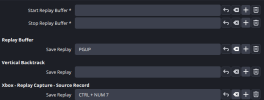
After installing Aitum Vertical - it no longer works. If you look at the attached image, it also has a setting called 'Save Replay' or "ReplayBuffer.Save". This means when the Raw runs, it fails because there are 2 hotkeys named the same thing.
In the interim, I've had to revert to using a Key Press from streamer.bot to trigger the save. This works, but I don't think it's as clean as using TriggerHotkeyByName
Not sure what you could do here, if anything?
I'm using streamer.bot and I had previously been triggering the hotkey by name like this:
{
"requestType": "TriggerHotkeyByName",
"requestData": {
"hotkeyName": "ReplayBuffer.Save"
}
}
in an OBS Raw.
After installing Aitum Vertical - it no longer works. If you look at the attached image, it also has a setting called 'Save Replay' or "ReplayBuffer.Save". This means when the Raw runs, it fails because there are 2 hotkeys named the same thing.
In the interim, I've had to revert to using a Key Press from streamer.bot to trigger the save. This works, but I don't think it's as clean as using TriggerHotkeyByName
Not sure what you could do here, if anything?
Attachments

Exeldro
Active Member
@evilTweedle set the contextName in the requestData to get the correct hotkey
evilTweedle
New Member
Thanks for the reply!@evilTweedle set the contextName in the requestData to get the correct hotkey
is the contextName the scene name, or a source?
Exeldro
Active Member
@evilTweedle the context name is the name that is displayed in the hotkey settings just above the hotkey
BoaDaSnakeMan
New Member
Hello. I've been using source record for awhile now, the source record would be on par and usually the same length as the raw recording inside OBS for my Webcam. As I go into the editor (VEGAS Pro), there is a short delay (When synced up with gameplay.). Is there a fix to this to where I can get it back to have both the OBS and Source record to sync up properly again?
Edit: Using the NVIDIA NVENC 264 encoder. If need anymore details, please let me know!
Edit: Using the NVIDIA NVENC 264 encoder. If need anymore details, please let me know!
intellectuall_idiots
New Member
Before I get roasted for being a novice, I have attempted to solve this via tutorials on youtube before coming to the official channel. I'm attempting to have each source that i've applied the "source record" filter to record distinct audio. I would like my FaceCam video to only record my mic and the Gameplay video to only record gameplay audio. Within the filters on each source I have selected "different audio" and selected the audio source I would like to pair the video recording with. Unfortunately when I go to the recordings both gameplay and Mic Audio are present on both. My questions are...
1. Can Source Record record separate audio according to each filter. I have assigned different audio sources in each filter yet it still captures all of the audio sources.
2. What OBS settings am I missing in order to make this happen?
3. Do I need to assign each audio source to a separate track?
4. Will my Scene recording still have both audio sources in the final output if they're assigned to different tracks? My understanding is that when I load the output file into CapCut that only the audio recorded on Track 1 will be present for editing.
1. Can Source Record record separate audio according to each filter. I have assigned different audio sources in each filter yet it still captures all of the audio sources.
2. What OBS settings am I missing in order to make this happen?
3. Do I need to assign each audio source to a separate track?
4. Will my Scene recording still have both audio sources in the final output if they're assigned to different tracks? My understanding is that when I load the output file into CapCut that only the audio recorded on Track 1 will be present for editing.
Exeldro
Active Member
@intellectuall_idiots 1 yes 2 leave track empty or select a track with only that audio. 3/4 the audio sources can be in multiple tracks, have all audio sources on track 1 and only 1 audio source on an other track for separation
Hi. I have recently started recording my content and I have found your plugin to be really useful in getting the recording I am after. The problem I am finding, and perhaps it's something I am doing wrong, is I can't seem to record audio on separate tracks as I can with the main OBS recorder.
The tests I have done are:
Thank you
The tests I have done are:
- Add the source record filter to the source I want to record. (Works)
- In the Different Audio options, I have:
- set the Audio Track to All and the Source to the scene I am using. (Records all audio on Track 1 and all other tracks are blank)
- set the Audio Track to None and the Source to the scene I am using. (Does not record any audio)
- set the Audio Track to Track 1 and the Source to the scene I am using. (Records all audio on Track 1 and not other tracks are present, this is what I expected)
- set the Audio Track to All and the Source is left blank (Does not record any audio)
- disabled the Different Audio options altogether. (Does not record any audio)
Thank you
Please ignore this as I appear to have resolved the issue. I think. I'm getting audio now and across different tracks which is exactly what I wanted. Not sure why it's started working now, perhaps a restart of OBS did the trick. I will continue to test this but for now everything appears to be working as I would expect. Thank you for the plugin.Hi. I have recently started recording my content and I have found your plugin to be really useful in getting the recording I am after. The problem I am finding, and perhaps it's something I am doing wrong, is I can't seem to record audio on separate tracks as I can with the main OBS recorder.
The tests I have done are:
I am wondering if there is something I am doing wrong here or if there is a bug where the audio isn't being separated onto different tracks as it should be.
- Add the source record filter to the source I want to record. (Works)
- In the Different Audio options, I have:
- set the Audio Track to All and the Source to the scene I am using. (Records all audio on Track 1 and all other tracks are blank)
- set the Audio Track to None and the Source to the scene I am using. (Does not record any audio)
- set the Audio Track to Track 1 and the Source to the scene I am using. (Records all audio on Track 1 and not other tracks are present, this is what I expected)
- set the Audio Track to All and the Source is left blank (Does not record any audio)
- disabled the Different Audio options altogether. (Does not record any audio)
Thank you