Resource icon

Multiple RTMP outputs plugin 2020-05-17

Turns out that this is NOT compatible with OBS 28 at this time. How do I uninstall the plugin?

A better question is "are you planning an update that will be compatible with obs 28?"
The plugin works flawlessly with OBS 28.0.1 here,only thing who needs to be fixed are the issue about multiple profiles,lists of RTMP outputs for each one could be better than one for all profiles as it is actually e.e
 
the update 28.0.1 solved it for me
Not for me, the problem remained

obs.jpg
 
does anyone have a way to make it work on 28 I keep getting the plugin not started error and looking at the log file the error is due to possible import conflicts...
 
If you don't update it, I think I will be forced to permanently delete the plugin from OBS

try this verison
 

try this verison
Thanks, this version works
 
It installed for me however when ever I try to run multiple RTMPs it disconnects from one and starts the new one up. Unable to run more than one. Any fix?
 
I just had one big trouble, and i don´t know how to fix it. I have eliminated all the rmtp destinations that I used to stream yesterday and used new directions for other stream today. Other youtube channel ando facebook. I streammed without problems. But then I chacked that the stream went to all the destinations that I used yesterday and today. Does anyone have the same problem?
 
A mi me funciona, pero al cerrar el obs y volver a abrirlo se me borran los destinos que tenía grabados y queda sólo uno. Alguna idea de por qué ocurre esto? Y antes de que lo digan ya he desinstalado, vuelto a instalar, abierto y cerrado OBS muchas veces.

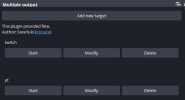
TO SAVE YOUR OUTPUTS FIRST ADD YOUR RTMP SERVER/KEY THEN AFTER ITS ADDED CLICK MODIFY, THEN CLICK OKAY.
PARA SALVARLOS PRIMEO AGREGA TU SERVIDOR DE RTMP DESPUES CLICKIA "MODIFICAR" DESPUES "OKAY"

After updating my obs client I got an error that I needed to update this plugin, It worked after I dropped the updated obs-multi-rtmp.dll in C:\ProgramData\obs-studio\plugins\obs-multi-rtmp\bin\64bit

For anyone else updating I think the the default location is C:\Program Files\obs-studio\obs-plugins\64bit
 
I just had one big trouble, and i don´t know how to fix it. I have eliminated all the rmtp destinations that I used to stream yesterday and used new directions for other stream today. Other youtube channel ando facebook. I streammed without problems. But then I chacked that the stream went to all the destinations that I used yesterday and today. Does anyone have the same problem?
It may have to do with the rtmp servers not saving until you add them then click modify, then click okay, might even be a bug? Not sure I expected them to just save. But a lot of people having issues like that including the post I address right above this one. Cheers.
 
Back
Top