rychkarychin
New Member
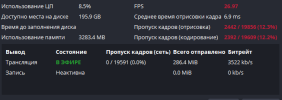
Hello! I'm broadcasting a counter until the new year, and I use a lot of gdi+ texts for timers. Recently, I've been experiencing a lot of frame skipping (encoding, rendering), and my FPS is in the range of 25.97-26.97, while the target is 29.97. On the broadcast and in the OBS itself, it looks like the frame stops for a few milliseconds every second, and it's very noticeable. However, the CPU and GPU usage is not high.
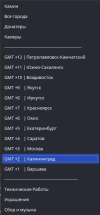
There are 12 time zones on the broadcast, each with 2 updated texts (time and counter)
My timer works through Pascal, according to the principle:
It calculates the time until the new year and changes 24 files every second, and the OBS reads them (12 time zones, each with 2 files).
If I disable the timer program, the FPS returns to normal and the frame skip disappears. If I enable it again, everything returns.
I also want to point out that there were no such FPS drops before, and it only started recently. Previously, the FPS was around 28-29, which was almost noticeable.
If you need more information, please let us know. I've been trying to fix this for 4 days now, and I've tried various options. Please help me with this issue
There are 12 time zones on the broadcast, each with 2 updated texts (time and counter)
My timer works through Pascal, according to the principle:
It calculates the time until the new year and changes 24 files every second, and the OBS reads them (12 time zones, each with 2 files).
If I disable the timer program, the FPS returns to normal and the frame skip disappears. If I enable it again, everything returns.
I also want to point out that there were no such FPS drops before, and it only started recently. Previously, the FPS was around 28-29, which was almost noticeable.
If you need more information, please let us know. I've been trying to fix this for 4 days now, and I've tried various options. Please help me with this issue