

You are using an out of date browser. It may not display this or other websites correctly.
You should upgrade or use an alternative browser.
You should upgrade or use an alternative browser.

Free MIDIControl - Control OBS, Soundboard, Twitch chat with MIDI Devices 2.0.1.0
- Thread starter Etuldan
- Start date

FirmeX
New Member
I'm a complete noob to MIDI and to this - I bought an APCmini to try out a MIDI interface for the first time in my life. I'm used to doing broadcasts on a streamdeck, and I thought it would be awesome to have sound faders and more options so I bought this, and I've been using this plugin for a bit and I love it. The thing is - I never managed to get LED feedback working for my interface using OBS. Would any of you kind hearted people be able to explain to me, a complete noob, how to get led feedback on APCmini? For scene preview/live, toggle mute, things like this. Sorry if this is a repeat question or it is something so simple I should be doing it easily :D
I'm a complete noob to MIDI and to this - I bought an APCmini to try out a MIDI interface for the first time in my life. I'm used to doing broadcasts on a streamdeck, and I thought it would be awesome to have sound faders and more options so I bought this, and I've been using this plugin for a bit and I love it. The thing is - I never managed to get LED feedback working for my interface using OBS. Would any of you kind hearted people be able to explain to me, a complete noob, how to get led feedback on APCmini? For scene preview/live, toggle mute, things like this. Sorry if this is a repeat question or it is something so simple I should be doing it easily :D
This program is buggy as hell and works kinda ok for only certain things. Anything beyond that and you're outta luck. MIDI on OBS is complete shit as is and not native.
I don't know if i'm going crazy over here.... But i've been trying for hours to get my APC40 Mk2 to control OBS.
I've got it to the point where i can use the faders to control source volumes, switch scenes and operate the transition slider, but i can't for the life of me get it to control any of the source mutes, toggles or filter sliders... How can some functions be working but not others? What have i missed?
I've got it to the point where i can use the faders to control source volumes, switch scenes and operate the transition slider, but i can't for the life of me get it to control any of the source mutes, toggles or filter sliders... How can some functions be working but not others? What have i missed?
Did somebody find a fix?Same, I only recently downloaded this awesome plugin. The only problem I've had so far. I wanted to have it just in case I accidently press too many soundboard keys.
Midicontrol still stops for me when pressing the assigned stop all button.
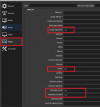
in %AppData%\MIDIControlhi, can it be used with OBS Replay? I don't know how to activate playback load, slow speed, etc.
file hotkeys.csv
Code:
Replay,ReplaySource.Replay
Backward,ReplaySource.Backward
BackwardOrFaster,ReplaySource.BackwardOrFaster
Clear,ReplaySource.Clear
Disable,ReplaySource.Disable
DisableNextScene,ReplaySource.DisableNextScene
DoubleSpeed,ReplaySource.DoubleSpeed
Enable,ReplaySource.Enable
EnableNextScene,ReplaySource.EnableNextScene
Faster,ReplaySource.Faster
First,ReplaySource.First
Forward,ReplaySource.Forward
ForwardOrFaster,ReplaySource.ForwardOrFaster
HalfSpeed,ReplaySource.HalfSpeed
Last,ReplaySource.Last
Next,ReplaySource.Next
NextScene,ReplaySource.NextScene
NormalSpeed,ReplaySource.NormalSpeed
Pause,ReplaySource.Pause
Previous,ReplaySource.Previous
Remove,ReplaySource.Remove
Restart,ReplaySource.Restart
Reverse,ReplaySource.Reverse
Save,ReplaySource.Save
Slower,ReplaySource.Slower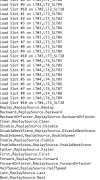
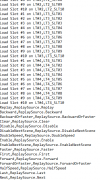
hello Maxter-by, thanks for the information, but I have a question, what do you tell me to add to the end of the file?in %AppData%\MIDIControl
file hotkeys.csv
Code:Replay,ReplaySource.Replay Backward,ReplaySource.Backward BackwardOrFaster,ReplaySource.BackwardOrFaster Clear,ReplaySource.Clear Disable,ReplaySource.Disable DisableNextScene,ReplaySource.DisableNextScene DoubleSpeed,ReplaySource.DoubleSpeed Enable,ReplaySource.Enable EnableNextScene,ReplaySource.EnableNextScene Faster,ReplaySource.Faster First,ReplaySource.First Forward,ReplaySource.Forward ForwardOrFaster,ReplaySource.ForwardOrFaster HalfSpeed,ReplaySource.HalfSpeed Last,ReplaySource.Last Next,ReplaySource.Next NextScene,ReplaySource.NextScene NormalSpeed,ReplaySource.NormalSpeed Pause,ReplaySource.Pause Previous,ReplaySource.Previous Remove,ReplaySource.Remove Restart,ReplaySource.Restart Reverse,ReplaySource.Reverse Save,ReplaySource.Save Slower,ReplaySource.Slower
where do I go to be able to configure the midi buttons now?
Specifically, what I want is to be able to assign a button on the midi keyboard to control the REPLAY, a button to save repetition, another for normal camera, ... slow motion, to be able to pause, etc.
Attachments
Last edited:
It works fine! Now, how can I make a midi keyboard button turn off its light at the end of a scene?in %AppData%\MIDIControl
file hotkeys.csv
Code:Replay,ReplaySource.Replay Backward,ReplaySource.Backward BackwardOrFaster,ReplaySource.BackwardOrFaster Clear,ReplaySource.Clear Disable,ReplaySource.Disable DisableNextScene,ReplaySource.DisableNextScene DoubleSpeed,ReplaySource.DoubleSpeed Enable,ReplaySource.Enable EnableNextScene,ReplaySource.EnableNextScene Faster,ReplaySource.Faster First,ReplaySource.First Forward,ReplaySource.Forward ForwardOrFaster,ReplaySource.ForwardOrFaster HalfSpeed,ReplaySource.HalfSpeed Last,ReplaySource.Last Next,ReplaySource.Next NextScene,ReplaySource.NextScene NormalSpeed,ReplaySource.NormalSpeed Pause,ReplaySource.Pause Previous,ReplaySource.Previous Remove,ReplaySource.Remove Restart,ReplaySource.Restart Reverse,ReplaySource.Reverse Save,ReplaySource.Save Slower,ReplaySource.Slower

Etuldan
Member
Etuldan updated MIDIControl - Control OBS, Soundboard, Twitch chat with MIDI Devices with a new update entry:
Profiles duplication
Read the rest of this update entry...
Profiles duplication
New features
- Added copying current profile to a new one
- Added confirm dialog for deleting a profile
Bug fix
- Fixed issue where saving Stop All Sounds to a control and using it would cause a crash because SwitchToProfile was set to null (correctly) but the event handler was checking for empty string
- Fixed Switch To Profile box in EntryGUI being checked when editing a control where its value is null because it was...
Read the rest of this update entry...
Hi there! How are you all doing?
So i'm having a real hard time to connect MIDIControl to OBS using the websocket, i'm using the right server number for both and even took out the authentication, however MIDIControl simply does not connect... The same thing happens to Twitch, i logged in, it appeared the redirection browser and then that was it, didn't connect and now everytime i click on twitch at midicontrol the redirection broswer appears and close not connecting me...
is there anyone with this same issue?
So i'm having a real hard time to connect MIDIControl to OBS using the websocket, i'm using the right server number for both and even took out the authentication, however MIDIControl simply does not connect... The same thing happens to Twitch, i logged in, it appeared the redirection browser and then that was it, didn't connect and now everytime i click on twitch at midicontrol the redirection broswer appears and close not connecting me...
is there anyone with this same issue?
+i cant get it running View attachment 83903View attachment 83904View attachment 83905View attachment 83906
i am no programmer so if annyone helps please know that...
HELP?
opgelost (solved)
Would appreciate it if you told people how you solved it.
4.9.1 keeps crashing every time I run it (couldn't get 5.0.0 to connect @ OBS 27.2.4 x64)
This really is an amazing program, I've had a blast setting up OBS and soundboards with it over the last month or so. Honestly I've had more fun with this than playing around in games recently.
Couple of nitpick things:
1. Is it possible to have the window open up in the same place upon launch? I've employed every trick I'm familiar with trying to get it to open up in the spot I'd like, but it always opens up in the top left quad of my main monitor. I don't mind moving it, but it would be convenient for it to open where I leave it.
2. LED feedback on the Launchpad is great, but is it possible to incorporate a backlit LED permanance function to better distinguish the individual pads' functions? Similar to how ControlCast works? https://github.com/dbkynd/controlcast
Might be asking a lot, and I'd certainly take a look at the source code myself if I was smart enough to understand code.
Couple of nitpick things:
1. Is it possible to have the window open up in the same place upon launch? I've employed every trick I'm familiar with trying to get it to open up in the spot I'd like, but it always opens up in the top left quad of my main monitor. I don't mind moving it, but it would be convenient for it to open where I leave it.
2. LED feedback on the Launchpad is great, but is it possible to incorporate a backlit LED permanance function to better distinguish the individual pads' functions? Similar to how ControlCast works? https://github.com/dbkynd/controlcast
Might be asking a lot, and I'd certainly take a look at the source code myself if I was smart enough to understand code.
Last edited:
Etuldan
Member
Etuldan updated MIDIControl - Control OBS, Soundboard, Twitch chat with MIDI Devices with a new update entry:
Twitch Fix
Read the rest of this update entry...
Twitch Fix
Bug Fix
- Twitch connection fix
Updates
- Dependencies updates
Read the rest of this update entry...
Etuldan
Member
Twitch connection has been fixed.
For OBS, you need (for the moment), to stay on 4.9.1 compat version.
See https://github.com/obsproject/obs-websocket/releases/tag/5.0.1
For OBS, you need (for the moment), to stay on 4.9.1 compat version.
See https://github.com/obsproject/obs-websocket/releases/tag/5.0.1
4.x compatability
We have also included binaries for a version of obs-websocket, 4.9.1-compat. This can be run alongside 5.0.0 in OBS and can provide legacy support for the 4.x protocol.
Etuldan
Member
Il faut, une fois tout créé dans MidiControl, sauvegarder le profil en cliquant sur l'icone d'enregistrement (la disquette)bonjour j ai un souci avec control midi pourriez vous m aider merci.En faite je n 'arrive pas a enregistré les scènes que ej met en place tout s'efface a chaque reboot de control midi .Merci de votre aide .
BramstokerD
New Member
awesome tool, thanks, is there any way to choose the color for the buttons, the mk1 has 3 colors per button
Found this out the hard way. Would be good if this compatibity info is in the readme/download page etc, so users are aware before download.Twitch connection has been fixed.
For OBS, you need (for the moment), to stay on 4.9.1 compat version.
See https://github.com/obsproject/obs-websocket/releases/tag/5.0.1