phillymantis
New Member
man if this was compatible with atium vertical plugin for the vertical sources/scenes
that would be huge
that would be huge

- Requires OBS 31.1 or higher
- Add OBS 32 support
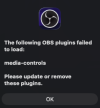
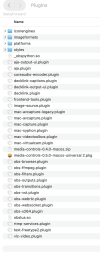
Using macOS Tahoe 26.0.1 with Chip: Apple M1 Pro. Use OBS Studio 32.0.1 (64 bit). Plugin version: media-controls-0.5.0-macos-universal.pkg. Another plugin (streamup-2.1.1-macos-universal.pkg is not visible either). Did check the Privacy & Security settings. Also ensured that I have Read & Write permissions for this plugin. Also tried previous versions of the plugin without success. Having a conference coming up in a few days and are getting nervous. We stream a lot of videos in OBS and need to be able to monitor the duration of the video to know when to switch to the next scene.@PeterMM try manually uninstalling the plugin first before installing the new version
Mr Exeldro, I think he's having a Mac issue that the updated OBS is having with Mac installers and the rest of the plugins. I had difficulty upgrading some of your plugins and others. I would install them manually and then they seem to work. I don't know. I'm getting erroneous things from Stream UP about plugins I've been using all along that are not supported....moreso, I've manually installed updates, I see them in the plugin folder, but don't see them in OBS.@PeterMM how did you manually uninstall the plugins? Can you provide an OBS log file?