Question / Help Drag docks does not work most of the time

jshrek

New Member
Hi

I am trying to drag my docks around on the OBS interface on my Mac.

I can grab the top of each dock and remove it from the interface, but then it gets stuck out as seperate window and I can not get it to drop back into the interface again.

Sometimes it will work (1 out of 25 times), but most of the time as I drag the dock over the interface, nothing happens.

Is there any key combo that will force an undocked dock to jump back into the interface somewhere.

Thanks
 
Not that I'm aware of. Just the View > Docks > Reset UI that returns the entire interface to default, and will collapse all palettes to their docked state.
 
I have the same issue. I've found that quitting OBS then reopening gets you another chance to dock the floating window in the main UI. Something that should be done before broadcasting, definitely not something you should mess with while livestreaming.
 
Yes I experience this problem constantly, most of the time you cannot get it to trigger the dock behavior, it just stays as a popout. When you finally do, it is nearly impossible to resize the dock no matter where you click and drag. Lock UI is NOT marked. It's an intermittent behavior problem so it's not a feature and I don't believe this is user error.
 
Hello Everyone: I am also experiencing this problem, on a fresh OBS install and macOS Monterey/12.0.1. I have been testing and setting all my Scenes and Sources, and OBS UI Layout on Windows, and just spent a very frustrating morning trying to recreate the same OBS layout on the Mac system.

I would be interested in knowing if this affects overall OBS operation - does it still perform on a Mac or is this a 'showstopper'? Or, has anyone found a workaround?

Cheers,
Tony N.
 
hi there! im having the same experience on MacOS as well (Monterey 12.2). it was very frustrating at first. if this is specific to the MacOS UI, using trackpad vs external mouse does not seem to matter.

however, ive consistently found that closing/reopening OBS resolves things for me, at least until ive adjusted a few views. hope this helps!

it's also worth noting that some views only fit in certain areas - pretty sure this is a separate matter completely. the Stats view needs a fat horizontal space (it only fits above, for me). the smallest views (Twitch Stats, etc) don't fit down the sides, unless you put a taller view (like Activity Feed) there first.
 
Whatever window manager OBS is using on Mac needs a complete overhaul. Trying to align windows in OBS on a vertically aligned monitor is near impossible and things do not scale correctly.
 
I‘m having this same issue on Mac. When I undock something to move it or resize it, OBS won’t allow me to dock it again.
 
Seems I've had the same problem for years, regardless of the OBS version or which MacOS. I'm now running 27.2.4. on a M1 Mac mini with Monterey and the docks are still finicky at best. One suggestion, is to take the OBS screen full screen before trying to rearrange or add/subtract docks (after, of course, unlocking the Dock UI). Full screen seems to work better.
 
I found that if I stretch my OBS Studio window a little bit, it seems to reset the UI to be able to resize the docks. But I have to do that each time I want to resize a dock.
 
  • Like
Reactions: TFE
Any updates on this?
I'm even researching if there's a way to resize and change the UI by script.
But every time I open OBS on my mac, the layout is back to default and it's a pain to get everything back in place
 
I'm now running OBS 29 on a Mac Studio (Ventura 13.1), so the latest versions of both, and the Docks UI is still not perfect, but better than in the past (thanks, Devs!).
 
Hi, I also experienced this problem.

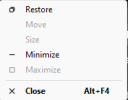
The thing I did to make the OBS slot become active again is to right click the top bar of the dock you want to set and click move. Then drag it again to the area you want to drag it. This works to me always.

I'm using Windows 10 and OBS ver 29. Sorry for my english.
 
I seem to have gotten it to work reliably for me if I right-click at the top of the dock where it shows the menu on the attached image and move the dock using the "Move" option there. I don't know if it's an only me solution though but it's worth a shot
 

Attachments

  • Screenshot 2023-11-30 163221.png
    Screenshot 2023-11-30 163221.png
    4.2 KB · Views: 134
Hi

I am trying to drag my docks around on the OBS interface on my Mac.

I can grab the top of each dock and remove it from the interface, but then it gets stuck out as seperate window and I can not get it to drop back into the interface again.

Sometimes it will work (1 out of 25 times), but most of the time as I drag the dock over the interface, nothing happens.

Is there any key combo that will force an undocked dock to jump back into the interface somewhere.

Thanks
Hello!

I was having the exact same issue.

I closed OBS, reopened, and then double-clicked on the docks that were "windowed." This inserted them and now I am able to move them around as I please.

Definitely such a frustrating issue to deal with! Hope this helps in your case too.
 
So I don't know if this is still an ongoing issue for people but it was happening to me on Windows.

SOLUTION: Under View "Dock Toolbars"; UNCHECK IT
This was stopping me from dropping the docks where I wanted them. I hope this helps!
 
Back
Top