Advanced Scene Switcher

Advanced Scene Switcher 1.33.1

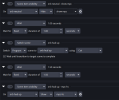
Not sure if that is the problem, but in your first screenshot you seem to be changing the height twice instead of changing the width and height.

And just to mention it, but I assume that is already clear:
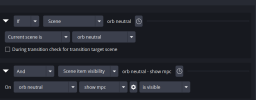
Both your macros seem to have the same condition.
So, if both are active at the same time and both are modifying the transform of the same source you might see "unexpected" results depending on which macro wins.

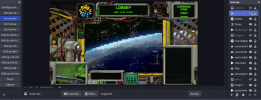
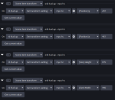
Ugh total brainfart. However it kinda fixed it but not in the actual scenario I need. I made a macro like you saw and it works when I hit run. I can't get it to work when I use it in the macro I want. It's complicated but I have a "home" scene with an empty image source I use as a button to trigger the sequence when I make it visible. I'm trying to have it resize to the frame in the center of the overlay. Everything works up until the set transform settings or string. I've included screenshots and a gif of the sequence, it should be resizing to fit the middle part. Maybe it working if it's the only thing in the macro will offer a clue.
 

Attachments

  • Screenshot 2026-05-11 221526.png
    Screenshot 2026-05-11 221526.png
    53.6 KB · Views: 6
  • Screenshot 2026-05-11 221245.png
    Screenshot 2026-05-11 221245.png
    51.4 KB · Views: 6
  • Screenshot 2026-05-11 220715.png
    Screenshot 2026-05-11 220715.png
    21.8 KB · Views: 7
  • ezgif-436d331376909f41.gif
    ezgif-436d331376909f41.gif
    652.2 KB · Views: 7
Update: If I click run macro it works but not by the the set conditions being met to trigger it.
Unfortunately, it is difficult to say what the problem might be with just the screenshots.

You can try to enable visual indicators to show when which macro /condition/action is firing:

If that doesn’t give any clues you can increase the verbosity of the log file (also described in the wiki), share it with me and I will have a look.
 
Hey! Firstly I’m a major fan of the plugin! I’m quite proud of the micros I’ve set up!! You truly have one of the best plugins!!

Sadly though after years of usage, I recently upgraded both OBS and multiple plugins (after a couple month hiatus).

Once I everything was updated, OBS now crashes regularly. Specifically “Advanced Scene Switcher (Not Responding)”

I’ve tried reinstalling the plugin multiple times but it hasn’t resolved my issue
not sure what to do? it's still crashing. this is my log file below that i attaached. i downloaded obs 32.1.2 and your most recent plugin, afterwards i then have issues
 

Attachments

Back
Top