

You are using an out of date browser. It may not display this or other websites correctly.
You should upgrade or use an alternative browser.
You should upgrade or use an alternative browser.

Advanced Scene Switcher 1.37.0
- Thread starter Warmuptill
- Start date
Here's what I do in AdvSS. I used FFMpeg.I have an important question. My replay recording buffer is usually 5 minutes long. But often I don't need that much time and only want to save the last minute. Is it possible to create a script that would save 1 minute instead of 5?
Download / Install FFMPEG. I used "Windows Builds by BtbN"
once installed, I use Advss to create a bat file with syntax
this code loads the input.mp4, and trims the first 60 seconds, then outputs it to output.mp4
ffmpeg -ss 60 -i INPUT.mp4 -c copy OUTPUT.mp4
Then the next line in ADvSS I run the batch file.
Might be easier ways, but this is how i've done it for quite some time. over...and over...and over again..
You could easily hot key this to say "show me the last 60 seconds" or 120 seconds or 4 minutes, etc. easy in ADvSS
Warmuptill
Active Member
I am not sure if I understand the question correctly.Hi everyone, I need the progress bar in the Source Toolbar to become automatically visible as soon as a video starts in OBS (currently, you have to click manually on the source to see it). Would it be possible to achieve this automatically using this plugin?
If you are asking, if it possible to automatically select a source in "Sources" dock of the OBS UI, then this is currently not possible, unfortunately.
Is this the progress bar / toolbar you were referring to?
I think I know what you want.I am not sure if I understand the question correctly.
If you are asking, if it possible to automatically select a source in "Sources" dock of the OBS UI, then this is currently not possible, unfortunately.
Is this the progress bar / toolbar you were referring to?
View attachment 119259
This 'click' (bringing up the video in the preview window that allows the controls to show up) but regardless of the video source.
So what this script does is takes takes the name of the Scene that is live (in my example its called 'Video-01' and saves that name to a variable "Selected-Scene".
Then it switches the preview monitor to be that exact same scene, which brings up the controls
This will, basically blindly make the preview window be exactly the same as the program window.
This could be easily fancier, lets say you only wanted this to happen on specific scenes, would be easy to have the script only change on scenes with the prefix Video-XX, and leave other scenes behaving as you would normally. Let me know if you need fancier
Here's the code you try
AAAYYXic7Vjdb9s2EP9XBKIPW2d5luXEsd/a1MUMNK0XJ9nDEBS0dJa5yKRAUk46I//7jqQ+7SRF2q7tgx+KKsf74t3vPugtWdNICkXGf28Jp2sgY3LFYhDeHFKINOmQRIo8I+MlTRV0SEZzBXO6gdewohsmJBn3CmqDR9I0hbQiRCuIbk4Fj5lmgqspn+1y0MicXEiWJCDPRAxWrbph2eQOog98rqnUFbfSInsVOV3L90K/Eby2bvxbCalPmYxypicbmubU8DY5TnPUsa5cOjUOTrkGidy1208ybYnRDI2PXjfsEP0pM5/3aIYzba+xAams/QCpsYhu5qA144kyshISplBn43KUxzTFK71BVjLWMgcn9hfjsbjFDNmDDllRdZ7z17nWRrnjQ9rMJGOPihHUuXpHF42or1iySvGfni7r7FzIvA6mLPVfwB1ehqA9UqS7Rbc2ibnz/tmlo+Fp1DLiPCqYavseleAZt7stibfGoadErMdGxoRqGiMDjTdK+RbgviH6/eNeOAwXI384oiN/QPsLn8b90F8cwyA8GcXDXtAnO/my4g5slcF5ljKNOZsJxRyysHoyU0XBqH/fKb7D45P760LBBH1zSh6XDcPjSrZnJEto/CH0DXxS7Rp0RJS+rqLeJGmRJCnMdsl1PK1dBckauG7iMRJpSjMF8X65tMETNWnk7JOX2s8OAU4XqZF32GtFk5m8qAi4gUMqEhbZColzaUsUK58tmSmGLdFsDR/RX6UlZdxVkgJzAfVw8fU+V3xItqZda7PEbSnSKbufAR3lGyyYmoucoQfkvtQ/sB3PJNGcdV/OjdLuS2JDdSEpd5m9oDIBbQ/reoIE7hBHS5YY4y5UZaSwb2rW6D8iKzJlLtS4x3XZL39kEjdUMut8p/p87yLoAgexPy/yXJ73C4YphjdlsVfSPVWF2rQ/eeUyalLB8/XV04muEI2+HXfKYEzjOzL2A/w7X8y1xLgUE6RW01RSc7F/4TEmm7tZI++koJ1RHa2sxYcFl9i3zw1jM+X1rHw850YQ/UJjpuV5WniGYs1mKY2gfVYQvVumV+RRqO3adfltmV1TvZrcZRKUyzn5xQu837y+99ILvV+9370BaQBqJsU6q2cz41muSxp5hSoS7tmoGB/LlI+dhqllNl6vRBo3hiDbOyC+D2b2ehqv6/sWohsmBTfpvmoj8HI+OZ+df3g7fTchX1/zsM5Qfy0XmAq4s/K2EqJcSvTBTB7IMPR7I986MEU9Ux5DEyVBEyUxk6Xtni0DhOM74InR+LBERuMYmU5XxrvBibkE9p/ybtiHYrF+n68XIPfA366hJusEAdaw19thTfAq2KvB7EGJyYvDj9NgS9U1pULe/R8QM9hapP4+KSS2s6WpuD2HDKgu1TkT/yjB/8xB4iQjL7pKrKHLAcdj3HVaHMduiFvON7PyQ4ffR4VFGpkqpXXKHQQdHNlTSHkM0EcVoPda8BPwrudViZyaZLas3CK7GNBfOHk7ZJHiAnbJNUvrAenWdhcoeyfngR1wUC1Mym0utiOUdW5pJofFfbEEeALlZZ/xYqkG7zd4sASHB8vhwfJtHyyLkC5OjnvUHwVHfX8w7PV9uhzhq2UQLY8CuhgOB9FXPlgGQf1gGT7zwTL4zg+Wn3zxnUnYMLj96r3X/gDjv9i2u/j9c9fh3mEbPmzD//s23Cu2YT8o6mO3Hx2238P2+323390+/OXL78+6+V7Xw6X10/3e3q9w731VBzmGJc1TXf3A0lihd4P2OclqFiMqHeyvGxcnQTcMu4j8/wAwhV9O
JordiRuiz99
New Member
Hi, I've recently installed the plugin and started using it. I've tried to make a simple sequence:

It works as I want, but the problem is that when I minimize OBS i automatically changes from Scene 2 to Scene 1. Can anybody tell me why and how to avoid it?
It works as I want, but the problem is that when I minimize OBS i automatically changes from Scene 2 to Scene 1. Can anybody tell me why and how to avoid it?
can you export your advss script and paste it here? id like to try and recreate thisHi, I've recently installed the plugin and started using it. I've tried to make a simple sequence:
View attachment 119269
It works as I want, but the problem is that when I minimize OBS i automatically changes from Scene 2 to Scene 1. Can anybody tell me why and how to avoid it?
thegamingstig
Member
What does the action Twitch "get channel information" do? I was thinking if this can pull stream channel's title and the current Twitch category to variables.
Warmuptill
Active Member
You are correct.What does the action Twitch "get channel information" do? I was thinking if this can pull stream channel's title and the current Twitch category to variables.
That is exactly what it is used for.
Here is an example:
I do have to admit that having to do that in two "steps" is quite unintuitive.
I will try to think of a way to make this easier to figure out.
Dan_of_Earth
New Member
i know this tool is powerful but i find it incredibly confusing, especially since things often change in updates. Im hoping someone can help me. I have a 30 min video im using for a BRB scene. Id simply like to have that video start from a random time each time the BRB scene becomes active. i cant figure it out for the life of me. Thanks in advance
Warmuptill
Active Member
Something like this should do the trick:Im hoping someone can help me. I have a 30 min video im using for a BRB scene. Id simply like to have that video start from a random time each time the BRB scene becomes active.
This boils down to "if current scene is BRB, generate a random value between 0 and 30 and seek "VLC Video Source" to that amount of minutes".
Let me know if you need further help!
Feedback is always welcome!i know this tool is powerful but i find it incredibly confusing, especially since things often change in updates
I try to be backwards-compatible whenever possible.
Which change in particular was causing issues for you?
Dan_of_Earth
New Member
That worked perfectly, thank you so much! There nothing in particular that changed that confused me, i just dont use the tool very often. Last time i made macros was like over a year ago, and back then i just set it and forget it. Sorry if my wording seemed like a criticism, i didn't mean it that what. I actually think the ui is great and fits perfectly into the OBS interface. I was specifically referencing my rare use of it! great work and thanks again for the help!Something like this should do the trick:
View attachment 119357
This boils down to "if current scene is BRB, generate a random value between 0 and 30 and seek "VLC Video Source" to that amount of minutes".
Let me know if you need further help!
Feedback is always welcome!
I try to be backwards-compatible whenever possible.
Which change in particular was causing issues for you?

KattPhloxworthy
Member
That is correct. I haven't determined whether it's a case of using whatever the currently-set transition type is versus like just a cut (that's all I've seen thus far). It appears to affect Exeldro's Transition Table. I've also let Exeldro know about the transition situation for Transition Table.
--Katt. =^.^=
This was an issue with Atium Stream Suite, which has since been fixed. The issues did not affect just AdvSS but other plugins like Transition Table.
I now return you to your regularly-scheduled Advanced Scene Switching. :3
--Katt. =^.^=
Hey! Firstly I’m a major fan of the plugin! I’m quite proud of the micros I’ve set up!! You truly have one of the best plugins!!
Sadly though after years of usage, I recently upgraded both OBS and multiple plugins (after a couple month hiatus).
Once I everything was updated, OBS now crashes regularly. Specifically “Advanced Scene Switcher (Not Responding)”
I’ve tried reinstalling the plugin multiple times but it hasn’t resolved my issue
Sadly though after years of usage, I recently upgraded both OBS and multiple plugins (after a couple month hiatus).
Once I everything was updated, OBS now crashes regularly. Specifically “Advanced Scene Switcher (Not Responding)”
I’ve tried reinstalling the plugin multiple times but it hasn’t resolved my issue
Attachments
Warmuptill
Active Member
Can you share what you have tried so far? (A screenshot should suffice)I'm trying to have advanced scene switcher resize a window capture of media player classic using scene item transform but both set transform setting and set transform string do nothing. Am I missing something?
Is the media source displaying something while you are trying to change the transform?
Does it work as expected when using a "simpler" source like for example a color source?
Which OBS version / plug-in version are you using specifically?Hey! Firstly I’m a major fan of the plugin! I’m quite proud of the micros I’ve set up!! You truly have one of the best plugins!!
Sadly though after years of usage, I recently upgraded both OBS and multiple plugins (after a couple month hiatus).
Once I everything was updated, OBS now crashes regularly. Specifically “Advanced Scene Switcher (Not Responding)”
I’ve tried reinstalling the plugin multiple times but it hasn’t resolved my issue
Can you share an OBS log file and/or crash report if there are any,
Last edited:

SpokeLee
New Member
Can you share what you have tried so far? (A screenshot should suffice)
Is the media source displaying something while you are trying to change the transform?
Does it work as expected when using a "simpler" source like for example a color source?
So I tried doing it on a color source and it worked exactly as it should.
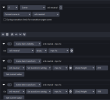
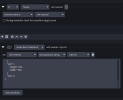
I tried the following two, but I also tried them with 1 second waits in between in case it was making the changes to the fast or something like that. Also occasionally it would adjust the height but not the exact value I specified.
Attachments
Warmuptill
Active Member
Not sure if that is the problem, but in your first screenshot you seem to be changing the height twice instead of changing the width and height.So I tried doing it on a color source and it worked exactly as it should.
I tried the following two, but I also tried them with 1 second waits in between in case it was making the changes to the fast or something like that. Also occasionally it would adjust the height but not the exact value I specified.
And just to mention it, but I assume that is already clear:
Both your macros seem to have the same condition.
So, if both are active at the same time and both are modifying the transform of the same source you might see "unexpected" results depending on which macro wins.
SpokeLee
New Member
Not sure if that is the problem, but in your first screenshot you seem to be changing the height twice instead of changing the width and height.
And just to mention it, but I assume that is already clear:
Both your macros seem to have the same condition.
So, if both are active at the same time and both are modifying the transform of the same source you might see "unexpected" results depending on which macro wins.
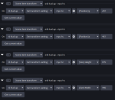
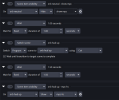
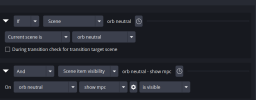
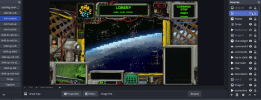
Ugh total brainfart. However it kinda fixed it but not in the actual scenario I need. I made a macro like you saw and it works when I hit run. I can't get it to work when I use it in the macro I want. It's complicated but I have a "home" scene with an empty image source I use as a button to trigger the sequence when I make it visible. I'm trying to have it resize to the frame in the center of the overlay. Everything works up until the set transform settings or string. I've included screenshots and a gif of the sequence, it should be resizing to fit the middle part. Maybe it working if it's the only thing in the macro will offer a clue.
Attachments
Warmuptill
Active Member
Unfortunately, it is difficult to say what the problem might be with just the screenshots.Update: If I click run macro it works but not by the the set conditions being met to trigger it.
You can try to enable visual indicators to show when which macro /condition/action is firing:
Troubleshooting
An automation tool for OBS Studio. Contribute to WarmUpTill/SceneSwitcher development by creating an account on GitHub.
 github.com
If that doesn’t give any clues you can increase the verbosity of the log file (also described in the wiki), share it with me and I will have a look.