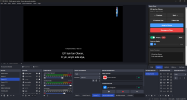
HymnFlow: Professional Hymn Lower-Thirds for OBS Studio
HymnFlow is a lightweight, high-performance toolset designed specifically for church worship teams, ministry broadcasters, and A/V operators. It provides a professional, fully customizable lower-third system that integrates directly into OBS Studio—eliminating the need for external projection servers or complex networking.✨ Key Features
A custom OBS UI Dock that puts your entire repertoire at your fingertips:
- Library Management: Search, add, edit, or delete hymns instantly without leaving OBS.
- Service Planner: Organize hymns into a "Service Program" for a seamless, one-click live workflow.
- Keyboard-First Navigation: Use arrow keys to cycle through verses and lines. The system handles transitions automatically at line boundaries.
- High-Speed Search: Find hymns by number, title, or author in milliseconds.
A sleek, responsive browser-based overlay optimized for high-quality video:
- Zero-Latency Sync: Uses browser localStorage events for instant communication between the dock and the overlay—no WebSockets or local servers required.
- Smart Labeling: Automatically displays hymn metadata (Title/Author/Verse). New in v2.2.0: Automatic Chorus detection and labeling.
- Live Indicators: The dock provides visual tally feedback (e.g., pulsing red states) so the operator knows exactly what is on-air.
Complete creative control to match your church’s visual identity:
- Typography: Support for 5+ modern fonts with adjustable sizing, weights, and styles.
- Readability Tools: Apply crisp text outlines, soft drop shadows, or outer glows to ensure lyrics remain legible over busy video backgrounds.
- Background Engine: Choose between transparency (alpha-channel), solid brand colors, or cinematic dual-color gradients.
- Motion Graphics: Built-in smooth CSS transitions for professional "Fade" and "Slide" animations.
1. Add the Control Dock
- Go to View → Docks → Custom Browser Docks.
- Name it HymnFlow Control.
- Set the URL to the local path of your index.html (e.g., file:///C:/HymnFlow/public/obs-dock/index.html).
2. Add the Overlay Source
- Add a new Browser Source named Hymn Lower-Third.
- Set the URL to your overlay path (e.g., file:///C:/HymnFlow/public/obs-overlay/index.html).
- Set Width/Height to your canvas size (e.g., 1920x1080).
- Check ✅ Shutdown source when not visible.
3. Import & Go!
- Open your new dock, click Import, and select your .txt or .json hymn library.
- Click a hymn title to load it, and you're live!
HymnFlow uses human-readable, portable formats:
- Flexible Import: Supports .txt (formatted with Title: Name) and .json for bulk library migration.
- Portable & Offline: Runs entirely via the file:// protocol. No internet, Node.js, or external dependencies required. Carry your entire setup on a USB drive.
- Open Source: Licensed under GPL-2.0, ensuring it remains free and community-driven.
️ We want to make HymnFlow the best tool for the global worship community.
- Found a Bug? Please Open an Issue on GitHub with a description of the problem and your OBS version.
- Want to Contribute? We welcome Pull Requests! Check out our Contribution Guidelines to get started with local development.
- Feature Requests: Have an idea for a new feature? Start a Discussion here.
HymnFlow was built to empower worship teams to focus on ministry, not troubleshooting.
GitHub Repository: https://github.com/ebena107/HymnFlow
Detailed Documentation: Setup & Formatting Guide