Hi folks.
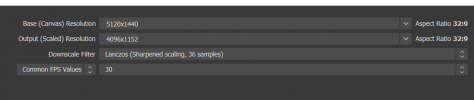
I like to stream stock market related content to my Youtube Channel. As it stands, I'm currently using a 49" monitor with a 32:9 aspect ratio. For archiving purposes, I also stream in a 32:9 ratio.
However, when I stream to YouTube VS record the stream offline, the quality is vastly superior offline, despite me using the same settings. I imagine part of this is because YouTube downscales quality greatly.
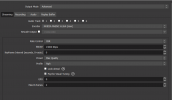
With that being said, is there anything I can do to make my quality better besides just uploading at a higher Kbps. (I'm currently at 13,000 and have an upload speed limit to 20Mbps).
I've attached pictures of my current settings.
Here is the a link to the stream so you can see the quality for yourself. LINK
Thank you for your time.
PS. I don't need to record audio for the stream at all.
My processor is a Ryzen 5950x
My videocard is a RTX3090
I like to stream stock market related content to my Youtube Channel. As it stands, I'm currently using a 49" monitor with a 32:9 aspect ratio. For archiving purposes, I also stream in a 32:9 ratio.
However, when I stream to YouTube VS record the stream offline, the quality is vastly superior offline, despite me using the same settings. I imagine part of this is because YouTube downscales quality greatly.
With that being said, is there anything I can do to make my quality better besides just uploading at a higher Kbps. (I'm currently at 13,000 and have an upload speed limit to 20Mbps).
I've attached pictures of my current settings.
Here is the a link to the stream so you can see the quality for yourself. LINK
Thank you for your time.
PS. I don't need to record audio for the stream at all.
My processor is a Ryzen 5950x
My videocard is a RTX3090