

You are using an out of date browser. It may not display this or other websites correctly.
You should upgrade or use an alternative browser.
You should upgrade or use an alternative browser.

DistroAV - Network Audio/Video in OBS-Studio using NDI® technology 6.2.2
- Thread starter Palakis
- Start date

We are checking this and why it did not match.Hi.
The checksums provided on the DistroAV 6.0.0 download page are not correct. I have used dozens of hashing algorithms to check — none of them matched.

l1i1l
Member
I just downloaded the windows installer and when using certutil -hashfie distroavfile sha256 the checksum seems to match.
Yes, the checksums have been fixed.
Previously they looked like this:
Attachments
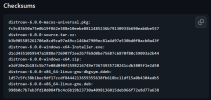
Installer hashes fixed. We identified a bug in our CI/CD & final human review process. Thanks @l1i1l for reporting.
To anyone updating, please follow the steps outlined to Upgrade from OBS-NDI to DistroAV
To anyone updating, please follow the steps outlined to Upgrade from OBS-NDI to DistroAV

KattPhloxworthy
Member
No more NDI source after installing update
Did you uninstall OBS-NDI before installing DistroAV? This is important.
Equally important, are you using the latest runtime, 6.0.1.0? If you're using anything older, it may not work properly or at all.
--Katt. =^.^=

airi
New Member
I'm having a strange problem with DistroAV, specifically that the output source on my streaming laptop is lagging/stuttering like crazy until I install then uninstall ethernet drivers, and then it works magically again for one day only. Ceases working after that until I install and then uninstall ethernet drivers again.
Has anyone had a problem like this, and if so, is there a solution?
Has anyone had a problem like this, and if so, is there a solution?
KattPhloxworthy
Member
I'm having a strange problem with DistroAV, specifically that the output source on my streaming laptop is lagging/stuttering like crazy until I install then uninstall ethernet drivers, and then it works magically again for one day only. Ceases working after that until I install and then uninstall ethernet drivers again.
Has anyone had a problem like this, and if so, is there a solution?
Out of curiosity, is this for an on-board ethernet interface or a USB one? If it's for on-board that is REALLY interesting. In theory, you'd figure those shouldn't have any such issues, even on a laptop.
For my part, I haven't tried doing it from a laptop, though I've had other, different issues.
And finally, are you making sure you're on the latest NDI runtime (the most recent release is 6.1.0.0 as of this writing)?
--Katt. =^.^=
Last edited:
KattPhloxworthy
Member
Hi, does anyone know how can I change which ethernet adapter with specific IP is used in DistoAV? I have multiple ones, and i want dedicate some mainly for DistroAV, but it keeps using wrong ones with lesser speed and more latency.
Are you broadcasting from this PC? One thought I had was you can tell OBS Studio, via its Advanced settings page, to tell it which interface/IP to send output on, though I don't know if this affects the broadcast/RTMP side of things. It COULD follow Windows' TCP/IP routing table, but the computers I have which send NDI streams don't actually stream. The one that does actually stream only receives an NDI stream. This is how I tell my NDI-emitting PCs where to send their NDI streams as all my computers involved have multiple ethernet interfaces.
Beam, on the other hand, is far more explicit in where it sends its output within its own interface, never needing the OBS-wide one.
--Katt. =^.^=
airi
New Member
Out of curiosity, is this for an on-board ethernet interface or a USB one? If it's for on-board that is REALLY interesting. In theory, you'd figure those shouldn't have any such issues, even on a laptop.
For my part, I haven't tried doing it from a laptop, though I've had other, different issues.
And finally, are you making sure you're on the latest NDI runtime (the most recent release is 6.1.0.0 as of this writing)?
--Katt. =^.^=
I don't think I did have them installed but I just installed them on both machines, restarted both and unfortunately still having this problem :(
It's a real brain twister because its only the source from the gaming PC on the laptop with OBS being run by NDI/DistroAV like the main PC isn't lagging at all, but im not sure what could be causing the frame dropping/stuttering
airi
New Member
I ran a test stream (5-minutes or so) to see if a log could figure out what was going on and this time it said there was an issue with max audio buffering (restarting source all the time because of it) could that be the root cause of all these problems?I don't think I did have them installed but I just installed them on both machines, restarted both and unfortunately still having this problem :(
It's a real brain twister because its only the source from the gaming PC on the laptop with OBS being run by NDI/DistroAV like the main PC isn't lagging at all, but im not sure what could be causing the frame dropping/stuttering
If it is... why on earth would it get solved by reinstalling ethernet drivers?
Attachments

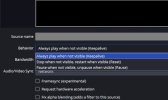
I recently discovered this updated item in the NDI source settings. (see image below)
It really messes with Advanced Scene Switcher video matching which can never switch the scene because the video is frozen on all NDI sources by default when they are not in the current scene in OBS.
I was wondering why my scene switcher was just dead lately, but after a month I found this setting and sure enough turning 'pause' (the default) off fixed the problem with the Advanced Scene Switching.
Wouldn't it be better to have the 'pause' as an option and the live play to be the default?
I have 3 OBS sources derived from the same NDI source and all three were just dead and not switching scenes using the Adv.S.S. macro for video matching. The video matching macro has you choose a part of the video that you want it to use to measure whether the video matches, and in that selecting window, you can see that the video is frozen on any NDI source that is part of the DistroAV sources, still set to pause, and not in the current program scene in OBS. It was only when I observed this being paused, that I thought 'wait a second that video should be not paused' and looked into the NDI source, noticing this option. Not cool. I didn't know this new feature was holding me back.
It really messes with Advanced Scene Switcher video matching which can never switch the scene because the video is frozen on all NDI sources by default when they are not in the current scene in OBS.
I was wondering why my scene switcher was just dead lately, but after a month I found this setting and sure enough turning 'pause' (the default) off fixed the problem with the Advanced Scene Switching.
Wouldn't it be better to have the 'pause' as an option and the live play to be the default?
I have 3 OBS sources derived from the same NDI source and all three were just dead and not switching scenes using the Adv.S.S. macro for video matching. The video matching macro has you choose a part of the video that you want it to use to measure whether the video matches, and in that selecting window, you can see that the video is frozen on any NDI source that is part of the DistroAV sources, still set to pause, and not in the current program scene in OBS. It was only when I observed this being paused, that I thought 'wait a second that video should be not paused' and looked into the NDI source, noticing this option. Not cool. I didn't know this new feature was holding me back.
Attachments
Last edited:

ajbrutico
New Member
Heya all, I am starting OBS and trying to use my NDI camera. My OBS scene has no visible video/picture until i go into the camera setting of the OBS scene and change to a different cam, and then BACK to NDI. Then the picture shows. I uninstalled the previous versions of the OBS plugin. Any ideas of why this behavior persists?

FerretBomb
Active Member
Just installed DistroAV 6.0.0 on a clean OBS 31.0.0 install. Used the NDI redist that the plugin offered in the error box stating it wasn't installed. Added two audio filters (one each on AIC and AOC).
Upon next start, OBS stalled out after initializing the first audio source; the logfile cuts off there and the UI window never opens, though the obs and two obs-webhelper processes kept running in the background and did not crash. Only way to get OBS running again was to end-task the process, delete the distroav DLL, and restart. Attaching a logfile from one of these stalled-out attempts. No crashlog available as it did not crash.
Upon next start, OBS stalled out after initializing the first audio source; the logfile cuts off there and the UI window never opens, though the obs and two obs-webhelper processes kept running in the background and did not crash. Only way to get OBS running again was to end-task the process, delete the distroav DLL, and restart. Attaching a logfile from one of these stalled-out attempts. No crashlog available as it did not crash.
Attachments
Last edited:
TrinityTosaLive
New Member
Feature Suggestion: Multiview as a source
As my church builds its production operation, we would like to distribute the Multiview to several locations. At present I can do this only by running a second OBS, window capturing the Multiview from #1, and distributing it via the DistoAV tools as the program output. Could the tools be enhanced to allow distribution of the Multiview from the same screen where one enables and names the Program and Preview outputs?
As my church builds its production operation, we would like to distribute the Multiview to several locations. At present I can do this only by running a second OBS, window capturing the Multiview from #1, and distributing it via the DistoAV tools as the program output. Could the tools be enhanced to allow distribution of the Multiview from the same screen where one enables and names the Program and Preview outputs?
please open a full bug report at : https://github.com/DistroAV/DistroAV/issues/new/chooseJust installed DistroAV 6.0.0 on a clean OBS 31.0.0 install. Used the NDI redist that the plugin offered in the error box stating it wasn't installed. Added two audio filters (one each on AIC and AOC).
Upon next start, OBS stalled out after initializing the first audio source; the logfile cuts off there and the UI window never opens, though the obs and two obs-webhelper processes kept running in the background and did not crash. Only way to get OBS running again was to end-task the process, delete the distroav DLL, and restart. Attaching a logfile from one of these stalled-out attempts. No crashlog available as it did not crash.
@TrinityTosaLive : this is log as a request already : https://github.com/DistroAV/DistroAV/issues/328
@gwstoni : this is most likely in the general library folder : https://github.com/DistroAV/DistroAV/wiki/OBS‐NDI-Is-Now-DistroAV#macos