Display Fightstick Motions

Free Display Fightstick Motions 210124

Hi, Firefox keeps saving my "layout.sav" as a CSS file. I can still open this to get the layout back, but when I do this, the OBS URL only shows the default.

1646019570092.png

Here, if I click "open in new window" I only get the default:
1646019608663.png


How do I get this to work properly?

Is this because I can't save a .SAV file? Is there some other way to do it?
 
boa tarde! O meu arcade funciona normal,porem nada hora que abro o plugin no tela (PRESS ANY BUTTON) nao aparece nada, ja troquei o navegador tanto firefox quanto google ,e não funciona pode me ajudar a desesperadamente.
 
Bumping this. I've looked through the instructions and have searched the thread with keywords and have not found a way to change the stick color. Anyone have any tips?
Just to add more context to this (because I still haven't figured out how to change the ball top color), here is how I have my customlayout folder setup (it doesn't have all the files yet, I know)

1666331489701.png


And here's how I have the fightstick settings on the webpage. I noticed that there are options to upload images of your button colors when they're pressed and unpressed, but no option for the ball top? Is this intended?

1666331523579.png
 
asdadsasdasdasdasd.JPG


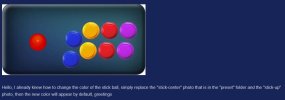
Hello, I already knew how to change the color of the stick ball, simply replace the "stick-center" photo that is in the "preset" folder and the "stick-up" photo, then the new color will appear by default, greetings
 
asdadsasdasdasdasd.JPG


To be able to edit the color of the buttons exactly (button by button), open the layout.sav file in a text editor and place the name of the photo of the buttons we want, just as it is shown in the photo! greetings <3
 
hello im trying to set up OBS Display for Haute42 R16. But i couldnt make the L/R/Up/Down button work. And where can i find buttons of different colors please?

haute42 R16.png
 
OBS straight up won't display my inputs for my MixBox. evwrytime I use browser source, it refuses to display any input coming from my MixBox, EVEN IN GAMEPAD VIEWER. This is absurd and I don't know how to fix it. No one seems to have an answer everywhere I go. Help would be greatly appreciated
Screenshot (1).png
 
OBS straight up won't display my inputs for my MixBox. evwrytime I use browser source, it refuses to display any input coming from my MixBox, EVEN IN GAMEPAD VIEWER. This is absurd and I don't know how to fix it. No one seems to have an answer everywhere I go. Help would be greatly appreciated
View attachment 110336

Update: It does recognize my MixBox but wont display inputs when I click off of the OBS window. I've tried everything that I could find on Youtube or elsewhere. does anyone have a solution? thank you in advance.
 

Attachments

  • Untitled.png
    Untitled.png
    382.6 KB · Views: 154
Update: It does recognize my MixBox but wont display inputs when I click off of the OBS window. I've tried everything that I could find on Youtube or elsewhere. does anyone have a solution? thank you in advance.
I'm having the exact same issue. Browser source is working correctly, and when opening the web page in Firefox directly it'll work when unfocused. However I need to be focusing OBS for the inputs to register via the browser source. Currently looking for a workaround / fix. In the meantime, maybe opening it up in a separate browser page, using a green background + chroma key could work? But ideally would like to have the browser source functioning first.
 
Same issue for me. If I click off of OBS, or my browser when configuring/testing, inputs no longer are recognized.

I even tried @MelissaMeantIt suggestion of running as a separate browser page and cropping it down, but as soon as I click off the browser my inputs are no longer recognized.

I'm seeing other streamers and content creators who are using this plugin actively and without issue, but no matter what I try, I can't get the inputs to display if OBS is not the active window. It's impossible to play games and have my inputs display.

Any help is appreciated!
 
Update: It does recognize my MixBox but wont display inputs when I click off of the OBS window.......

I'm having the exact same issue. Browser source is working correctly, and when opening the web page in Firefox directly it'll work when unfocused......

Same issue for me. If I click off of OBS, or my browser when configuring/testing, inputs no longer are recognized......

The Browser Source has been updated in the new version of OBS, which is causing this problem.

One workaround is to use an older version of OBS (I guess version 30.2.3 should be fine).

Another workaround is to add "--disable-features=EnableWindowsGamingInputDataFetcher" to the OBS shortcut like:
"C:\Program Files\obs-studio\bin\64bit\obs64.exe" --disable-features=EnableWindowsGamingInputDataFetcher
(Note that you need to add a space character before "--disable-features..." and also change the file path to yours.)
Screenshot 2025-01-03 105658-0.png
 
This fix didn't work for me. Anytime I click off of my browser it just completely stops registering inputs. It worked fine a few days ago, and then today I boot up stream and it just completely stopped registering my inputs when I was in-game. Any other workarounds, since SF6 doesn't allow you to be focused on another window and register inputs from your controller at the same time
 
So, this is a really cool find! I'm using this with my Neo Geo Arcade Stick Pro! Here are the values if anyone at all is interested:
Neutral93.28
Up9-1
Down90.14
Left90.71
Right9-0.42
Up-Left91
Down-Left90.42
Up-Right9-0.71
Down-Right9-0.14
Alright. So far so good, right? I do have a couple of problems with the graphics and the button detection, it looks. Even after moving them around in the editor above the parameters field(s), my changes don't want to apply over to the actual overlay for some reason. For example, I use a custom image (directly from Google Images, by the way) and it doesn't want to show properly at all, so the OBS link just dismisses it completely and uses the default. Another thing that's dismissed is my button layout to match the buttons better because initially when I press the buttons, they were all over the place, so I had some moving around to do. Now, it looks like it is saved to the layout properly when I save my edits and then load them back in after refreshing the page, but here's the kicker. It doesn't seem to actually apply when I look at the overlay in OBS. The overlay works fine, it just doesn't know that I changed some things for some reason. So, it's the complete default background and images and layout on the overlay, essentially and I kind of would not like that. I keep looking around, but it doesn't seem to be in my control for some reason. To make matters worse, it looks like this thing hasn't been updated in nearly 4 years. But, I don't really know quite where else I can find something like this. Is there going to be updates to this soon to help fix this or should I look for something newer?
 
So, this is a really cool find! I'm using this with my Neo Geo Arcade Stick Pro! Here are the values if anyone at all is interested:
...
Hello, I just tested it and didn't find the problem you mentioned. Have you overwritten it with the new layout.sav after changing the layout?
 
Back
Top