

You are using an out of date browser. It may not display this or other websites correctly.
You should upgrade or use an alternative browser.
You should upgrade or use an alternative browser.

Advanced Scene Switcher 1.37.0
- Thread starter Warmuptill
- Start date

ottawafro
Member
Turned on Live Stats on Main Scene:
The macros to triggered to cause the freezing.
AAApxnic7VptT+M4EP4rlj+xUotaCkvpt+XtrjoKiHY5nVYVch03sZrEke0UUMV/35k4SdMWwep09GDJh7bReN48z+OJG2dBI8a1MrT3Y0FjFgnaoxdyLoxl1pCrSzIM1D35Zoywhjaor1Wa0N6UhUY0aMJSI4ZsLo5FwOZSadpr5dKKjmZhKMJSwAPBZycq9qSVKjb9+Hpdg3EcGWnp+0IPlAfO2g1qZjI5exD8Kh5apm2pbaxKvnHna3qp7KmKl9Exv0BpeyI1T6U9m7MwZahb1ThJwUdUpnSCCfZjKzRoL9N+UWlB0bOoXLR2Ow1qHxO8fIIwsbRZdeZCmyx+G6Se4rOhsFbGvkFbLXxpwGdlciz2WAhTOgVV2rM6Fc7sbxl76h7QygYaNGDmJo2PU2vRudMD2TWCsSGFCtrUXLBJpeqB9IMQPrY/XaIz0umymLrwPxIPMBkK8WgO94o8i0lxzptj350MRvlKEJdRrrSMT5gWBNPeXbE4x4ReMskyRhssVd8DBebNjWlmZG+isPm1e3jUZXt7zYMJ6zb3Rfew2Z0cHjZbE86/dvY9zo+6dA2vzNyRrQw4TEJpAbNrZaRjFqykBFdU5/DgqVG5HucOziA35+QF2/1OadtCy4Iafyo7E49mdQ06IViPy6pXRVb5fiiu18XLemZxjfAjEdsqH7kKQ5YY4ZXh5kwPWJKAwtlDAtysDJUraZVXvCqjg0cSZpcNKmI2CdHe0bIs9F41CqY2hspLxNBwEYu7uTRyIqFwj+AkVL7k2cLyUp2tbGgYcipxDS2olZG4g2kaq5mM3QI0Audtnl+zrdfWLIizLIYiFNxBtihMGkUDHUAwMkQ1ZC2L57DilvrZMC0c9a2InncmvYdR5dr9gnbeockwa9HoqARyo8N8bFTbrb13hesfLILka0x/J0xvBGw3yI1S0f+M67jY+HyYbqxSzbHD5RfPFPcvyWekD1MmQxnPcPqMl3N3ZvkEiy3KwvnGO7cwXMskxwFtZZykdiBsoLxNB6XpgMUpC3evEoG7E5dRd90djhKnSXZc7C80u8GjKHd565iGyQCUyS3T65jTXrPdKDNe2SqYEjg3GYl7xZBx4Ta0rRXZlfaE2zwzzkViTyXs+fwctA+y4l9nw00agdOaDzUfHB/+UekondSEqAlRefBAbqW4B2/EBd0KI6YK9hsFFY7W/ZzDKNnB75oBb82AkVZzRS6Ur7aEvAxFifzBup9+xHxBzkGH7FwzG9T4vzX+x8pq+UCaBO4NFu8NeTfYDhukuQsVZ+HdCi3a6w4vUIdMM1ocKxXWtNja/4i6K3xG+PO7QnV3kD32fQdkwDxyLnwfnTe7X2pObLElVChRM+KzMwIfLwAP1tpElNSk+MSkGN1Ly4O6UdScePYxA7nMmoYhx4zP8OUGPG3YCjegbEov/2N01j2d4DjZcT8sTAJWE2MbxMh5kYWssKImxUciReH6dVbcM4mP/ooDyedOGtuvnzQuHez9y7PKRpZJeYb4G5z3vn70Wu3D2QHpG53Abp5CponHrBhpFhfv3eQlsaWodGYrWrgonO1pSZjc8iUG/RL+ZXepEf9vztw3DhLeN+pjQKF8Mcy4N7SyuwZ0cInouPKPKw5oe7ezv9umTz8Bp1U3AQ==

The macros to triggered to cause the freezing.
AAApxnic7VptT+M4EP4rlj+xUotaCkvpt+XtrjoKiHY5nVYVch03sZrEke0UUMV/35k4SdMWwep09GDJh7bReN48z+OJG2dBI8a1MrT3Y0FjFgnaoxdyLoxl1pCrSzIM1D35Zoywhjaor1Wa0N6UhUY0aMJSI4ZsLo5FwOZSadpr5dKKjmZhKMJSwAPBZycq9qSVKjb9+Hpdg3EcGWnp+0IPlAfO2g1qZjI5exD8Kh5apm2pbaxKvnHna3qp7KmKl9Exv0BpeyI1T6U9m7MwZahb1ThJwUdUpnSCCfZjKzRoL9N+UWlB0bOoXLR2Ow1qHxO8fIIwsbRZdeZCmyx+G6Se4rOhsFbGvkFbLXxpwGdlciz2WAhTOgVV2rM6Fc7sbxl76h7QygYaNGDmJo2PU2vRudMD2TWCsSGFCtrUXLBJpeqB9IMQPrY/XaIz0umymLrwPxIPMBkK8WgO94o8i0lxzptj350MRvlKEJdRrrSMT5gWBNPeXbE4x4ReMskyRhssVd8DBebNjWlmZG+isPm1e3jUZXt7zYMJ6zb3Rfew2Z0cHjZbE86/dvY9zo+6dA2vzNyRrQw4TEJpAbNrZaRjFqykBFdU5/DgqVG5HucOziA35+QF2/1OadtCy4Iafyo7E49mdQ06IViPy6pXRVb5fiiu18XLemZxjfAjEdsqH7kKQ5YY4ZXh5kwPWJKAwtlDAtysDJUraZVXvCqjg0cSZpcNKmI2CdHe0bIs9F41CqY2hspLxNBwEYu7uTRyIqFwj+AkVL7k2cLyUp2tbGgYcipxDS2olZG4g2kaq5mM3QI0Audtnl+zrdfWLIizLIYiFNxBtihMGkUDHUAwMkQ1ZC2L57DilvrZMC0c9a2InncmvYdR5dr9gnbeockwa9HoqARyo8N8bFTbrb13hesfLILka0x/J0xvBGw3yI1S0f+M67jY+HyYbqxSzbHD5RfPFPcvyWekD1MmQxnPcPqMl3N3ZvkEiy3KwvnGO7cwXMskxwFtZZykdiBsoLxNB6XpgMUpC3evEoG7E5dRd90djhKnSXZc7C80u8GjKHd565iGyQCUyS3T65jTXrPdKDNe2SqYEjg3GYl7xZBx4Ta0rRXZlfaE2zwzzkViTyXs+fwctA+y4l9nw00agdOaDzUfHB/+UekondSEqAlRefBAbqW4B2/EBd0KI6YK9hsFFY7W/ZzDKNnB75oBb82AkVZzRS6Ur7aEvAxFifzBup9+xHxBzkGH7FwzG9T4vzX+x8pq+UCaBO4NFu8NeTfYDhukuQsVZ+HdCi3a6w4vUIdMM1ocKxXWtNja/4i6K3xG+PO7QnV3kD32fQdkwDxyLnwfnTe7X2pObLElVChRM+KzMwIfLwAP1tpElNSk+MSkGN1Ly4O6UdScePYxA7nMmoYhx4zP8OUGPG3YCjegbEov/2N01j2d4DjZcT8sTAJWE2MbxMh5kYWssKImxUciReH6dVbcM4mP/ooDyedOGtuvnzQuHez9y7PKRpZJeYb4G5z3vn70Wu3D2QHpG53Abp5CponHrBhpFhfv3eQlsaWodGYrWrgonO1pSZjc8iUG/RL+ZXepEf9vztw3DhLeN+pjQKF8Mcy4N7SyuwZ0cInouPKPKw5oe7ezv9umTz8Bp1U3AQ==
M1 Max: Isolated Render Deadlock (3 FPS) with Advanced Scene Switcher (CoreAudio Conflict)
I have isolated a severe performance deadlock on my M1 Max (macOS Sequoia 15.7.8 / OBS build 32.1.2 64-bit Apple Silicon) specifically tied to the Advanced Scene Switcher plugin (v1.34+).
Isolation: I disabled/uninstalled all plugins and activated them one at a time. Advanced Scene Switcher was the only plugin that caused this. At first I had assumed that this couldn't be the problem as I've used this plugin without issue for years. But I tested with a fresh, default configuration of Advanced Scene Switcher. The issue persists in this isolated state.
The Symptom:
Thanks for all you do on this plug-in. I hope the above helps you find the issue. This only started happening recently, I've been using ASS for years.
I have isolated a severe performance deadlock on my M1 Max (macOS Sequoia 15.7.8 / OBS build 32.1.2 64-bit Apple Silicon) specifically tied to the Advanced Scene Switcher plugin (v1.34+).
Isolation: I disabled/uninstalled all plugins and activated them one at a time. Advanced Scene Switcher was the only plugin that caused this. At first I had assumed that this couldn't be the problem as I've used this plugin without issue for years. But I tested with a fresh, default configuration of Advanced Scene Switcher. The issue persists in this isolated state.
The Symptom:
- The Trigger: Switching back to any scene that uses a previously active Audio Input Capture (Behringer U-PHORIA).
- The Choke: Performance dives from 60 FPS to ~3 FPS. Render time spikes to 2150ms, while CPU stays at ~3%.
- The "One-Shot" Discovery: I can create 10 unique audio sources for 10 scenes and they all work once. However, the moment I return to a scene I've already visited, the choke happens immediately.
- Inactive State: This happens even if the plugin is set to "Inactive" with no macros enabled and in its freshly. installed state.
Thanks for all you do on this plug-in. I hope the above helps you find the issue. This only started happening recently, I've been using ASS for years.
Warmuptill
Active Member
Thanks for letting me know!M1 Max: Isolated Render Deadlock (3 FPS) with Advanced Scene Switcher (CoreAudio Conflict)
I have isolated a severe performance deadlock on my M1 Max (macOS Sequoia 15.7.8 / OBS build 32.1.2 64-bit Apple Silicon) specifically tied to the Advanced Scene Switcher plugin (v1.34+).
Isolation: I disabled/uninstalled all plugins and activated them one at a time. Advanced Scene Switcher was the only plugin that caused this. At first I had assumed that this couldn't be the problem as I've used this plugin without issue for years. But I tested with a fresh, default configuration of Advanced Scene Switcher. The issue persists in this isolated state.
The Symptom:
The issue only resolves when the plugin is completely removed or unchecked in the Plug-in Manager. Restarting OBS is the only way to "reset" the audio sessions, but the cycle repeats as soon as a source is re-used, which isn't practical, so the only solution I have is to disable the plug-in.
- The Trigger: Switching back to any scene that uses a previously active Audio Input Capture (Behringer U-PHORIA).
- The Choke: Performance dives from 60 FPS to ~3 FPS. Render time spikes to 2150ms, while CPU stays at ~3%.
- The "One-Shot" Discovery: I can create 10 unique audio sources for 10 scenes and they all work once. However, the moment I return to a scene I've already visited, the choke happens immediately.
- Inactive State: This happens even if the plugin is set to "Inactive" with no macros enabled and in its freshly. installed state.
Thanks for all you do on this plug-in. I hope the above helps you find the issue. This only started happening recently, I've been using ASS for years.
Would you mind sharing the settings you are using, so I can try to reproduce it on my end?
Hey guys, i haven found a way to create this:
with a Macro, hit a hotcue, then move randomly between a selected group of scenes say 1 second in between, during 20 seconds or repeat 20 counts. any idea how to do so?, ive been doing with scenes, and i think that with macros could be more efficient.

with a Macro, hit a hotcue, then move randomly between a selected group of scenes say 1 second in between, during 20 seconds or repeat 20 counts. any idea how to do so?, ive been doing with scenes, and i think that with macros could be more efficient.
Warmuptill
Active Member
Hi!Hey guys, i haven found a way to create this:
with a Macro, hit a hotcue, then move randomly between a selected group of scenes say 1 second in between, during 20 seconds or repeat 20 counts. any idea how to do so?, ive been doing with scenes, and i think that with macros could be more efficient.
View attachment 119793
Something like this might do the trick:
thanks, that worked perfect, but, how we can add a loop to repeat say 20 times?
Warmuptill
Active Member
Depends a bit on how you want to set it up.thanks, that worked perfect, but, how we can add a loop to repeat say 20 times?
Without knowing more I would suggest something like this:
- One macro which calls the previous example macro I shared earlier twenty times:
It uses the Variable "Counter" to keep track how often the random scene switch was performed already. - Another macro to use as the trigger:
All it does it set the "Counter" variable to zero, if a hotkey is pressed.
Code:
AAApE3ic7Vpbc5tGFP4rzE4f2lSogJCE9JY4zlQzcaJaSvLQ8WQWOIKtETDsIjv1+L/37C5X32LHblNnNBMncDi3Pdcv4AuypUGRcTL/84KkdAtkTl5nBhflZmM4liHYFjgZkKjIypzMNzThMCA5LTms6A5eQUx3LCvI3KqoHZ6CJgkkDSGIITg9yNKQCZalfJEur3LQQD5ZFyyKoDjKQlBq+SnLD88heJ+uBC1Ew81Flr8MtK7Nu0y8ztLWuvQvzgpxwIqgZOJwR5OSSt4ux0GJOraNSwfSwUUqoEDu1u07mS6I1AydC2s4GhDxJZeXl2gmZUIdYwcFV/ZtpIZZcLoCIVgacSlbQMQ46uwcjqYhTfBIr5GVzEVRghb7xNIwO1NpwgcDElN+XKavSiGkcs2HtKVMxjUqRlCU/C31O1GPWRQn+CMWmzY766Jsg1nU+tdwjochaI9U6e7RlU0iz3z92QdNw6dBz4j2qGJq7Ru0AEO6PexJvJEO3SWiPJYyMlSLEBlouOPcVFVuSqLpzsaeDd7UnHne2HSnE9+cuWFoUn/qTkeTYOSEE3IlX0pcF1tjcJUnTGDOlhlnurKwhXLZSrY7uxxU1yPPuTypFByib1rJ7bKjsdXIWlKyLo3fM3EKX3i/BzURpU+aqHdJIouiBJZXyW08lV0O0RZS0a3HIEsSmnMIG3M7WhzRPEeGw/Mca7PzqOmkfl0FXRo5+mIk6nJAIKV+IuV1WTaBdrpWpGsnGHkmc4hkJmVQOMkiFqiGCstCdTQOCrZhsncuiBxXn/F4XBSUpbrxOMjz8pt71fpar14OGuvv9Hg8yErZ/qR94FRPFinqZaFR0w0OCah8E9nRxUdtlVh4m5bb6tZRXjQ5wRJQSYdzrLQNi6S7OmLd0SpYZ0RleZVM61JWjB6jzyW3qjNI7bU6vSbNyToGIxMxFAac022OAV0YEW6dhntVx3etc1jTF3iG806e7W6Wk8prfa7G80pSukQekQA1Ld/X9xedei0A9BaCdoTgJOuN2XZCtI0u99+nGFLVxk1kOYhFmpei5WPVrQptCjgzwiMdyGazf8dFbu8X+X6RP+0iH/uTseN7gen7M2q64IxMn4aOGVA69Vx/YzkBPG6Re+0edyzvQXvc8xpRz7txj+tcPtUa7819vIHuJJEENR4+VpupHhO6Jz6xMALxO8jaIfOJpRDI/39zdFDBk6/o3oZu90gfL/R3dhWwRYibx5TjrvRXokCnq2nXDpaujpaL/Q23MalttKSy0tAWGb6oN9QRFUGsLN4suMEZcywZH7rEpCD6JZcwtqchMkNSlNk8oQH0n1VE44yJ+P7LUye6Z3ZLRYyVVADXySc/G7bxq+EYL4yR8Yvxm+GSTmUti2ybi/4CrGnkJaqIUkNFRfpYZ3yuNajluZRex1kSdgY2u/aAmCbIcjIEHtc0Va3uWJGlMt0f+5X3YXV4vDx+/2bx9lAWVAApNCBFAdQaqLQbOaBYk7zDRY4QuxKMhoBtjvp7cqwuL1Yhld54UwYXKHcnAgpZUduyVNVj+b2FNMLk3SKR0zBEpoNYeuN60mkODegqsPOz7bty60Nxrdj7LdNlPcSC6tizrrBGeBRE+CB3dCTzoOtFa1CdqSFuJa//tYmcXT2Sc500IgonJ0l2dgw5UFGr0yb+4ln6RwkFzlny05BnWxhqPDXUWjTH1RD3nO9k5b7DuEFpx4Dgzmhn2B6y7SHbDwLZXICN63iOuZkBQjZ/TE06cl3T2oSW7c7AGoXW4yCbY7XvT+wHvnux9+9erqOsWDv/Xd68hMAD7X/jBf79SiIRHUw5EJYSLdRHen7vP/5NFGvdDGOtW2GstYexexi7h7F7GPsEMPaOt7d7RLtHtD8Iop14dOQ4k9D0JpOJ6U5935zNbNfcTMbj0Anxz3j2OEQ7stuPiSP3YR8TLee/BbQ/EPpayR1krDNjhXAgiPHqyV8n3o7DnOkeiO2B2B6IfU8gpgdAH4lpmnMD7VYsVpXB04KxZ/F9RhXPZ67GZ+cDv1WXqK43dldl3Vbw46bgbxzTd7QApltvyabaWpL6pQBB2hcc3/jmYkD8BLHBh1SwZN1o14iy+novvV7XSp5DMs8o+3pkxvfAqpUC5yYN9n1iKz3RobO/5T8oJx0hYg9H7tA2J2a08WzLtqZTcvkPlY4s+w==Hope that helps!
Warmuptill
Active Member
Warmuptill updated Advanced Scene Switcher with a new update entry:
Advanced Scene Switcher 1.34.2
Read the rest of this update entry...
Advanced Scene Switcher 1.34.2
Important notes:
- The minimum supported OBS version is OBS 31.1.1.
- Please make sure to back up your settings!
- If you run into any issues, please either post in the OBS forums or create an...
Read the rest of this update entry...
hey, that worked as expected, thanks pal, only one downside i saw, i have active the random scene if no action is performed after say 6 seconds, the issue i saw, is, if i press the hot key in between that time frame from the random, will wait until the end of the time frame to change the reset to 0, is there a way to create like an instant action with the random function activated?Depends a bit on how you want to set it up.
Without knowing more I would suggest something like this:
You can use this code to import the three example macros:
- One macro which calls the previous example macro I shared earlier twenty times:
View attachment 119796
It uses the Variable "Counter" to keep track how often the random scene switch was performed already.- Another macro to use as the trigger:
View attachment 119797
All it does it set the "Counter" variable to zero, if a hotkey is pressed.
Code:AAApE3ic7Vpbc5tGFP4rzE4f2lSogJCE9JY4zlQzcaJaSvLQ8WQWOIKtETDsIjv1+L/37C5X32LHblNnNBMncDi3Pdcv4AuypUGRcTL/84KkdAtkTl5nBhflZmM4liHYFjgZkKjIypzMNzThMCA5LTms6A5eQUx3LCvI3KqoHZ6CJgkkDSGIITg9yNKQCZalfJEur3LQQD5ZFyyKoDjKQlBq+SnLD88heJ+uBC1Ew81Flr8MtK7Nu0y8ztLWuvQvzgpxwIqgZOJwR5OSSt4ux0GJOraNSwfSwUUqoEDu1u07mS6I1AydC2s4GhDxJZeXl2gmZUIdYwcFV/ZtpIZZcLoCIVgacSlbQMQ46uwcjqYhTfBIr5GVzEVRghb7xNIwO1NpwgcDElN+XKavSiGkcs2HtKVMxjUqRlCU/C31O1GPWRQn+CMWmzY766Jsg1nU+tdwjochaI9U6e7RlU0iz3z92QdNw6dBz4j2qGJq7Ru0AEO6PexJvJEO3SWiPJYyMlSLEBlouOPcVFVuSqLpzsaeDd7UnHne2HSnE9+cuWFoUn/qTkeTYOSEE3IlX0pcF1tjcJUnTGDOlhlnurKwhXLZSrY7uxxU1yPPuTypFByib1rJ7bKjsdXIWlKyLo3fM3EKX3i/BzURpU+aqHdJIouiBJZXyW08lV0O0RZS0a3HIEsSmnMIG3M7WhzRPEeGw/Mca7PzqOmkfl0FXRo5+mIk6nJAIKV+IuV1WTaBdrpWpGsnGHkmc4hkJmVQOMkiFqiGCstCdTQOCrZhsncuiBxXn/F4XBSUpbrxOMjz8pt71fpar14OGuvv9Hg8yErZ/qR94FRPFinqZaFR0w0OCah8E9nRxUdtlVh4m5bb6tZRXjQ5wRJQSYdzrLQNi6S7OmLd0SpYZ0RleZVM61JWjB6jzyW3qjNI7bU6vSbNyToGIxMxFAac022OAV0YEW6dhntVx3etc1jTF3iG806e7W6Wk8prfa7G80pSukQekQA1Ld/X9xedei0A9BaCdoTgJOuN2XZCtI0u99+nGFLVxk1kOYhFmpei5WPVrQptCjgzwiMdyGazf8dFbu8X+X6RP+0iH/uTseN7gen7M2q64IxMn4aOGVA69Vx/YzkBPG6Re+0edyzvQXvc8xpRz7txj+tcPtUa7819vIHuJJEENR4+VpupHhO6Jz6xMALxO8jaIfOJpRDI/39zdFDBk6/o3oZu90gfL/R3dhWwRYibx5TjrvRXokCnq2nXDpaujpaL/Q23MalttKSy0tAWGb6oN9QRFUGsLN4suMEZcywZH7rEpCD6JZcwtqchMkNSlNk8oQH0n1VE44yJ+P7LUye6Z3ZLRYyVVADXySc/G7bxq+EYL4yR8Yvxm+GSTmUti2ybi/4CrGnkJaqIUkNFRfpYZ3yuNajluZRex1kSdgY2u/aAmCbIcjIEHtc0Va3uWJGlMt0f+5X3YXV4vDx+/2bx9lAWVAApNCBFAdQaqLQbOaBYk7zDRY4QuxKMhoBtjvp7cqwuL1Yhld54UwYXKHcnAgpZUduyVNVj+b2FNMLk3SKR0zBEpoNYeuN60mkODegqsPOz7bty60Nxrdj7LdNlPcSC6tizrrBGeBRE+CB3dCTzoOtFa1CdqSFuJa//tYmcXT2Sc500IgonJ0l2dgw5UFGr0yb+4ln6RwkFzlny05BnWxhqPDXUWjTH1RD3nO9k5b7DuEFpx4Dgzmhn2B6y7SHbDwLZXICN63iOuZkBQjZ/TE06cl3T2oSW7c7AGoXW4yCbY7XvT+wHvnux9+9erqOsWDv/Xd68hMAD7X/jBf79SiIRHUw5EJYSLdRHen7vP/5NFGvdDGOtW2GstYexexi7h7F7GPsEMPaOt7d7RLtHtD8Iop14dOQ4k9D0JpOJ6U5935zNbNfcTMbj0Anxz3j2OEQ7stuPiSP3YR8TLee/BbQ/EPpayR1krDNjhXAgiPHqyV8n3o7DnOkeiO2B2B6IfU8gpgdAH4lpmnMD7VYsVpXB04KxZ/F9RhXPZ67GZ+cDv1WXqK43dldl3Vbw46bgbxzTd7QApltvyabaWpL6pQBB2hcc3/jmYkD8BLHBh1SwZN1o14iy+novvV7XSp5DMs8o+3pkxvfAqpUC5yYN9n1iKz3RobO/5T8oJx0hYg9H7tA2J2a08WzLtqZTcvkPlY4s+w==
Hope that helps!
somehow i worked arround, i have macros to iterate between 8 cameras, with time and so on, but those macros will end at certain point, so i select this random to go to main camera to trigger a randomization slow between al of them until i hit again a macro, just to avoid stay in the same camera.

and once main gets selected, will activate the sequence

i have 50 iteraction alike, which gives me arroung 5 minutes to hit again a macro, usually dont wait more than 3 min but i hit 5 just to be sure, the problem is that at 1.7 minutes, the last action starts verifying again the whole variables which causes a delay when i hit a macro again until reaches the random time

hope this helps.
and once main gets selected, will activate the sequence
i have 50 iteraction alike, which gives me arroung 5 minutes to hit again a macro, usually dont wait more than 3 min but i hit 5 just to be sure, the problem is that at 1.7 minutes, the last action starts verifying again the whole variables which causes a delay when i hit a macro again until reaches the random time
hope this helps.
Warmuptil представил новый ресурс:
Автоматическое переключение сцены - Переключается на противоположные сцены в зависимости от того, какое окно находится в фокусе
Думаешь, теперь стало ещё лучше?
Warmuptill
Active Member
Seems like some locale files are missing or out of date.Hello, since my OBS update, i have a visual glitch....
You can try re-installing them using the plugin's installer or by manually updating the “data” folder.
Hello, I did a clean install and have figured out that it wasn't the Advanced Scene Switcher. sorry about the trouble.Thanks for letting me know!
Would you mind sharing the settings you are using, so I can try to reproduce it on my end?
FrostPhantom
New Member
I need some help to get the plugin working again
I was using it before, but reinstalled windows and since then I couldn't get the plugin to work properly
I'm using OBS 32.1.2 and Advanced Scene Switcher 1.34.2
Basically, when opening the plugin I get this error:

I was using the plugin to display to connect actions in my OBS to redeems, but with this error, that doesn't work. The option to use a twitch redeem as trigger disappeared
So far I've tried:
- Installing the plugin both via .exe installer and manually
- Installing an older version of the plugin, both via legacy and new method
- Reinstalling OBS and doing a clean install of everything
I can see the files are in the folder in the exact same path that the error message describes it
I am running OBS as admin
I'm really at a loss for what to do, so any help is appreciated
Thanks in advance
I was using it before, but reinstalled windows and since then I couldn't get the plugin to work properly
I'm using OBS 32.1.2 and Advanced Scene Switcher 1.34.2
Basically, when opening the plugin I get this error:
I was using the plugin to display to connect actions in my OBS to redeems, but with this error, that doesn't work. The option to use a twitch redeem as trigger disappeared
So far I've tried:
- Installing the plugin both via .exe installer and manually
- Installing an older version of the plugin, both via legacy and new method
- Reinstalling OBS and doing a clean install of everything
I can see the files are in the folder in the exact same path that the error message describes it
I am running OBS as admin
I'm really at a loss for what to do, so any help is appreciated
Thanks in advance
Warmuptill
Active Member
Can you please try the following:I need some help to get the plugin working again
I was using it before, but reinstalled windows and since then I couldn't get the plugin to work properly
I'm using OBS 32.1.2 and Advanced Scene Switcher 1.34.2
Basically, when opening the plugin I get this error:
View attachment 119888
I was using the plugin to display to connect actions in my OBS to redeems, but with this error, that doesn't work. The option to use a twitch redeem as trigger disappeared
So far I've tried:
- Installing the plugin both via .exe installer and manually
- Installing an older version of the plugin, both via legacy and new method
- Reinstalling OBS and doing a clean install of everything
I can see the files are in the folder in the exact same path that the error message describes it
I am running OBS as admin
I'm really at a loss for what to do, so any help is appreciated
Thanks in advance
- Uninstall the plugin
- Re-install the plugin, but instead of using the suggested path in the installer use:
C:\Program Files\obs-studio
- Launch OBS
C:\Program Files\obs-studio of course.Can I just ask which version of Windows and OBS you are using?
FrostPhantom
New Member
That solved the problem! Thank you so much!Can you please try the following:
That is assuming you have installed OBS to
- Uninstall the plugin
- Re-install the plugin, but instead of using the suggested path in the installer use:
C:\Program Files\obs-studio
View attachment 119896- Launch OBS
C:\Program Files\obs-studioof course.
Can I just ask which version of Windows and OBS you are using?
I'm using OBS 32.1.2 and Windows 11 25H2
Hello !
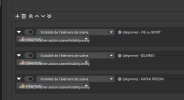
It would be awesome if we could hide the "Set transition to" and "Set transition duration to" options on each 'Scene Item Visibility' action. Right now, it makes the element way too large vertically, which is really impractical and cluttered when you stack a lot of them in a row.
On top of that, the plugin is becoming less and less responsive. Each action now takes more than a second to process, which wasn't the case a few months ago...

It would be awesome if we could hide the "Set transition to" and "Set transition duration to" options on each 'Scene Item Visibility' action. Right now, it makes the element way too large vertically, which is really impractical and cluttered when you stack a lot of them in a row.
On top of that, the plugin is becoming less and less responsive. Each action now takes more than a second to process, which wasn't the case a few months ago...