
Advanced Scene Switcher

Advanced Scene Switcher 1.37.2

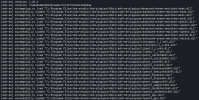
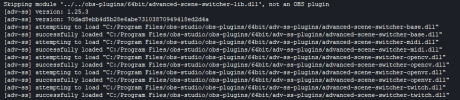
Hi, Advanced scene switcher isn't working in portable mode after the OBS 31 update. It is actually working fine in non-portable version of OBS, which is updated to 31 as well, but giving issue in portable version.
I've attached screenshots of the log from non-portable version where its working fine as well as the portable version where its not loading up at all.
 

Attachments

  • Screenshot 2024-12-07 191339.png
    Screenshot 2024-12-07 191339.png
    82.6 KB · Views: 150
  • Screenshot 2024-12-07 191246.png
    Screenshot 2024-12-07 191246.png
    35.1 KB · Views: 117
Hi, Advanced scene switcher isn't working in portable mode after the OBS 31 update. It is actually working fine in non-portable version of OBS, which is updated to 31 as well, but giving issue in portable version.
I've attached screenshots of the log from non-portable version where its working fine as well as the portable version where its not loading up at all.
Hi,
I just gave it a try with a fresh OBS 31 portable install and it seems to work.

1733596227580.png


What exactly is not working on your end?
The "advanced-scene-switcher-lib.dll" not begin loaded is expected as it is not an obs-plugin just as the error states and instead a lib used by the advanced scene switcher itself.

Unfortunately, I think your issue is more likely related to you using version 1.25 of the advanced scene switcher.
This version being compatible with OBS 31 in non-portable mode is just a happy accident.
OBS 31 support was only added with advanced scene switcher 1.28.
 
Hi @Warmuptill,
Please, I have a new to me issue where whenever I click on anywhere within the OBS program, my "Projector" (windowed - on startup) which is set to recognize whatever is on a screen (scene) will instantly go blank. With the projector blank Adv.SS macros will simply not work anymore. I did download the latest OBS but rolled back to version 30.2.3 in case it was an update matter. I am running Adv.SS version1.28.1
Before I send logs etc. please I was just wondering if there was a common reason why clicking on OBS makes a projector fail to see content - in my case "Media" which is output from a separate software.
 
Hi,
I just gave it a try with a fresh OBS 31 portable install and it seems to work.

View attachment 109771

What exactly is not working on your end?
The "advanced-scene-switcher-lib.dll" not begin loaded is expected as it is not an obs-plugin just as the error states and instead a lib used by the advanced scene switcher itself.

Unfortunately, I think your issue is more likely related to you using version 1.25 of the advanced scene switcher.
This version being compatible with OBS 31 in non-portable mode is just a happy accident.
OBS 31 support was only added with advanced scene switcher 1.28.
Thanks for your response. What's the best way to check what version of ADV-SS I'm on right now?
 
Hi,
I just gave it a try with a fresh OBS 31 portable install and it seems to work.

View attachment 109771

What exactly is not working on your end?
The "advanced-scene-switcher-lib.dll" not begin loaded is expected as it is not an obs-plugin just as the error states and instead a lib used by the advanced scene switcher itself.

Unfortunately, I think your issue is more likely related to you using version 1.25 of the advanced scene switcher.
This version being compatible with OBS 31 in non-portable mode is just a happy accident.
OBS 31 support was only added with advanced scene switcher 1.28.
UPDATE: I just updated plugin to 1.28.1 and that isn't working on OBS portable 31.0.0 as well.
 
Hi @Warmuptill,
Please, I have a new to me issue where whenever I click on anywhere within the OBS program, my "Projector" (windowed - on startup) which is set to recognize whatever is on a screen (scene) will instantly go blank. With the projector blank Adv.SS macros will simply not work anymore. I did download the latest OBS but rolled back to version 30.2.3 in case it was an update matter. I am running Adv.SS version1.28.1
Before I send logs etc. please I was just wondering if there was a common reason why clicking on OBS makes a projector fail to see content - in my case "Media" which is output from a separate software.
After a couple of hours trying, I figured it out.

It appears that one of the scenes PTZ presets was not playing nice with my master set of presets (PTZ Controls - Plugin) so I started going through my scenes to delete and recreate each one until OBS came right. Thankfully I found it first up so recreating a scene didn't take long. Don't know what happened there - someone had messed the scenes up. So that sorted the projector.

Next was sorting out Adv.SS not working.

For that fix I discovered that the macro screenshot was too small for the "Perform check only in area" feature. So I recreated a full screen screenshot and then selected a section for Adv.SS to "check only...". Fixed!

I don't know why these two areas became messed up - it is a remote PC in another area so perhaps "helpful users" had had a go at making changes and failed.
 
Hi! I run an in-house arts related TV channel in a hospital.

I have a VLC video source in OBS (two directories of music videos) that shuffle and play continuously.

During the holidays, every 4 hours, I want 1 specific video to play (this video is set up as a separate scene in OBS, as. VLC media source).

I am able to get the playback of this video at specific times to work successfully. (Another Marco switches back to the video shuffle scene once the specific video has completed.)

However, what I want to do for the scheduled video is WAIT until the current video (the video in the shuffle scene) is done playing before the timed video plays. So, if the video is scheduled to play at 12:00, I want it to wait until the current video paying at 12:00 is done before playing the timed video. The attached image is how I have it set, but I cannot get it to work. When I add the second part about waiting for the video to end, the macro doesn't do anything.

Any advice about what I'm doing wrong would be appreciated. :-)
Screenshot 2024-12-11 at 12.00.01 PM.png
 
Hi! I run an in-house arts related TV channel in a hospital.

I have a VLC video source in OBS (two directories of music videos) that shuffle and play continuously.

During the holidays, every 4 hours, I want 1 specific video to play (this video is set up as a separate scene in OBS, as. VLC media source).

I am able to get the playback of this video at specific times to work successfully. (Another Marco switches back to the video shuffle scene once the specific video has completed.)

However, what I want to do for the scheduled video is WAIT until the current video (the video in the shuffle scene) is done playing before the timed video plays. So, if the video is scheduled to play at 12:00, I want it to wait until the current video paying at 12:00 is done before playing the timed video. The attached image is how I have it set, but I cannot get it to work. When I add the second part about waiting for the video to end, the macro doesn't do anything.

Any advice about what I'm doing wrong would be appreciated. :-)
View attachment 109881
I know you are down the road on this. but you might want to look into my app, Casttor. It is a small tv station app (the app isn't small) that can schedule anything, do bulletin boards, psa, , whats coming up next intermission segments, can schedule out months if you want, does random,shuffe, fill,, does unlimited overlays/real compositing, like logos, text, can do commercial inserts, timed scheduling, ie. hogans hereos at 9pm, scheduled health videos, total 24/7. There are 2 cable companies currently running the software. We are in beta test, but have been running one station for a few years. The other one is in Saco River maine and is running 6 township government channesl. I am looking for new beta testers. Easy to use. FYI: casttor uses OBS as the front end, encoder/compositior. I can chat more here or DM me if interested. You will not be disappointed. Casttor is more for pre-recorded materials/unattended operation. than advanced scene switcher. Casttor can not do some of the amazing live features of advanced scene switcher. Each has it's strengths. Oh, easy to make music videos.

Thanks for your consideration.
 
Last edited:
Hi! I run an in-house arts related TV channel in a hospital.

I have a VLC video source in OBS (two directories of music videos) that shuffle and play continuously.

During the holidays, every 4 hours, I want 1 specific video to play (this video is set up as a separate scene in OBS, as. VLC media source).

I am able to get the playback of this video at specific times to work successfully. (Another Marco switches back to the video shuffle scene once the specific video has completed.)

However, what I want to do for the scheduled video is WAIT until the current video (the video in the shuffle scene) is done playing before the timed video plays. So, if the video is scheduled to play at 12:00, I want it to wait until the current video paying at 12:00 is done before playing the timed video. The attached image is how I have it set, but I cannot get it to work. When I add the second part about waiting for the video to end, the macro doesn't do anything.

Any advice about what I'm doing wrong would be appreciated. :-)
View attachment 109881
This example on the wiki might help setting this up:

Basically you rely on the VLC source entering state "Ended" every time the playback of a playlist item ends.
 
Perhaps I'm missing this option somewhere in the extensive list of options..

Is there an option to detect if an Audio Source has been muted within OBS?
I see the option for % & dB detection (thought it doesn't seem to work, or I'm using it incorrectly) but using this would not work, as it would trigger if the audio source went silent, either switch games, or not talking...

Audio condition -> Configured volume level -> Muted
 
Hi there,
First and foremost, I'd like to thank you for the plug-in, what a great tool this is!

I have a rather simple question that baffles me a little. I made a schedule to run streams at certain time of a day and all works great if I keep OBS open. However, if I minimize OBS window, the macro doesn't run. "Hide OBS to tray" and your plugin works again?

Is there any reason why "minimize" stops Advanced Scene Switcher from working?

Windows 11 21H2 (updating to 23H2), OBS 30.2.3 (64), Advanced Scene Switcher 1.28.1
Make sure your windows power settings or anything else don't hinder processes that are in background. E.g. https://support.microsoft.com/en-us...-windows-4f32dffe-b97c-40e8-a790-3ca10373a1ef
 
I'm afraid I may have found a glitch (or a limitation I wasn't aware of).
Adv. Scene Switcher 1.28.1
OBS 30.2.3

I have a few macros that trigger upon transitioning to certain scenes. For instance, mic on when switching to Scene X, mic off when switching to Scene Y. The thing is, it stopped acknowledging certain scenes when transitioning to them.

View attachment 109431

Take the above screenshot. It's configured to mute the mic for this list of scenes. It works if you switch to e.g., my Loading or Break overlays, but doesn't work if you switch to e.g., my Stream Start or Intro Videos overlay despite them all being in the same list. I can check using the green flashes when the macro is working and when it's not.

It worked perfectly fine until maybe a week or 2 ago. Maybe 1.28.0 broke it.

The full list of ones I have that don't work anymore are named:
  • Stream Start Overlay
  • Intro Videos
  • Stream End Overlay
  • Black Screen
Are words like "Stream" or "Intro" considered invalid now for some reason? Or is this maybe a bug?

Thanks for any help that can be provided.
I figured out what the problem is. It had nothing to do with the names.

If you set a listener for "Transitioning to X scene", but the scene has a "transition override" set on it, Advanced Scene Switcher doesn't recognize that the transition is happening.

I don't think it applies here, but this occurs despite what transition application setting is checked in the General menu side.

I believe this is new unwanted behavior starting from ver. 1.28.0. I'd appreciate it if this could be looked into.
Thank you very much for narrowing down the area of the issue!
A build with a fix will be available here in a few minutes:
You will have to be logged into GitHub to be able to download it - let me know if that should be an issue.

Unfortunately, I was unable to reproduce the issue with a fresh Windows install.
So at the moment I am at a bit off a loss on how to investigate this issue further.

Feature request (file under Nice to Have)

Have the ability in the Macro tab to search for Macros name
Thanks for the suggestion!
I will add it to the list.
 
Back
Top