- Supported Bit Versions
- 64-bit
- Source Code URL
- https://github.com/alexholzreiter/obs-hyperate-plugin
- Minimum OBS Studio Version
- 32.0.2
- Supported Platforms
- Windows
- macOS
- Linux
HypeRate Plugin for OBS
The HypeRate Plugin adds native heart rate support to OBS Studio.
It provides sources and filters that use live heart rate data from HypeRate directly inside OBS scenes.
The plugin is intended for streamers who want to build heart rate-driven overlays or automate parts of their production without relying on browser sources or external scripts.
⸻
Features
⸻
Sources
The plugin includes two native OBS sources.
Heart Rate Source
The Heart Rate Source provides access to your live heart rate received from HypeRate.
It can be added to any scene and used together with other OBS sources or plugin components that require heart rate data.
BPM Display Source
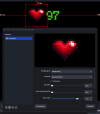
The BPM Display Source displays your current heart rate as a native OBS text source.

It automatically updates whenever your heart rate changes and supports the standard OBS text properties, including font, size, color, alignment and outline. This makes it easy to integrate a live BPM display into existing overlays without using browser sources.
⸻
Filters
Heartbeat Filter
The Heartbeat Filter can be applied to supported OBS sources, including images, text, media sources and cameras.

It scales the selected source according to the current heart rate, creating a heartbeat animation that automatically follows the incoming BPM value.
Several filter properties are available to adjust the animation to different scene layouts.
⸻
Automation
The plugin supports heartbeat sounds, configurable heart rate zones, smoothing and pulse actions.
Heartbeat sounds are synchronized with the current heart rate and automatically adjust to the incoming BPM.
Pulse Actions allow OBS sources to react to changes in heart rate using user-defined thresholds and zones.
Heart rate smoothing can be enabled to reduce rapid visual changes caused by short fluctuations.
⸻
Requirements
⸻
Supported Devices
The plugin works with all devices supported by HypeRate, including:
Additional devices supported by HypeRate are also compatible with the plugin.
⸻
Installation
⸻
Source Code
The complete source code is available on GitHub:

 github.com
⸻
Support
Bug reports and feature requests can be reported on GitHub or discussed on the HypeRate Discord server.
Website
 hyperate.io
Discord
 discord.gg
Development Note: AI-assisted development tools were used during the development of this project. All source code, documentation and releases are reviewed, tested and maintained by the project maintainer before publication.
The HypeRate Plugin adds native heart rate support to OBS Studio.
It provides sources and filters that use live heart rate data from HypeRate directly inside OBS scenes.
The plugin is intended for streamers who want to build heart rate-driven overlays or automate parts of their production without relying on browser sources or external scripts.
⸻
Features
- Heart Rate Source
- BPM Display Source
- Heartbeat Filter
- Heartbeat Sound
- Pulse Actions
- Heart Rate Zones
- Heart Rate Smoothing
- Native OBS integration
- Cross-platform support
⸻
Sources
The plugin includes two native OBS sources.
Heart Rate Source
The Heart Rate Source provides access to your live heart rate received from HypeRate.
It can be added to any scene and used together with other OBS sources or plugin components that require heart rate data.
BPM Display Source
The BPM Display Source displays your current heart rate as a native OBS text source.
It automatically updates whenever your heart rate changes and supports the standard OBS text properties, including font, size, color, alignment and outline. This makes it easy to integrate a live BPM display into existing overlays without using browser sources.
⸻
Filters
Heartbeat Filter
The Heartbeat Filter can be applied to supported OBS sources, including images, text, media sources and cameras.
It scales the selected source according to the current heart rate, creating a heartbeat animation that automatically follows the incoming BPM value.
Several filter properties are available to adjust the animation to different scene layouts.
⸻
Automation
The plugin supports heartbeat sounds, configurable heart rate zones, smoothing and pulse actions.
Heartbeat sounds are synchronized with the current heart rate and automatically adjust to the incoming BPM.
Pulse Actions allow OBS sources to react to changes in heart rate using user-defined thresholds and zones.
Heart rate smoothing can be enabled to reduce rapid visual changes caused by short fluctuations.
⸻
Requirements
- OBS Studio 32 or newer
- HypeRate ID
- Supported heart rate device
⸻
Supported Devices
The plugin works with all devices supported by HypeRate, including:
- Apple Watch
- Wear OS
- Garmin
- Fitbit
- Polar
- Bluetooth Heart Rate Monitors
- Android
- iPhone
Additional devices supported by HypeRate are also compatible with the plugin.
⸻
Installation
- Install the plugin.
- Start OBS Studio.
- Enter your HypeRate ID.
- Add a Heart Rate Source, BPM Display Source or Heartbeat Filter.
- Start streaming.
⸻
Source Code
The complete source code is available on GitHub:
GitHub - alexholzreiter/obs-hyperate-plugin: Bring your own graphic. Give it a heartbeat. Native OBS Studio plugin for real-time heart rate animations.
Bring your own graphic. Give it a heartbeat. Native OBS Studio plugin for real-time heart rate animations. - alexholzreiter/obs-hyperate-plugin
github.com
⸻
Support
Bug reports and feature requests can be reported on GitHub or discussed on the HypeRate Discord server.
Website
HypeRate.io - Stream Widgets for Heart Rate, Speed & Real Emotion
Engage your audience with real-time heart rate, GPS, and emotion overlays. Ideal for Twitch, YouTube, TikTok & more.
hyperate.io
Discord
Join the HypeRate Discord Server!
Check out the HypeRate community on Discord - hang out with 2228 other members and enjoy free voice and text chat.
Development Note: AI-assisted development tools were used during the development of this project. All source code, documentation and releases are reviewed, tested and maintained by the project maintainer before publication.