OBS Zoom to Mouse (WORKING IN 2026) – Updated Lua Script for OBS 30+
Hey everyone,
I noticed that the original
Zoom to Mouse Lua script has been broken for a while due to OBS API changes (especially after OBS 28+). Functions like obs_sceneitem_get_info were removed, which caused the script to stop working entirely.
So I decided to rebuild it from scratch — focusing on stability, compatibility, and simplicity.
✅ What this version does
- Smooth zoom in/out
- Mouse tracking (follows cursor)
- Lightweight and stable
- Fully compatible with OBS Studio 28 / 29 / 30+ (tested in 2026)
⚡ What changed
Instead of relying on deprecated sceneitem transform APIs, this version uses:
- Crop filter (native and stable)
- Mouse position tracking
- Interpolation (lerp) for smooth movement
This avoids all deprecated functions and ensures forward compatibility.
Script (zoom_mouse_v2.lua)
-- paste your script here<br>
️ How to use
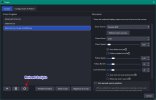
- Go to Tools → Scripts
- Add the .lua file
- Select your source (Display Capture recommended)
- Set zoom factor (e.g. 2.0)
- Assign a hotkey
⚠️ Notes
- This version is intentionally simplified for reliability
- It does not include some legacy features like advanced safe zones or multi-monitor auto-detection
- Works best with Display Capture sources
Why this version
The original script became incompatible due to breaking API changes.
Instead of patching outdated code, this version was redesigned to:
- Work with modern OBS APIs
- Be easier to maintain
- Avoid deprecated functions entirely
Future improvements (optional)
If there's interest, I can extend this with:
- Safe zone tracking
- Smarter mouse locking
- Multi-monitor support
- More advanced easing animations
If you test it or improve it further, feel free to share your version
Cheers!