Tuna
Member
Not until https://github.com/fzwoch/obs-teleport/issues/43 is resolved or you build OBS yourself with the changes mentioned in that issue.Will it have an Apple Silicon compatibility version?

Not until https://github.com/fzwoch/obs-teleport/issues/43 is resolved or you build OBS yourself with the changes mentioned in that issue.Will it have an Apple Silicon compatibility version?
I removed the flatpak version and installed via PPA and it worksHi,
I'm trying to get this installed into OBS 28.1.2 on Linux Mint 21.1 Cinnamon I've put the .so file manually into where it should go as per Mint 19.3 (which worked) except OBS is not finding it, also the installer doesn't seem to work either. Please help


For people that think that Teleport "Just doesn't work"
Be sure to check your DLNA settings in the "Media Streaming Options" panel in settings.
Be sure to check if the windows service enabled named "Windows Media Player Network Sharing Service"
If both things are running you can set up the connection on both PCs with the "Media Streaming Options" function in settings.
You can also check in "Firewall and Network protection" for the menu "allow an app through firewall" and find anything OBS related to allow it to work.
Thanks, Wulfashka for finding out how to enable all this.
I believe I have it figured out. I had multiple different teleport source names using the same teleport feed. I think it was causing issues. After making one source per teleport feed, I haven't had the issue yet. My second question. Is it normal for teleport to use 30-40% GPU utilization? Every PC with teleport is using that much or is that just an OBS thing?Here is my issue. I will have 4 PCs all sending teleport video to the stream PC by stream deck button presses. Everything works great. Then next time I turn them all on, I get video but no audio from all the sources. If I delete the teleport source from the stream PC and add it again, I get audio. I can't do this constantly with a ton of scenes/inputs. It would take way too long everytime I wanted to stream. Anyone come across this audio issue or have an idea to fix it? Audio is enabled on all PCs.
That should do it. Unless you are running Flatpak. In that case I actually don't know.I'm still relatively new to Linux, so I'm not sure what I'm doing wrong.
I'm using Pop!_OS 22.04 LTS and OBS 29.0.0
I've tried running the linux-X86_64\install.sh file and it puts a copy of the obs-teleport.so file in the /plugins/obs-teleport/bin/64bit folder. However, when I open OBS, it doesn't seem to see the plugin.
Weird thing is that I'm pretty sure that I hadn't chosen the flatpack install. Either way, uninstalling OBS and reinstalling as ppa seems to have solved it.That should do it. Unless you are running Flatpak. In that case I actually don't know.
Im curious about what the "Exactly" the quality bar does, i experiment with teleporting 1-18 machines to a control machine for streaming, lowering quality seems to lower the network bandwidth to the control machine, but not sure how it affects other things like rendering lag, dropped network frames, fps, etc.Is there documentation about the "natural" delay of the plugin (1 or 2 frames, sorry don't know how to be more specific)?
How much data does "Quality" send (this is huge, because it actually can cut down on my processor load just enough without losing Perceived quality and also stops Routers from being too saturated)?
Also, is there also a way to add "Teleport" as a Filter to Audio or other Media to separate outputs?
So far all tests seem to be in excellent conditions under 2 hours. Haven't gone above that yet.
Cheers again!

Yeah I spoke too soon on my issue. Audio doesn't work now either. I can delete the Teleport source and re-add it and the audio will work. Turn off the PCs and days later it will not work whatsoever until I delete the source and re-add it. This is just not possible with many PCs and complex scenes. Going to have to spend another 2 days re-doing the whole setup to go back to NDI. If this issue was sorted, teleport would be GOAT.I really wanted to like obs-teleport. Running a two-pc setup, I wanted to keep my exisiting stream, and use the new PC for my ableton looping/chatting. this pc is more powerful, so I wanted to teleport the other older PC into the new one. sadly after about an hour or so, the audio starts to go out of sync. such a real shame, as this would have solved so many problems. whoever wrote this, thank you, you have a hot product for sure!
Starting with this version the minimum required OBS version is now v28.
- Skip data processing on sender side when no client is connected.
- Display a warning in the UI when the quality slider is set to > 90.
- Sending logic improved - one worker for each client.
- Additional logging of internal states to easier identify issues.
- Timestamp offset handling removed. Should make random access in filter mode more stable.
Apple Silicon support added. Note that there is...
I think this is just how OBS works internally. I know no way around that. Hide the source until the audio meter in the mixer gets removed and show the Teleport source again and the latency should be back to normal again.hello guys and hello tuna! I've swapped from ndi to teleport for my production (two pc setup) and its amazing (motion side). When ndi have a micro stuttering teleport goes absolutely smooth. I have right now only one little problem and i want to know if its possible a solution. When the teleport stream is starting everything is going well but after some time it lost half a second every 30 mins approx and it goes later compared to source. how can i fix it? Thanks a lot
If it shows up in the mixer I have no idea what else Teleport can do here..I'm having trouble with a teleport source not having the audio from the Game PC not being sent to the stream. The Audio is turning up in the Stream PC, I can see the bar moving, it just isn't being seen correctly in OBS to send it up to the stream.
The work around I'm doing is setting it to monitor so that it can be sent to stream. So the Audio is coming across properly
As Far as I can tell all the audio tracks are set up correctly.
does anyone know how to fix it?
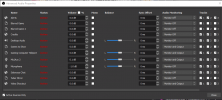
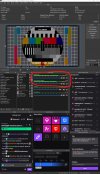
I've attached my most recent log, screen shot showing the audio coming in, and image of the advanced audio setting panel.
https://obsproject.com/logs/SXslZpMBraKFULFj
Thanks in advance for any help you can provide