obs-gstreamer

obs-gstreamer 0.4.1

It is always recommended to compile your own version to the GStreamer SDK of your choice. The pre-built one is compiled to the SDK installed via macports. Copying other runtime files around may or may not work.

When compiling on your own the correct locations should be set in your final library. It will also build for the native architecture of your system (x86_64 or arm64).
 
I am reading and trying to get a gstreamer instance in OBS working from an IP camera but keep getting a black screen. Here are some stats:
  • Windows 10 pc
  • gstreamer installed
  • path variable is set (checked this on this forum and youtube)
  • plugin installed on OBS and get the test patern.
  • I can get an rstp stream from VLC with the following URL
Code:
rtsp://admin:pass1234@192.168.1.81:554/ch0_0.264

I am fairly certain that my pipeline is the issue but I cannot figure it out. Here are some examples of what I have tried.
Code:
uridecodebin uri=rtsp://admin:pass1234@192.168.1.81:554/ ! queue ! video.

rtspsrt location-rtspt://admin:pass1234@192.168.1.81:554/ch0_0.264 ! rtph264depay ! h264parse ! nvh264dec ! videoconvert ! video.

rtspsrc location=rtspt://admin:pass1234@192.168.1.81:554/ch0_0.264latency=100 ! rtpjitterbuffer latency=0 ! rtph264depay ! h264parse ! d3d11h264dec ! video.

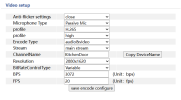
Attached is a screenshot of Video settings on the camera (if that helps).

Any suggestions on how to troubleshoot this on a Windows PC?
 

Attachments

  • 2025-03-06 12_44_01-IPcamera.png
    2025-03-06 12_44_01-IPcamera.png
    20.1 KB · Views: 139
.264 but H.265 in profile would make me suspicious. But as always - make it work with gst-launch-1.0 first. If that does not work it is not a fault of the plugin.
 
Hey, I'm, having some issues when trying to use my camera in OBS (since v4l2 and pipewire both don't work). It used to work, but now I removed the source by mistake and am struggling to add it again as I can't remember what I used

I think this should work, but it doesn't
Code:
libcamerasrc ! video/x-raw,format=RGBA ! videoconvert ! video

using this in a terminal works
Code:
gst-launch-1.0 libcamerasrc ! video/x-raw,format=RGBA ! videoconvert ! waylandsink

no luck even with something as simple as
Code:
libcamerasrc ! video

All that happens is I see the camera LED turn on for a second and then off again (instead of staying on)
 
Hey, I'm, having some issues when trying to use my camera in OBS (since v4l2 and pipewire both don't work). It used to work, but now I removed the source by mistake and am struggling to add it again as I can't remember what I used

I think this should work, but it doesn't
Code:
libcamerasrc ! video/x-raw,format=RGBA ! videoconvert ! video

using this in a terminal works
Code:
gst-launch-1.0 libcamerasrc ! video/x-raw,format=RGBA ! videoconvert ! waylandsink

no luck even with something as simple as
Code:
libcamerasrc ! video

All that happens is I see the camera LED turn on for a second and then off again (instead of staying on)
Don't forget the "." after video.
 
I have been really strugling with this plugin.
I cant get my CCTV camera RTSP stream to launch using the GST-launch commands from CLI,
However if I put the same command in OBS it does not want to load.
i have found that "appsink" command at the end causes issues but is required .


If i replace "appsink" with "autovideosink" THe stream loads up but it is in a new window not in the OBS window.

Code:
rtspsrc location=rtsp://admin:password@192.168.20.10:554/h264Preview_01_main latency=200 ! rtph264depay ! h264parse ! avdec_h264 ! videoconvert ! videoscale ! appsink

My camera stream specs are :
Code:
    Video Codec: H.264 (MPEG-4 AVC part 10)

    Video Resolution: 2560x1440

    Buffer Dimensions: 2560x1440

    Frame Rate: ~29.97 fps

    Audio Codec: MPEG AAC (mp4a)

    Sample Rate: 32 kHz, 32 bits per sample, stereo

Running 64-bit version of OBS, version 32.0.2
Plugin version pre complied latest from Github (0.4.1)
 
True, streamer has a steep learning curve... took me quite a while to get it working perfectly. The reward, though, is high ;-)

so a few suggestions :

rtspsrc location=rtspt://admin:password@192.168.20.10:554/h264Preview_01_main latency=200 ! rtph264depay ! h264parse ! nvh264dec ! video.

rtspt instead of rtsp , to use TCP for UDP
latency 200 seems a bit high.... my setup is happy with 30
nvh264dec is much faster for avdec_h264 , if you happen to have an NVIDEA video card this unloads your CPU

but most important : try just , and mind the dot : video.
(my setup does only the video from camera, i have a separate audio feed)

i use gstreamer with 7 hikvision IP camera's, 4 of which are PTZ controlled for our local church. Nicely lip sync, so no expensive NDI cameras needed....

good luck !
 
i use gstreamer with 7 hikvision IP camera's, 4 of which are PTZ controlled for our local church. Nicely lip sync, so no expensive NDI cameras needed....

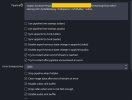
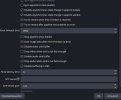
Which of the checkboxes do you have checked in the configuration window?

1763551790012.png


If I enable the Use pipeline time stamps (video) / Sync appsink to clock (videol), the video will start to slowly lag behind until it reaches around 4-500ms. Without them the latency parameters are not taken into account, the video feed will sometimes drop some frames. We accepted the dropped frames in favor of realtime video, but if I can do something to fix it, I would.

Also I noticed, that avdec_h264 is more stable, than nvh264dec, video frames are far less jumpy...
 
So here are my gstreamer settings. I noticed no lagging , our use is max 1 to 1,5 hour so maybe a bit too short to develop this problem.

any suggestions are welcome of course !
 

Attachments

  • gstreamer_1_anoniem.jpg
    gstreamer_1_anoniem.jpg
    43.6 KB · Views: 114
  • gstreamer_2.jpg
    gstreamer_2.jpg
    43.6 KB · Views: 163
Hallo, i've have a problem with win11.

I install all as usually but obs return me this message

1765259190477.png


Translate:

PLUGIN LOADING ERROR

This plugins aren't loaded in OBS:

obs-streamer

Update or revove those plugins.
*******

The plugin was downloaded from this page this morning.

What was i wrong?

Thanks for your helping hand.
 
Hallo, i've have a problem with win11.

I install all as usually but obs return me this message

View attachment 117127

Translate:

PLUGIN LOADING ERROR

This plugins aren't loaded in OBS:

obs-streamer

Update or revove those plugins.
*******

The plugin was downloaded from this page this morning.

What was i wrong?

Thanks for your helping hand.
From the README:
Experimental prebuilt 64-bit Windows plugin is available. You still require the official GStreamer run-time (MinGW version) to be installed. Make sure the run-time bin path is added to Windows's PATH environment.
 
Hello all, a big thank you to @Tuna for making this plugin. I am humbly asking for some help getting an IP camera into OBS using the plugin. I am using OBS on Ubuntu 24.04.3 LTS, installed via snap. I have installed the V0.4.1 release `obs-gstreamer.so` into `snap/obs-studio/current/.config/obs-studio/plugins/obs-gstreamer/bin/64bit/` and can see it in the plugins menu within obs. I have an old-ish PC but it has handled streaming from OBS in the past when it ran Win10. It has an old nvidia GT710 graphics card and I have seen no difference between the OS drivers and the nvidia ones when trying to get this working.

I have tried both rtsp and uridecodebin pipelines of varying types. Tested on gstreamer and working but getting nothing in OBS. I can get the camera connected in OBS over rtsp as a media source (horrible lag). For example:
Code:
gst-launch-1.0 uridecodebin uri=rtsp://192.168.1.230:554/12 name=bin ! queue ! autovideosink
works (I can see video feed pop up) but
Code:
uridecodebin uri=rtsp://192.168.1.230:554/12 name=bin ! queue ! video.
does not. Likewise:
Code:
gst-launch-1.0 rtspsrc location=rtsp://192.168.1.230:554/12 name=bin bin. ! rtph264depay ! avdec_h264 ! autovideosink
works but
Code:
rtspsrc location=rtsp://192.168.1.230:554/12 ! queue ! rtph264depay ! avdec_h264 ! video.
also does not.
Here are what my screens look like in OBS
Screenshot from 2026-01-10 23-01-32.png
Screenshot from 2026-01-10 23-02-02.png


Please could people suggest what to try / test next and let me know what other info would help you help me?
 
I guess you need to check whether Snap includes all the GStreamer components you are using. Since Snap is a container, confirming it running from a console from the real system does not tell you whats up with Snap.
 
I guess you need to check whether Snap includes all the GStreamer components you are using. Since Snap is a container, confirming it running from a console from the real system does not tell you whats up with Snap.
Excellent points, thanks. I have uninstalled the snap OBS and installed from the terminal and I get my video displayed using the plugin. Immediate problem solved!

Any idea what snap connect might be required for gstreamer? None of the snap connect camera etc seem relevant but I admit I didn't test them when I realised snap was probably the issue.
 
Back
Top