rdagijones
New Member
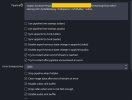
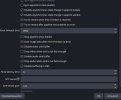
I am reading and trying to get a gstreamer instance in OBS working from an IP camera but keep getting a black screen. Here are some stats:
I am fairly certain that my pipeline is the issue but I cannot figure it out. Here are some examples of what I have tried.
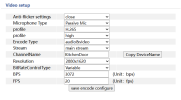
Attached is a screenshot of Video settings on the camera (if that helps).
Any suggestions on how to troubleshoot this on a Windows PC?
- Windows 10 pc
- gstreamer installed
- path variable is set (checked this on this forum and youtube)
- plugin installed on OBS and get the test patern.
- I can get an rstp stream from VLC with the following URL
Code:
rtsp://admin:pass1234@192.168.1.81:554/ch0_0.264I am fairly certain that my pipeline is the issue but I cannot figure it out. Here are some examples of what I have tried.
Code:
uridecodebin uri=rtsp://admin:pass1234@192.168.1.81:554/ ! queue ! video.

rtspsrt location-rtspt://admin:pass1234@192.168.1.81:554/ch0_0.264 ! rtph264depay ! h264parse ! nvh264dec ! videoconvert ! video.

rtspsrc location=rtspt://admin:pass1234@192.168.1.81:554/ch0_0.264latency=100 ! rtpjitterbuffer latency=0 ! rtph264depay ! h264parse ! d3d11h264dec ! video.
Attached is a screenshot of Video settings on the camera (if that helps).
Any suggestions on how to troubleshoot this on a Windows PC?