Encoder overload error and obs crashes since updating despite previously having zero issues

oatmilk

New Member
Hello, I have been experiencing frequent encoder overload errors and obs crashes as well as stream disconnects ever since the new OBS update. I have lowered my settings to 720p and lowered my encoder present and even stopped multistreaming. My OBS has also been crashing instead of properly closing ever since getting the SE live plug in so I am not sure if that issue is connected here or contributing to it. Please help :(

Also, these are my specs
CPU: intel i5-146000k
GPU: NVIDIA GeForce RTX 3060 Ti

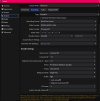
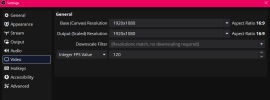
Previously, i was running 1020p 60 fps at 8000 bitrate with no downscaling but was having visual artifacts and my recordings looked bad, so my friend recommend i copy his settings at 720p 120 fps at 8000 bitrate. I have been able to run 1020p 120 fps with no issues before so i'm really hoping it's not suddenly an issue that i am streaming at 120.
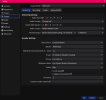
 

Attachments

  • Screenshot 2026-03-24 155449.png
    Screenshot 2026-03-24 155449.png
    61.6 KB · Views: 12
  • Screenshot 2026-03-24 155520.png
    Screenshot 2026-03-24 155520.png
    72.8 KB · Views: 10
  • Screenshot 2026-03-24 155531.png
    Screenshot 2026-03-24 155531.png
    25.6 KB · Views: 12
  • 2026-03-24 11-52-29.txt
    2026-03-24 11-52-29.txt
    205.4 KB · Views: 25
  • Screenshot 2026-03-24 160938.png
    Screenshot 2026-03-24 160938.png
    16.5 KB · Views: 12
Twitch max bitrate for non partners is 6000kpbs and max FPS is 60 (like in other streaming services)

You have network issues:
13:51:59.379: WriteN, RTMP send error 10053 (443 bytes)
13:51:59.379: WriteN, RTMP send error 10038 (80 bytes)
13:51:59.379: WriteN, RTMP send error 10038 (42 bytes)
It could be due to different factors.
On your side: network driver, network adapter, network cable, router/modem, port where the network cable connects into the router/modem.
In the ISP due to changes they did. On the server where you're trying to connect rejecting the connection.

Go to OBS Settings / Stream and untick ignore streaming service settings recommendations
SE live plugin is known to break OBS. For support on this one you need to contact SE support. If you want to be safe, remove all the plugins you installed.
 
Twitch max bitrate for non partners is 6000kpbs and max FPS is 60 (like in other streaming services)

You have network issues:

It could be due to different factors.
On your side: network driver, network adapter, network cable, router/modem, port where the network cable connects into the router/modem.
In the ISP due to changes they did. On the server where you're trying to connect rejecting the connection.

Go to OBS Settings / Stream and untick ignore streaming service settings recommendations
SE live plugin is known to break OBS. For support on this one you need to contact SE support. If you want to be safe, remove all the plugins you installed.
Do you see any reason for why i'm getting encoder error messages though? I tried streaming today at what you recommended and i'm still getting those errors? Is that because of the plugins you mentioned or the wifi issues?
 
Run system informer to see if your cpu and gpu utilization is hitting 100%. From the obs log, you seem to have a couple of obs-browser objects throwing errors. Probably going to come down to I/O priority issues.

Also, the recording cqp is set to 14, which is odd. Normally, it should be between 18-24. Any reason recording to .mov instead of .mkv?
 
Last edited:
Rendering lag is GPU overload, plain & simple. Start reducing load.
OBS is running @ 120FPS. Your main monitor is @ 240HZ. Both require more resources than just running @ 60HZ/60FPS. See link for more info.

15:47:25.527: Output 'Vertical Backtrack': Number of lagged frames due to rendering lag/stalls: 1447 (0.1%)
15:47:25.544: Video stopped, number of skipped frames due to encoding lag: 1447/1673597 (0.1%)
15:47:25.578: warning: 2 frames left in the queue on closing

 
After doing the corrections and testing, always post a new log file from the new test.
Okay here is new log. This is after I changed to 1020p, 60fps and lowered my bitrate to 6000. This stream actually completely went offline before it told me there was an encoding overload error and then for the rest of the following stream i was getting some frames missed due to rendering lag.
 

Attachments

Run system informer to see if your cpu and gpu utilization is hitting 100%. From the obs log, you seem to have a couple of obs-browser objects throwing errors. Probably going to come down to I/O priority issues.

Also, the recording cqp is set to 14, which is odd. Normally, it should be between 18-24. Any reason recording to .mov instead of .mkv?
Recording in .mov because mkv was significantly worse quality when i was trying to edit clips for youtube! Thanks for telling me about the cqp, i didn't know that, i just copied my friends settings there!
 
Same network issue Pai pointed out earlier. Something other than OBS is interrupting your stream.
13:58:29.637: WriteN, RTMP send error 10053 (4104 bytes)
13:58:29.637: WriteN, RTMP send error 10038 (80 bytes)
13:58:29.637: WriteN, RTMP send error 10038 (42 bytes)

There's thousands of these java script errors. Perhaps SE is causing your pain? Is it vetted for the installed version of OBS?
13:22:39.938: [obs-browser: 'music widget'] Error: Axios error: Request failed with status code 429 (https://beta.nowplaying.site/assets/index-D1S6unMN.js:73)
13:22:40.024: [obs-browser: 'music widget'] Error: Axios error: Request failed with status code 401 (https://beta.nowplaying.site/assets/index-D1S6unMN.js:73)

On the bright side, Rendering lag has improved now that you're running OBS @ 60FPS. Run that monitor @ 120 or 60 & the rest should vanish.

13:58:29.637: [rtmp stream: 'adv_stream'] Disconnected from rtmp://ingest.global-contribute.live-video.net/app
13:58:29.637: Output 'adv_stream': stopping
13:58:29.637: Output 'adv_stream': Total frames output: 117560
13:58:29.637: Output 'adv_stream': Total drawn frames: 120969 (120970 attempted)
13:58:29.638: Output 'adv_stream': Number of lagged frames due to rendering lag/stalls: 1 (0.0%)
13:58:29.638: Output 'adv_stream': Reconnecting in 2.00 seconds..
13:58:31.668: [obs-nvenc: 'advanced_video_stream'] settings:

 
FYI

When using CQP Rate Control, the CQ Level is the Quality setting. Nothing wrong with using 14, especially if you're going to re-encode that video when editing. I do most of my editing with Avidemux so no re-encode needed but when I do need to re-encode with Vegas there's a huge difference in the end result when the lower CQ# is used in the original recording.
 
Same network issue Pai pointed out earlier. Something other than OBS is interrupting your stream.
13:58:29.637: WriteN, RTMP send error 10053 (4104 bytes)
13:58:29.637: WriteN, RTMP send error 10038 (80 bytes)
13:58:29.637: WriteN, RTMP send error 10038 (42 bytes)

There's thousands of these java script errors. Perhaps SE is causing your pain? Is it vetted for the installed version of OBS?
13:22:39.938: [obs-browser: 'music widget'] Error: Axios error: Request failed with status code 429 (https://beta.nowplaying.site/assets/index-D1S6unMN.js:73)
13:22:40.024: [obs-browser: 'music widget'] Error: Axios error: Request failed with status code 401 (https://beta.nowplaying.site/assets/index-D1S6unMN.js:73)

On the bright side, Rendering lag has improved now that you're running OBS @ 60FPS. Run that monitor @ 120 or 60 & the rest should vanish.

13:58:29.637: [rtmp stream: 'adv_stream'] Disconnected from rtmp://ingest.global-contribute.live-video.net/app
13:58:29.637: Output 'adv_stream': stopping
13:58:29.637: Output 'adv_stream': Total frames output: 117560
13:58:29.637: Output 'adv_stream': Total drawn frames: 120969 (120970 attempted)
13:58:29.638: Output 'adv_stream': Number of lagged frames due to rendering lag/stalls: 1 (0.0%)
13:58:29.638: Output 'adv_stream': Reconnecting in 2.00 seconds..
13:58:31.668: [obs-nvenc: 'advanced_video_stream'] settings:

Okay i was able to stream for two whole hours with zero issues! I did a bunch of things to try to fix it that i'll list here just in case anyone is reading through the forum looking for potential fixes:

-Logged out and back into twitch on obs
-Changed server destination to a specific server instead of auto
-Changed my encoder from NVENC to x264
-Changed my stream settings to 720p 60fps at 6000 bitrate
-Updated my driver again as a new one came out since i posted here initially
-Lowered my in game settings to the lowest possible settings
-Lowered my monitor hz to 120
-Moved both my computer and router to a different outlet as we were having wiring issues with the outlet they were previous plugged in to

Have zero clue which fix actually did it for me but here's hoping that i don't experience any further issues :3 Thank you to everyone for your help!
 
Same network issue Pai pointed out earlier. Something other than OBS is interrupting your stream.
13:58:29.637: WriteN, RTMP send error 10053 (4104 bytes)
13:58:29.637: WriteN, RTMP send error 10038 (80 bytes)
13:58:29.637: WriteN, RTMP send error 10038 (42 bytes)

There's thousands of these java script errors. Perhaps SE is causing your pain? Is it vetted for the installed version of OBS?
13:22:39.938: [obs-browser: 'music widget'] Error: Axios error: Request failed with status code 429 (https://beta.nowplaying.site/assets/index-D1S6unMN.js:73)
13:22:40.024: [obs-browser: 'music widget'] Error: Axios error: Request failed with status code 401 (https://beta.nowplaying.site/assets/index-D1S6unMN.js:73)

On the bright side, Rendering lag has improved now that you're running OBS @ 60FPS. Run that monitor @ 120 or 60 & the rest should vanish.

13:58:29.637: [rtmp stream: 'adv_stream'] Disconnected from rtmp://ingest.global-contribute.live-video.net/app
13:58:29.637: Output 'adv_stream': stopping
13:58:29.637: Output 'adv_stream': Total frames output: 117560
13:58:29.637: Output 'adv_stream': Total drawn frames: 120969 (120970 attempted)
13:58:29.638: Output 'adv_stream': Number of lagged frames due to rendering lag/stalls: 1 (0.0%)
13:58:29.638: Output 'adv_stream': Reconnecting in 2.00 seconds..
13:58:31.668: [obs-nvenc: 'advanced_video_stream'] settings:

As for the java script errors, are they all related specifically to the music widget browser source? that isn't directly through streamelements so i'm honestly not sure if it is compatible with the current obs version. it hasn't had any issues displaying as far as i've noticed. If you think it might be causing crashes or rendering issues i could just change it to a streamelements overlay instead.
 
Same network issue Pai pointed out earlier. Something other than OBS is interrupting your stream.
13:58:29.637: WriteN, RTMP send error 10053 (4104 bytes)
13:58:29.637: WriteN, RTMP send error 10038 (80 bytes)
13:58:29.637: WriteN, RTMP send error 10038 (42 bytes)

There's thousands of these java script errors. Perhaps SE is causing your pain? Is it vetted for the installed version of OBS?
13:22:39.938: [obs-browser: 'music widget'] Error: Axios error: Request failed with status code 429 (https://beta.nowplaying.site/assets/index-D1S6unMN.js:73)
13:22:40.024: [obs-browser: 'music widget'] Error: Axios error: Request failed with status code 401 (https://beta.nowplaying.site/assets/index-D1S6unMN.js:73)

On the bright side, Rendering lag has improved now that you're running OBS @ 60FPS. Run that monitor @ 120 or 60 & the rest should vanish.

13:58:29.637: [rtmp stream: 'adv_stream'] Disconnected from rtmp://ingest.global-contribute.live-video.net/app
13:58:29.637: Output 'adv_stream': stopping
13:58:29.637: Output 'adv_stream': Total frames output: 117560
13:58:29.637: Output 'adv_stream': Total drawn frames: 120969 (120970 attempted)
13:58:29.638: Output 'adv_stream': Number of lagged frames due to rendering lag/stalls: 1 (0.0%)
13:58:29.638: Output 'adv_stream': Reconnecting in 2.00 seconds..
13:58:31.668: [obs-nvenc: 'advanced_video_stream'] settings:

OKAY i'm at a loss here, i had another stream crash after two days of it being completely fine. This time having both frames missed due to rendering and skipped frames due to encoding lag but mostly the latter. The only difference between today's stream and the previous one after making all the changes listed earlier was that i am streaming from a different wifi. I have two logs for the crash.

Running this through log analyzer i see stuff about game capture and display capture interfering with each other but i always have only one active at a time and it's never been an issue before :( as for the encoding preset i have no problems with turning it down but like i mentioned, i did multiple streams with no issues and my cpu usage never going higher than like 7-9% percent so i'm really confused.
 

Attachments

Last edited:
Same java script errors & same network errors. Ditch the wi-fi & if that doesn't work, you may need to contact your ISP or an electrician if those electrical problems extend past the outlet.

FYI, it appears you may have removed SE as it is not loading up in the latest log. If you did remove it, OBS needs to be removed & re-installed as well.

20:55:46.161: WriteN, RTMP send error 10053 (4104 bytes)
20:55:46.161: WriteN, RTMP send error 10038 (80 bytes)
20:55:46.161: WriteN, RTMP send error 10038 (42 bytes)
20:55:46.161: [rtmp stream: 'adv_stream'] Disconnected from rtmp://usw20.contribute.live-video.net/app
20:55:46.161: Output 'adv_stream': stopping
20:55:46.161: Output 'adv_stream': Total frames output: 632144 (633170 attempted)
20:55:46.161: Output 'adv_stream': Total drawn frames: 639410 (639413 attempted)
20:55:46.161: Output 'adv_stream': Number of lagged frames due to rendering lag/stalls: 3 (0.0%)
20:55:46.161: Output 'adv_stream': Number of dropped frames due to insufficient bandwidth/connection stalls: 1026 (0.2%)
20:55:46.161: Output 'adv_stream': Reconnecting in 2.00 seconds..
20:55:46.162: [rtmp stream: 'adv_stream'] Freeing 1 remaining packets
20:55:48.161: NV12 texture support enabled
20:55:48.161: P010 texture support not available
 
Last edited:
Same java script errors & same network errors. Ditch the wi-fi & if that doesn't work, you may need to contact your ISP or an electrician if those electrical problems extend past the outlet.

FYI, it appears you may have removed SE as it is not loading up in the latest log. If you did remove it, OBS needs to be removed & re-installed as well.

20:55:46.161: WriteN, RTMP send error 10053 (4104 bytes)
20:55:46.161: WriteN, RTMP send error 10038 (80 bytes)
20:55:46.161: WriteN, RTMP send error 10038 (42 bytes)
20:55:46.161: [rtmp stream: 'adv_stream'] Disconnected from rtmp://usw20.contribute.live-video.net/app
20:55:46.161: Output 'adv_stream': stopping
20:55:46.161: Output 'adv_stream': Total frames output: 632144 (633170 attempted)
20:55:46.161: Output 'adv_stream': Total drawn frames: 639410 (639413 attempted)
20:55:46.161: Output 'adv_stream': Number of lagged frames due to rendering lag/stalls: 3 (0.0%)
20:55:46.161: Output 'adv_stream': Number of dropped frames due to insufficient bandwidth/connection stalls: 1026 (0.2%)
20:55:46.161: Output 'adv_stream': Reconnecting in 2.00 seconds..
20:55:46.162: [rtmp stream: 'adv_stream'] Freeing 1 remaining packets
20:55:48.161: NV12 texture support enabled
20:55:48.161: P010 texture support not available
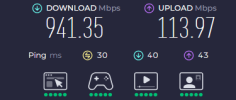
I am streaming from a completely different house and wifi (i brought my computer here so still same set up) and still experiencing the same issues so do you think this is a hardware issue? Or like a connected to twitch error specifically? I have already fully reinstalled obs and relogged into twitch and even changed the server i connect to, should i try connecting my obs via stream key instead? If it helps at all, i did try Twitchtest which i saw in another similar entry in the forums which i'll include the results in a file for you.

As for the java script errors, i got rid of the one that was pointed out to me to be causing issues, the only other browser sources i have are from streamelements themselves, should i just clear the cache on all of them or is there another solution to that?
 

Attachments

  • Screenshot 2026-03-29 114000.png
    Screenshot 2026-03-29 114000.png
    28 KB · Views: 4
Last edited:
It could be but hard to say for sure. I have been looking for a specific error in your log but it hasn't shown up. That error would indicate a network driver issue. The WriteN RTMP send error indicates that the stream is being interrupted somewhere. It could be your network, your ISP, something beyond your ISP or Twitch.

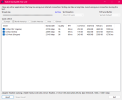
Anyway, back to your network driver. This is the driver info for what you have currently installed (from your screenshot).
1774822481659.png


Go to your mobo's support page & see if there's a newer driver available. If so, download & install it.
 
Back
Top