h7opolo
New Member
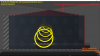
I would like to disable the red colored border that surrounds unlocked video sources in the OBS preview window. The reason being that I capture the OBS window itself for a feedback effect, and these red boxes ruin the effect if I want to change the position of a source in the OBS preview window.
Is there a way to do this by editing the code somewhere? I have tried editing the lines 139 and 140 in the obspython.py
GS_BLEND_SRCCOLOR = _obspython.GS_BLEND_SRCCOLOR
GS_BLEND_INVSRCCOLOR = _obspython.GS_BLEND_INVSRCCOLOR
by removing the values to no avail.
Is there a way to do this by editing the code somewhere? I have tried editing the lines 139 and 140 in the obspython.py
GS_BLEND_SRCCOLOR = _obspython.GS_BLEND_SRCCOLOR
GS_BLEND_INVSRCCOLOR = _obspython.GS_BLEND_INVSRCCOLOR
by removing the values to no avail.