

You are using an out of date browser. It may not display this or other websites correctly.
You should upgrade or use an alternative browser.
You should upgrade or use an alternative browser.
Resource icon
Closed Captioning via Google Speech Recognition 0.0.8
- Thread starter RatWithACompiler
- Start date

Peter Akakpo
New Member
Are you guys sure this plugin is working as expected as u claim? the plugin displays a word every 15 minutes and above irrespective of the downloaded model. is there something am not doing right? selected simple, english , set output source, and selected whisper large v3 turbo as model . model was downloaded .

Lywën
New Member
Hey thanks for the pluggins, it helps me a lot to make my stream more accessible.
I was wondering: is it possible to add an option to retrieve a second sound source and display it on a second text element?
MAIN : Micro > Microphone-specific text source
SECONDARY : Voice chat > Text source specific to voice platforms like discord.
This would also allow us to have the other person's subtitles when there are 2 or more of us playing together.
Currently the only solution I've found is to copy the pluggin 2 times in obs-plugins but this doesn't always work, sometimes it even conflicts.
Exemple :

I was wondering: is it possible to add an option to retrieve a second sound source and display it on a second text element?
MAIN : Micro > Microphone-specific text source
SECONDARY : Voice chat > Text source specific to voice platforms like discord.
This would also allow us to have the other person's subtitles when there are 2 or more of us playing together.
Currently the only solution I've found is to copy the pluggin 2 times in obs-plugins but this doesn't always work, sometimes it even conflicts.
Exemple :
Minoscereb
New Member
I've been using this plugin for a good while on Windows and Nobara Linux now and love it. I recently decided to try out Pop Os Linux, and I can't for the life of me get the plugin to show up in OBS there.
There's no plugins-folder where I expected one, although there are multiple /plugins folders under various obs-folders under very deep directory trees
I've installed OBS as a flatpak, if that matters, because the .deb version in Popshop is several versions behind. I've gotten the plugin to work on Nobara Linux no problem, but it seems to use a completely different file/directory structure for the installation.
I've tried using "show settings folder" in OBS, which takes me to home/.var/app/com.obsproject.studio/config/obs-studio, but there's no plugins-folder there, and creating one and placing the plugin there does nothing.
I even tried creating a plugins folder in the same location as Nobara uses, to no avail.
Does anyone have experience with Pop Os, or just general advice about locations that might work? (Searching for Pop OS on the forum is a bit hard given the generic words...).
There's no plugins-folder where I expected one, although there are multiple /plugins folders under various obs-folders under very deep directory trees
I've installed OBS as a flatpak, if that matters, because the .deb version in Popshop is several versions behind. I've gotten the plugin to work on Nobara Linux no problem, but it seems to use a completely different file/directory structure for the installation.
I've tried using "show settings folder" in OBS, which takes me to home/.var/app/com.obsproject.studio/config/obs-studio, but there's no plugins-folder there, and creating one and placing the plugin there does nothing.
I even tried creating a plugins folder in the same location as Nobara uses, to no avail.
Does anyone have experience with Pop Os, or just general advice about locations that might work? (Searching for Pop OS on the forum is a bit hard given the generic words...).
Minoscereb
New Member
Update: I tried installing the .deb version through the instructions for ubuntu using the terminal, and then created a /plugins folder under home/.config/obs-studio and placed the plugin there. It now loads immediately, but I'm stuck on a year-old version of OBS...
Edit: but docks don't work properly, so that's a no-go as well. :D
Edit: but docks don't work properly, so that's a no-go as well. :D
Keyboard_zombie
New Member
This pluggin just stopped working while live? I just updated to 31.0.4 before stream and now even reinstalling wont make it work.
did you ever figure this out?Installation is fine, got the captions dock and everything, but no matter what audio source i use or what settings i use it won't output any text, is anyone else having this issue and know how to fix it? i am on 31.1.2
KilobyteKeith
New Member
The latest OBS update breaks this plugin.
Phoenixpete
New Member
Since the update to obs 32.0.0 this is what I get when opening the program:

And can no longer use the lovense obs toolset even though it is the latest version.
Can someone tell me what is going to be done to rectify this please?
And can no longer use the lovense obs toolset even though it is the latest version.
Can someone tell me what is going to be done to rectify this please?

caitlinakafallen
New Member
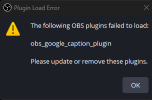
You have to delete every plugin from the obs plugin folder and then reinstall them for it to work again. That's what I had to do so that everything could work again.Since the update to obs 32.0.0 this is what I get when opening the program:
View attachment 115717
And can no longer use the lovense obs toolset even though it is the latest version.
Can someone tell me what is going to be done to rectify this please?
I found the solution!
Delete the Google Captions plugin from your OBS plugins folder (the old one is outdated due to the latest update).
Download the latest version here: OBS Captions Plugin (GitHub).
Add the new plugin back into your OBS plugins folder.
Open OBS, and it should work! :D
Delete the Google Captions plugin from your OBS plugins folder (the old one is outdated due to the latest update).
Download the latest version here: OBS Captions Plugin (GitHub).
Add the new plugin back into your OBS plugins folder.
Open OBS, and it should work! :D
The latest OBS update breaks this plugin.
I found the solution!did you ever figure this out?
Delete the Google Captions plugin from your OBS plugins folder (the old one is outdated due to the latest update).
Download the latest version here: OBS Captions Plugin (GitHub).
Add the new plugin back into your OBS plugins folder.
Open OBS, and it should work! :D

Maverynthia
New Member
Pretty sure it does, there's a Custom Name option.Does anyone know if this supports OBS's filename formatting? I want my transcripts to be in the same folder as my recordings (%CCYY-%MM-%DD %hh-%mm)
All I know is that it does `datetime` as a default.
no, i even tried going back to an older version and it had the same issuedid you ever figure this out?
this has not fixed my issueI found the solution!
Delete the Google Captions plugin from your OBS plugins folder (the old one is outdated due to the latest update).
Download the latest version here: OBS Captions Plugin (GitHub).
Add the new plugin back into your OBS plugins folder.
Open OBS, and it should work! :D