
Question / Help Black Bars Around GameCapture

internetpers0na

New Member
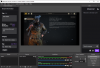
Hey everybody, I just downloaded OBS and was testing it out trying to get used to it. When I started capturing my screen the capture didnt scale to the window and now im left with two black bars. If i try to fit it to the screen it just becomes stretched. Thanks for any help!
 

Attachments

  • OBS 24.0.3 (64-bit, windows) - Profile_ Untitled - Scenes_ Untitled 1_4_2020 10_27_41 PM.png
    OBS 24.0.3 (64-bit, windows) - Profile_ Untitled - Scenes_ Untitled 1_4_2020 10_27_41 PM.png
    334.9 KB · Views: 846
This means the resolution you are capturing is not the same as the one your computer is using, possibly because your computer has a display with an aspect ratio different than 16:9.

This means either you're going to see black bars or stretching while playing, or your audience will see black bars or stretching during playback, because most video platforms assume a 16:9 ratio, and that's what a lot of displays and TVs use.
 
This means the resolution you are capturing is not the same as the one your computer is using, possibly because your computer has a display with an aspect ratio different than 16:9.

This means either you're going to see black bars or stretching while playing, or your audience will see black bars or stretching during playback, because most video platforms assume a 16:9 ratio, and that's what a lot of displays and TVs use.

The canvas resolution is 1600x900 and so is the output
 
Easiest solution, right click [game capture], left click [transform] and then left click [stretch to screen].

Please upload a log file.
 
Back
Top