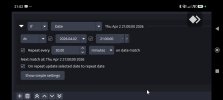
Jup saw that :-) I attached a image what happens. The pc time is now 21:03 nothing seems changed or start running .
As far as I can tell the macro
seems to do what it is supposed to:
You have quite a few "wait" actions in there.
By default macro will not be executed again while it is currently still running.
So, the action execution might just have been skipped because the macro actions are still being executed.
You can change that behavior in the settings of the macro:
I did however notice one visual bug:
The "repeat every ..." option does not update the settings unless you close the advanced scene switcher settings window completely.
In the past it did update when switching away from the macro and back again.
(The "Next match at: ..." field did however update correctly)
I will make sure to fix that in the next release, so that the date / time field updates again when switching between macros.
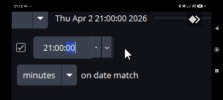
I also see a object button under a object button ? See image or did i see this wrong .
The field is big enough.
That is just how the time selection widget from Qt looks.
I don't think there is anything missing here.
One of the "buttons" on the right side of the widgets increments the time and the other decrements it.
(I do agree that it looks a bit strange though :D)
Sorry if I misunderstood what you meant here.