I see.
Trying to recognise text can be a very expensive operation.
Especially if it is done on the whole "screen" / OBS canvas.
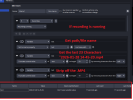
So the first step I would suggest to take is to reduce the size of the area the plugin needs to check by enabling the "Perform check only in area" setting.
Select an appropriate region of the screen by clicking the "Select area" button.
The smaller the area, the better the performance.
View attachment 118166
The "No Signal" message is static and won't move or anything like that, correct?
In that case I would suggest, instead of checking for specific words on screen, to only look for the warning triangle.
This will allow you to further reduce the size of the area to check.
You can try to do this using the "exactly matches" or "matches pattern" options of the "Video" condition.
The former needs a pixel perfect match and is relatively inexpensive computationally.
The latter does not require a perfect match but takes a longer to calculate. (Pattern matching should still be much cheaper than text recognition)
I would suggest to try to start with an exact match and see if it works as expected.
To do so click the "Browse" button to select an image to compare the input image to.
You will have the option to create a screenshot of the selected input image already cropped to the size you specified earlier.
Video compression artifacts / noisy input images might render the "exactly matches" check ineffective.
If it should not be suitable, switch to "matches pattern".
You can reuse the screenshot you created earlier and only need to adjust the threshold value defining how closely the input image needs to match the provided screenshot. (The higher the better to avoid any potential false positives)
Finally you can reduce the frequency, at which the condition is checked, in a few ways.
If you plan on setting up additional macros I would suggest to open the advanced settings for this particular macro and configure a custom condition check interval like this:
View attachment 118168
If you don't plan on setting up any other change the "check conditions every X ms" at the top of the General tab.
I hope this helps!
If something is unclear / does not work feel free to reach out with further questions!