- Supported Bit Versions
- 64-bit
- Source Code URL
- https://github.com/lingeriegoat/OBSSpotifyPlugin
- Minimum OBS Studio Version
- 31.1.1
- Supported Platforms
- Windows
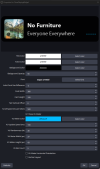
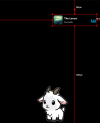
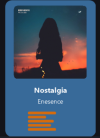
This plugin allows you to have a native "now playing" widget entirely inside of OBS. No need for additional programs or web servers or browser sources or any of that stuff. This is all native directly inside OBS.
Works for Spotify, YoutubeMusic, QQMusic, Apple Music, and more. Additional services can be configured entirely by the user if they support sending SMTC data to windows (press win+A, if your music shows in the audio panel, it can be supported)
The widget offers many customization options, including using the album art as a background, vertical and horizontal layouts, extensive text customization, and animated effect overlays (VHS, 8mm Film, etc). You can make the widget look almost any way you want.
Releases can be found on my github page for the plugin: https://github.com/lingeriegoat/OBSSpotifyPlugin
To install, download the latest release from the Releases page, and unzip both folders into the root of your OBS directory, usually something like
AI Disclaimer: I used AI to help write the cpp portion of this plugin, because my cpp knowledge is very poor. I wrote the "heavy lifting" part in a C# dll because that is the language I know. The cpp portion functions mainly to interface with OBS, draw the widget, and wrap my dll. The DLL source code repo is linked in the plugin repo. I have reviewed all the generated code for problems, and tested the plugin functionality extensively, and believe it to be safe and functional.
Works for Spotify, YoutubeMusic, QQMusic, Apple Music, and more. Additional services can be configured entirely by the user if they support sending SMTC data to windows (press win+A, if your music shows in the audio panel, it can be supported)
The widget offers many customization options, including using the album art as a background, vertical and horizontal layouts, extensive text customization, and animated effect overlays (VHS, 8mm Film, etc). You can make the widget look almost any way you want.
Releases can be found on my github page for the plugin: https://github.com/lingeriegoat/OBSSpotifyPlugin
To install, download the latest release from the Releases page, and unzip both folders into the root of your OBS directory, usually something like
C:\Program Files\obs-studio. More detailed instructions as well as a screenshot are available on github.AI Disclaimer: I used AI to help write the cpp portion of this plugin, because my cpp knowledge is very poor. I wrote the "heavy lifting" part in a C# dll because that is the language I know. The cpp portion functions mainly to interface with OBS, draw the widget, and wrap my dll. The DLL source code repo is linked in the plugin repo. I have reviewed all the generated code for problems, and tested the plugin functionality extensively, and believe it to be safe and functional.