


- Supported Bit Versions
- 64-bit
- Source Code URL
- https://github.com/Halsu/halsu-plugins-for-streaming
- Minimum OBS Studio Version
- 30.0.0
- Supported Platforms
- Windows
Halsu plugins for streaming is a collection of third-party plugins for OBS Studio, focused on live compositing, chroma keying, alpha-matte cleanup, and edge integration.

The plugins are designed to work out of the box with sensible defaults, making them usable for beginners, while still exposing advanced controls for users who need deeper control over keying and compositing behavior. The plugins are designed to be chained together or used independently, depending on workflow needs.
Overview (detailed user manuals can be found at GitHub):
Halsu HybridKeyer
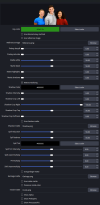
HybridKeyer is a chroma / luma / difference / RGB / YUV keyer intended for live use.

With default settings it functions as a straightforward (almost) one-click keyer suitable for typical green-screen setups. For more demanding footage, the filter exposes separate stages for pre-key processing, matte generation, and post-key refinement. This allows control over edge quality, spill suppression and other advanced settings. The keyer can take a reference image of the empty greenscreen stage to greatly improve keying result on poor quality backdrops.
Halsu AlphaTools
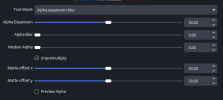
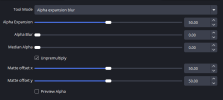
AlphaTools is a corrective utility filter for fixing and refining existing alpha mattes produced by keyers or sources with embedded alpha channel.

Its primary purpose is cleanup: repairing matte lines, softening alpha edges, and correcting offset mattes caused by chroma subsampling. It can also be used as multiple instances by e.g. first expanding, then contracting the matte to fill holes. Alpha preview is included to visualize the matte while adjusting. With default settings, AlphaTools does not modify the image.
Halsu Relightwrap
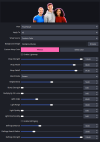
Relightwrap is an edge integration and relighting filter for keyed sources.

In its default configuration relightwrap functions as a traditional light wrap, using either a user-defined color (default) or sampling a (pre-blurred) background image to integrate foreground edges with the background. It can also be used to emulate a light affecting the subject, producing a fake relighting effect. At higher settings, both modes can be pushed into stylistic use. Relightwrap additionally includes fringe correction for addressing common keying artifacts.
Halsu LensEffects
Collection of lens effects including Lens Blur, Diffusion, Glow, Chromatic Aberration and Vignette.

The effect can be used to simulate semi-realistic camera lens blur and lens artifacts, as well as glows and other types of stylistic effects. Often realism lives at low settings, and weirdness can be achieved near the extremes. Beware though - some combinations of settings can be very tasking on the hardware.
Downloads & technical information
Prebuilt installers, source code, documentation, changelogs, and issue tracking are available on GitHub:

 github.com
Bug reports and feature requests should be submitted via the GitHub issue tracker.
Platform support: Windows (64-bit)
Warning: Some effects are compute-intensive at high settings. Performance may vary depending on your hardware, resolution, and settings. Start with lower quality/radius values and increase as needed.
Tested with: HD footage | 128GB RAM | RTX 4090 | Win11 | OBS Studio 32.0.4
Made by: Eki "Halsu" Halkka
License: GPL v2.0
AI Disclosure: Core shader logic and design were mostly hand-coded as shaderfilters by Halsu. AI tools were used for additional shader features, C++ boilerplate, and build infrastructure.
Affiliation: This is a third-party plugin and is not affiliated with the OBS Project.
The plugins are designed to work out of the box with sensible defaults, making them usable for beginners, while still exposing advanced controls for users who need deeper control over keying and compositing behavior. The plugins are designed to be chained together or used independently, depending on workflow needs.
Overview (detailed user manuals can be found at GitHub):
Halsu HybridKeyer
HybridKeyer is a chroma / luma / difference / RGB / YUV keyer intended for live use.
With default settings it functions as a straightforward (almost) one-click keyer suitable for typical green-screen setups. For more demanding footage, the filter exposes separate stages for pre-key processing, matte generation, and post-key refinement. This allows control over edge quality, spill suppression and other advanced settings. The keyer can take a reference image of the empty greenscreen stage to greatly improve keying result on poor quality backdrops.
Halsu AlphaTools
AlphaTools is a corrective utility filter for fixing and refining existing alpha mattes produced by keyers or sources with embedded alpha channel.
Its primary purpose is cleanup: repairing matte lines, softening alpha edges, and correcting offset mattes caused by chroma subsampling. It can also be used as multiple instances by e.g. first expanding, then contracting the matte to fill holes. Alpha preview is included to visualize the matte while adjusting. With default settings, AlphaTools does not modify the image.
Halsu Relightwrap
Relightwrap is an edge integration and relighting filter for keyed sources.
In its default configuration relightwrap functions as a traditional light wrap, using either a user-defined color (default) or sampling a (pre-blurred) background image to integrate foreground edges with the background. It can also be used to emulate a light affecting the subject, producing a fake relighting effect. At higher settings, both modes can be pushed into stylistic use. Relightwrap additionally includes fringe correction for addressing common keying artifacts.
Halsu LensEffects
Collection of lens effects including Lens Blur, Diffusion, Glow, Chromatic Aberration and Vignette.
The effect can be used to simulate semi-realistic camera lens blur and lens artifacts, as well as glows and other types of stylistic effects. Often realism lives at low settings, and weirdness can be achieved near the extremes. Beware though - some combinations of settings can be very tasking on the hardware.
Downloads & technical information
Prebuilt installers, source code, documentation, changelogs, and issue tracking are available on GitHub:
GitHub - Halsu/halsu-plugins-for-streaming: 3rd party addons for OBS streaming software
3rd party addons for OBS streaming software. Contribute to Halsu/halsu-plugins-for-streaming development by creating an account on GitHub.
github.com
Bug reports and feature requests should be submitted via the GitHub issue tracker.
Platform support: Windows (64-bit)
Warning: Some effects are compute-intensive at high settings. Performance may vary depending on your hardware, resolution, and settings. Start with lower quality/radius values and increase as needed.
Tested with: HD footage | 128GB RAM | RTX 4090 | Win11 | OBS Studio 32.0.4
Made by: Eki "Halsu" Halkka
AI Disclosure & Licensing
License: GPL v2.0
AI Disclosure: Core shader logic and design were mostly hand-coded as shaderfilters by Halsu. AI tools were used for additional shader features, C++ boilerplate, and build infrastructure.
Affiliation: This is a third-party plugin and is not affiliated with the OBS Project.
-
 Halsu_Relightwrap_01.jpg
 -
 HalsuPlugins_Key_01.png
 -
 HalsuPlugins_Alpha_01.png
 -
 HalsuPlugins_Alpha_01.png
 -
 HalsuPlugins_Wrap_01.png