my english is going to be terrible. Hope you will understand this.
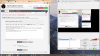
when I try to record, the video crops down to a very low resolution and makes a black "blank" around it, and won't capture right. Also my mouse cursor is messed up too
I will upload a screenshot of this, so you might be able to understand more. I have my video settings to 1920x1080 which is my native screen resolution.
I have an AMD Radeeon R9 M265X graphics card, just in case that has anything to do with the problem.
Thanks for reading this and Helping out (if you did).
when I try to record, the video crops down to a very low resolution and makes a black "blank" around it, and won't capture right. Also my mouse cursor is messed up too
I will upload a screenshot of this, so you might be able to understand more. I have my video settings to 1920x1080 which is my native screen resolution.
I have an AMD Radeeon R9 M265X graphics card, just in case that has anything to do with the problem.
Thanks for reading this and Helping out (if you did).