Question / Help Stream still pixely w/ TOP NOTCH Hardware?!?!

TavidzTV

New Member
Hi Everyone,
I go by the name of Tavidz on Twitch.tv. I have started streaming a couple of months ago and when I first started I pretty much figured everything out on my own with little to no guides. I found that they didn't seem to apply to my situation so I had to go on my own path to figuring out my issues. Eventually I found a nice sweet spot for my stream quality that looked "DECENT". The problem is, I don't want decent. I want AMAZING quality. For this reason, I went out and spent 2K on a computer with some of the most top of the line specs to deal with almost anything that someone can throw at it. And yet still I cannot figure out how or why my stream sometimes looks blocky on movement with pixels everywhere...(You can pay the channel a visit and look at some of my Highlights or my Recent Broadcasts to see what I'm talking about here: twitch.tv/tavidz) it's infuriating me to utter desperation! However, here's the weird part... : the moment I stop and stand still or there's no motion going on the screen...It looks PERFECT IMAGE FIDELITY!!?!? I'm sorry, I'm a little worked up about it because I've spent months stressing out over this and wanting to put out great quality content because I'm very serious about streaming and establishing a certain standard of quality for my viewers. Some other streamers even have weaker or inferior PC hardware to mine and yet they somehow manage to get away with better image fidelity... Please help me. These are my PC Specs:
Processor1 x Intel® Core™ i7-4790K


Processor Cooling1 x Asetek 510LC Liquid CPU Cooling System [SOCKET-1150] - Standard 120mm Fan
Memory1 x 16 GB [8 GB x2] DDR3-2133 G.SKILL Ripjaws X
Video Card1 x NVIDIA GeForce GTX 970 - 4GB - Single Card


MotherboardASUS Z97-K -- 2x PCIe x16, 4x USB 3.0, 2x USB 2.0


Power Supply1 x 1000W Standard
Primary Hard Drive1 x Read: 450MB/s Write: 450MB/s 240GB Kingston V300 SSD* (Single Drive Only)
Data Hard Drive1 x 1 TB HARD DRIVE -- 32M Cache, 7200 RPM, 6.0Gb/s - Single Drive
Optical Drive1 x 14X LG Blu-ray Re-writer


Sound Card1 x 3D Premium Surround Sound Onboard
Network Card1 x Onboard LAN Network (Gb or 10/100)


Operating System1 x Windows 8.1 + Office 365 Trial [Free 30-Day !!!] 64-bit

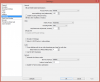
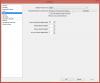
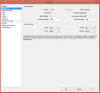
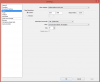
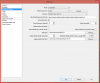
So now that you see these specs...what is the issue I'm facing? Oh and I'm using an El Gato HD60 capture Card. I have a few screenshots of what my obs settings are so that you can see what I call my "sweet spot". The reason I have it on NVENC as encoder is because I drop frames with x264 and not sure why. That shouldn't happen. Here's the screen shots:​


Broadcast Settings.png Advanced.png Audio.png Encoding.png Video.png

Please help me out best you guys can. I put a lot of effort into my streams and it also took a lot of effort to come on this thread and make it look nice and neat for you guys to be able to target the problem. I will be calling the company that provided this PC to me through my purchase to see if it may be an issue with hardware. I'm troubleshooting in EVERY possible way guys. I'm desperate for that AMAZING quality that I would only achieve through my dream of owning a Powerful PC. Now it's finally here and the news isn't that great. :/ Again thanks for taking the time to read this hefty topic/thread and troubleshooting with me. I will be checking up on this thread DAILY and another one that I have with a crash report issue I'm currently facing. I will be STARING those email notifications down to see if anyone has replied to my thread. :P Thanks again guys.​


Yours Truly .


Tavidz!
 
You need x264 if you want better quality, and you need to pour on the compression. Your filter is too intense for high motion gameplay at your resolution and bitrate. Adjust the filter as you please.

If you get dropped frames... you need to find out why and fix it. No way around that. NVENC is a terrible encoder for streaming. It is very fast/low compression useful only for recording with copious amounts of bandwidth available.
 
Switch to X264 and up the bitrate to 3000. Do not set the bitrate any higher than 3500 in total.

You encoding profile is set to main. Setting it to high should give you a little bit better quality (I don't see a difference tbh). The main profile is morecompatible with mobile devices though.

If you spare cpu power you can set the x264 cpu preset higher than veryfast.
 
You need x264 if you want better quality, and you need to pour on the compression. Your filter is too intense for high motion gameplay at your resolution and bitrate. Adjust the filter as you please.

If you get dropped frames... you need to find out why and fix it. No way around that. NVENC is a terrible encoder for streaming. It is very fast/low compression useful only for recording with copious amounts of bandwidth available.

Thank you guys for your suggestions and here's my reasoning behind my settings:

I have it set as NVENC as encoder because it's constant and doesn't drop frames..the only issue is it just doesn't output top notch quality. Also, I have it set to 2000 bit rate because if not then my stream will not make it to any mobile devices and a lot of my viewers are mobile viewers. So doing that would be pretty much stream suicide for me.

However, I have tried both you guys' suggestions and well... I'm still dropping frames. My internet connection is also TOP NOTCH as well with it being 16MB upload to 20MB. It looks a bit better by the way guys but if I lower the filter ..it starts getting very pixely. ALSO to me it still looks a bit fuzzy with all the settings that I put on that you guys suggested on top of dropping frames.. I'm looking for absolute 100% true image fidelity that looks good. I would expect that with the internet quality that I pretty much am paying for.
 
The lower filters blur the image more, but are more compatible with lower bitrates. It's a tradeoff with pixellation and sharpness. The CPU hit is negligible. Bilinear is what you should be using at 2000 bitrate for most games.

What kind of "dropped frames" are you talking about? If your dropped frames are from high CPU usage, then you have a problem on your PC, as your PC should be strong enough. If you get dropped frames from your internet, then something is screwed up on that system.

One thing is for sure: you're never going to get the best image quality using NVENC. Or quicksync.
 
Well I don't know what it is then. It makes no SENSE as to why I'm dropping frames. Internet is beyond what it needed for decent quality...CPU is not high in usage, it has more than enough space and clock speed. It's water cooled...I'm just absolutely frustrated beyond words. NVENC is the only encoder that wont drop frames. This is the part that confuses the absolute everything out of me. Even when I had all the settings set to lower bitrates and lower filter...I STILL DROPPED FRAMES ON x264.

So connection is fine: CHECK.
Computer hardware is close to TOP NOTCH: CHECK.
The preview in obs software looks SUPERB,so there's no reason as to why I wont be able to upload THAT quality: CHECK

What's the issue?? None of the settings suggested work... I'm using the correct servers closest to my location.
Sometimes I think that this system somehow knows everything I am using and just doesn't want me streaming good quality streams. That's pretty much my only explanation. I am bound to low quality and pixely gameplay because of me being constrained to NVENC to be able to pull off a stream that does not lose frames. x264 DOES NOT WORK FOR ME with ANY SETTINGS without dropping frames. CPU usage is FINE. CONNECTION IS ALSO FINE. PERFECT ACTUALLY. NVENC wont give me that quality I'm so desperately looking for but its the only one that doesn't drop frames?

I need a professional. Like badly.
 
Ok, it seems you have established that there is a problem.

If you have a problem, please POST A LOG. It will give us more info then some screenshots and walls of text.

The preview in OBS is not encoded, so you see a perfect picture. Again, UPLOAD and PASTE a log.
 
The preview in OBS is not encoded, so you see a perfect picture. Again, UPLOAD and PASTE a log.
The preview in OBS is indeed encoded (but not written to anything). It's why the CPU hit is there. It's used as a means to check everything is working without needing to actually stream.

You are right about us needing a log though.
 
The preview in OBS is indeed encoded (but not written to anything). It's why the CPU hit is there. It's used as a means to check everything is working without needing to actually stream.

You are right about us needing a log though.
Yea, it's encoded, but the preview you see if not actually encoded(You still see the raw input) right? (I think thats how it works)
 
Yea, it's encoded, but the preview you see if not actually encoded(You still see the raw input) right? (I think thats how it works)
No, you see what OBS'd output. What you see there is the encoded thing, and if your OBS encoder skips frames (due to CPU) you'd see the skipping, etc. That's the purpose of the preview.
 
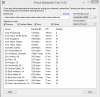
Every single thing in that log points to problems with your internet connection... but since it only happens when using x264, that means something on your PC is messed up somehow.
 
Well how does that make sense? The PC has some great quality hardware in it. The internet should be fine... I need more people on this case.
 
Looks like germany and new york are the only places that did really well... that's too weird. Your log seems to be going up and down. Try longer tests, like 30 seconds or 60 seconds. You can safely un-check asia as you have terrible bandwidth to Asia.
 
No, you see what OBS'd output. What you see there is the encoded thing, and if your OBS encoder skips frames (due to CPU) you'd see the skipping, etc. That's the purpose of the preview.

You don't see the actual encoded output in the preview, if your bitrate is set to 1000kbps the recording will be pixelated, the preview won't get pixelated.
 
You don't see the actual encoded output in the preview, if your bitrate is set to 1000kbps the recording will be pixelated, the preview won't get pixelated.
You do see other problems, like when you game capture BF4 and fullscreen it, sometimes it's exceedingly choppy for no reason, etc. Or skipping due to encoder lag. But yes, you don't see the sent bandwidth footage.
 
It might help to know which games the OP is trying to stream. If it's something extremely CPU heavy like GTA V, BF4, or DayZ, then that might be one of the contributing factors.
 
It might help to know which games the OP is trying to stream. If it's something extremely CPU heavy like GTA V, BF4, or DayZ, then that might be one of the contributing factors.
He has no skipped frames via encoder lag, so he is not running into a CPU issue. What it looks like, is that his internet is rather unstable.
 
Back
Top