You are using an out of date browser. It may not display this or other websites correctly.
You should upgrade or use an alternative browser.
You should upgrade or use an alternative browser.


rusty1
Member
I found that manually closing all the docks windows then allows OBS to quit. Claude says this...
After reviewing the source code, I believe the issue is that plugin-created top-level windows (floating docks and source windows) block Qt 6's quit handler on macOS.
When quitting, Qt calls closeAllWindows() then checks for remaining visible top-level windows. If any remain, Qt rejects the quit (e->ignore() in QApplication::event(QEvent::Quit)). On macOS, floating OBSDock widgets and source_windows are independent top-level windows that can survive this check.
Suggested fix
Add Qt::WA_QuitOnClose set to false on all plugin-created top-level windows so they don't block Qt's quit:
window->setAttribute(Qt::WA_QuitOnClose, false);
This should be added in GetSourceWindowByTitle() in source-dock-settings.cpp.
Additional issues found
1. Signal handler copy-paste bug in source-dock.cpp (~line 1635-1638): "activate" is disconnected twice, but "deactivate" is never disconnected before reconnecting. This can lead to multiple OBSActiveChanged callbacks firing on destroyed widgets during shutdown.
signal_handler_disconnect(sh, "activate", OBSActiveChanged, this);
signal_handler_disconnect(sh, "activate", OBSActiveChanged, this); // should be "deactivate"
signal_handler_connect(sh, "activate", OBSActiveChanged, this);
signal_handler_connect(sh, "deactivate", OBSActiveChanged, this);
2. EXIT handler (~line 433-443): source_windows are close()d and deleted synchronously. If closeAllWindows() already closed some of them, this could cause double-free.
Consider using deleteLater() instead.
3. Async tasks (~line 474): update_active is queued to the graphics thread and accesses source_docks, which may have been cleared by the EXIT handler by the time the task executes.
After reviewing the source code, I believe the issue is that plugin-created top-level windows (floating docks and source windows) block Qt 6's quit handler on macOS.
When quitting, Qt calls closeAllWindows() then checks for remaining visible top-level windows. If any remain, Qt rejects the quit (e->ignore() in QApplication::event(QEvent::Quit)). On macOS, floating OBSDock widgets and source_windows are independent top-level windows that can survive this check.
Suggested fix
Add Qt::WA_QuitOnClose set to false on all plugin-created top-level windows so they don't block Qt's quit:
window->setAttribute(Qt::WA_QuitOnClose, false);
This should be added in GetSourceWindowByTitle() in source-dock-settings.cpp.
Additional issues found
1. Signal handler copy-paste bug in source-dock.cpp (~line 1635-1638): "activate" is disconnected twice, but "deactivate" is never disconnected before reconnecting. This can lead to multiple OBSActiveChanged callbacks firing on destroyed widgets during shutdown.
signal_handler_disconnect(sh, "activate", OBSActiveChanged, this);
signal_handler_disconnect(sh, "activate", OBSActiveChanged, this); // should be "deactivate"
signal_handler_connect(sh, "activate", OBSActiveChanged, this);
signal_handler_connect(sh, "deactivate", OBSActiveChanged, this);
2. EXIT handler (~line 433-443): source_windows are close()d and deleted synchronously. If closeAllWindows() already closed some of them, this could cause double-free.
Consider using deleteLater() instead.
3. Async tasks (~line 474): update_active is queued to the graphics thread and accesses source_docks, which may have been cleared by the EXIT handler by the time the task executes.
rusty1
Member
@Exeldro Here is a screen recording to clarify... https://www.loom.com/share/d619717a8cc94c029290332b73f395bb I do not know how this stuff works.
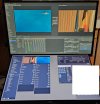
Ok, I have setup the touch screen monitor and it's working but as I expected, touching the "eye" icon its a bit tricky,Thanks for such a useful plugin, I was looking for a plugin like this to be able to switch between sources inside a certain scene (together with source toggle) and it does help and work as intended but now I was planning to get a touch screen monitor to be able to easily touch the source and switch to it, but I see it only works when clicking on the tiny area of the "eye" (visible) icons on the right side of the sources list.
Would it be easy to implement an option to also do a visibility toggle by just clicking on the Source name itself? (this would give a much bigger area to click or touch).
Regards,
Miguel
@Exeldro do you think it's possible to add an option that makes the whole text line (for each source item) clickable to make it visible? ideally it would change background color (to blue or any strong color other than default bg text color) to reflect when it's visible/active, and the filters icon would better not be there (not to click it by mistake).
Attachments
Last edited:
Ok, I have setup the touch screen monitor and it's working but as I expected, touching the "eye" icon its a bit tricky,
@Exeldro do you think it's possible to add an option that makes the whole text line (for each source item) clickable to make it visible? ideally it would change background color (to blue or any strong color other than default bg text color) to reflect when it's visible/active, and the filters icon would better not be there (not to click it by mistake).
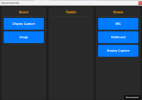
Hello, after a few conversations with Gemini "we" end up with an HTML Source Dock that does what I needed, is some one needs something similar here it is:
Just need to enable websocket server in OBS inside the HTML replace password with your the websocket password in this line:
const PASSWORD = "QQiUlZL0VtU";
and replace the names of the scenes you need ("Score", "Testim", "Scene") in the line:
// Defina aqui as 2 ou 3 cenas que quer ver lado a lado no tablet:
const SCENES_TO_CONTROL = ["Score", "Testim", "Scene"];
And the it should automatically create the sources (you can add more scenes in the list).