OBS NVENC encoding problem with RTX 5080

Otaquet_

New Member
System specs:
  • GPU: MSI RTX 5080 (brand new replacement)
  • CPU: Intel Core i7-14700KF
  • RAM: 64 GB DDR5 (Kingston FURY 6000 MHz)
  • Motherboard: ASUS TUF Gaming Z790
  • PSU: be quiet! Pure Power 12M – 1000W
  • OS: Windows 11 Pro (64-bit)
  • NVIDIA Driver: 32.0.15.8157 (Oct 9, 2025)
  • OBS Studio: latest stable version

Problem description​

Even after upgrading from a 5070 ti to the RTX 5080 , OBS keeps showing “Encoder overloaded” warnings and the GPU usage spikes to 100% while streaming, even with light games or low settings. (like Dune awakening, Battlefront II, Skate)
CPU usage stays around 40%, so it’s not a CPU bottleneck.

OBS stats:
  • Average render time: ~20ms
  • Missed frames (render): ~4%
  • Skipped frames (encoding): 10–15%
  • FPS fluctuates between 20–50 instead of stable 60.

Troubleshooting done​

  • Clean reinstall of NVIDIA drivers (using DDU).
  • Tested different OBS versions (stable + beta).
  • Tried NVENC H.264 / HEVC, Quality and Performance presets.
  • Different bitrates (6000–10000 kbps) and resolutions (720p–1080p).
  • Disabled G-Sync, V-Sync, Ray Tracing, DLSS, and in-game overlays.
  • Temps are fine (GPU < 60°C, CPU < 70°C).

Issue persists​

Even with a brand-new RTX 5080, OBS + NVENC cause stutters, frame drops, and high GPU usage on any game.
Other streamers with RTX 50-series cards report similar issues, so it might be a driver or NVENC compatibility problem.


Request​

Could you please confirm:
  1. If this is a known issue with RTX 50-series and OBS/NVENC?
  2. Any recommended driver version or settings to fix it?
  3. If needed, I can provide OBS logs, DxDiag, and GPU-Z info.
Thank you for your help!


Attachments

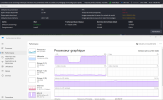
  • Capture d'écran 2025-11-14 Battlefront II.png
    Capture d'écran 2025-11-14 Battlefront II.png
    111.4 KB · Views: 186
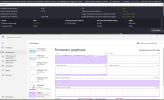
  • Capture d'écran 2025-11-14 Dune.png
    Capture d'écran 2025-11-14 Dune.png
    109.3 KB · Views: 176
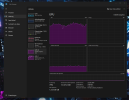
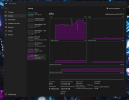
  • Capture d'écran 2025-11-14 Skate.png
    Capture d'écran 2025-11-14 Skate.png
    125.9 KB · Views: 157
  • 2025-11-14 17-00-03.txt
    2025-11-14 17-00-03.txt
    137.2 KB · Views: 146
Task Manager clearly shows that your GPU is overloaded & the log confirms it as Rendering Lag is GPU overload. Simple stuff. Eliminate the rendering lag & that encoding lag will cease as well. See the link below.

18:07:03.344: Output 'rtmp multitrack video': Total frames output: 660000
18:07:03.344: Output 'rtmp multitrack video': Total drawn frames: 216007 (220135 attempted)
18:07:03.344: Output 'rtmp multitrack video': Number of lagged frames due to rendering lag/stalls: 4128 (1.9%)
18:07:03.344: [rtmp stream: 'rtmp multitrack video'] Freeing 3 remaining packets
18:07:03.344: Video stopped, number of skipped frames due to encoding lag: 4207/220059 (1.9%)
18:07:03.347: ==== Streaming Stop ================================================
18:07:03.392: Video stopped, number of skipped frames due to encoding lag: 4178/220061 (1.9%)
18:07:03.429: Video stopped, number of skipped frames due to encoding lag: 4128/220064 (1.9%)
18:07:03.463: Video stopped, number of skipped frames due to encoding lag: 4128/220066 (1.9%)

I also noticed that your NIC either needs a driver update or you're using Energy Efficient Ethernet settings.
17:05:54.467: [rtmp stream: 'rtmp multitrack video'] Interface: Intel(R) Ethernet Controller I226-V (ethernet, 2500↓/2500↑ mbps)
17:05:54.467: [rtmp stream: 'rtmp multitrack video'] Interface has non-zero error counters (38/0 errors, 38/0 discards)

 
You'll free up a significant amount of VRAM by disabling acceleration on your Media Sources. Too many are using it, I stopped counting @ 12. There should only be 2-3 of them using it & only if they're in your main Scene.

17:00:08.531: [Media Source 'Guignols t es un vrai con']: settings:
17:00:08.531: input: C:/Users/User/Desktop/Stream/video son montage/video/DIVERS FR/t es un vrai con euh consommateur j veux dire.mp4
17:00:08.531: input_format: (null)
17:00:08.531: speed: 100
17:00:08.531: is_looping: no
17:00:08.531: is_linear_alpha: no
17:00:08.531: is_hw_decoding: yes
17:00:08.531: is_clear_on_media_end: yes
17:00:08.531: restart_on_activate: yes
17:00:08.531: close_when_inactive: yes
17:00:08.531: full_decode: no
 
hi thanks for you answer
where do I found the "disabling acceleration on your Media Sources." I dont see it on the box to uncheck (it s probably different in french). Which "line" is it under the "local file" section?
 
Remove the source clone plugin for now. You need to get OBS to work as intended before messing with plugins.
The GPU you have works better at 1440p or higher, so set the Base resolution the same as your display monitor resolution (1440p) and then if you stream to a service that allows a max resolution of 1080p, set the output resolution to this.
Don't use Enhanced Broadcast. Simply disable it.

Follow what rockbottom already told you. You probably need to update network drivers. Consult the support for your motherboard.
I also noticed that your NIC either needs a driver update or you're using Energy Efficient Ethernet settings.
17:05:54.467: [rtmp stream: 'rtmp multitrack video'] Interface: Intel(R) Ethernet Controller I226-V (ethernet, 2500↓/2500↑ mbps)
17:05:54.467: [rtmp stream: 'rtmp multitrack video'] Interface has non-zero error counters (38/0 errors, 38/0 discards)

Now, run the Auto-configuration Wizard (tools menu) selecting the display monitor resolution and then apply the settings it gives. Remember to not use enhanced broadcast. Restart OBS. Yes, do restart OBS.
Without changing anything do a test and post here the log file. A test is: start streaming, do as you normally do for no less than 30 seconds, stop streaming. Look inside Help menu, upload current log file. Post in here the URL to the log file.
Yes, OBS has a useful help menu.
 
I looked at that plugin last week, installed version is up to date so I left it alone.

Another good troubleshooting step, create a new Scene Collection, just add (1) Source & test. If the overload is gone, there's more than likely something buggy in the old collection that will need to be hunted down & eliminated.
 
System specs:
  • GPU: MSI RTX 5080 (brand new replacement)
  • CPU: Intel Core i7-14700KF
  • RAM: 64 GB DDR5 (Kingston FURY 6000 MHz)
  • Motherboard: ASUS TUF Gaming Z790
  • PSU: be quiet! Pure Power 12M – 1000W
  • OS: Windows 11 Pro (64-bit)
  • NVIDIA Driver: 32.0.15.8157 (Oct 9, 2025)
  • OBS Studio: latest stable version

Problem description​

Even after upgrading from a 5070 ti to the RTX 5080 , OBS keeps showing “Encoder overloaded” warnings and the GPU usage spikes to 100% while streaming, even with light games or low settings. (like Dune awakening, Battlefront II, Skate)
CPU usage stays around 40%, so it’s not a CPU bottleneck.

OBS stats:
  • Average render time: ~20ms
  • Missed frames (render): ~4%
  • Skipped frames (encoding): 10–15%
  • FPS fluctuates between 20–50 instead of stable 60.

Troubleshooting done​

  • Clean reinstall of NVIDIA drivers (using DDU).
  • Tested different OBS versions (stable + beta).
  • Tried NVENC H.264 / HEVC, Quality and Performance presets.
  • Different bitrates (6000–10000 kbps) and resolutions (720p–1080p).
  • Disabled G-Sync, V-Sync, Ray Tracing, DLSS, and in-game overlays.
  • Temps are fine (GPU < 60°C, CPU < 70°C).

Issue persists​

Even with a brand-new RTX 5080, OBS + NVENC cause stutters, frame drops, and high GPU usage on any game.
Other streamers with RTX 50-series cards report similar issues, so it might be a driver or NVENC compatibility problem.


Request​

Could you please confirm:
  1. If this is a known issue with RTX 50-series and OBS/NVENC?
  2. Any recommended driver version or settings to fix it?
  3. If needed, I can provide OBS logs, DxDiag, and GPU-Z info.
Thank you for your help!


I can tell you, why you still have encoding problems:

This Hardware upgrade was completely nonsense, at least in terms of encoding. The RTX5070ti has the exact same amount of encoder cores in comparison to the rtx5080

- RTX5070Ti and RTX5080 both have 2 encoder cores on 1 chip and can process up to 8 encoder threads
- Only the RTX5090 has 3 encoder cores on 1 chip, but also is limited to 8 encoder threads

You can find the specs per gpu in the nvenc encoder matrix:

So you just paid for 10-15% more 3D performance.

Beside that fact, i have the same problems.

Can you tell me, how many encoding processes you have running?

My setup:
- Intel Core Ultra 7 265k
- RTX5070Ti
- 48GB DDR5-6000 RAM

Using the aitum stream suite plugin with
- YouTube in AV1 1440p
- YouTube Vertical Canvas with 1080x1920p in H264
- Recording Canvas in 4480x1440p (Gameplay in 1440p next to Facecam in 1080p) in H.265

Had the same symptoms, all the values about load in taskmanager are okay and not even close to 100%, except for the 3d gpu load, which is normal in gaming (95% max, game mode on), vram 14,5gb of 16gb, max 20gb of ram in use (tested with bf6, but alternatively tested with the finals, same thing)

I also made a request in the aitum discord about this. There were people with an rtx5090 telling they have the same problems with encoder overload. RTX4000 users reported the same thing, when they changed to RTX5000, that they had problems, they didn't have before. Maybe encoding pipeline stalls causing the AV1 stream to stutter, but i also changed the av1 stream to h265, same behaviour.

There are rumors about a nvidia driver issue with rtx5000 cards, so this seems to be something, that can not be solved at the moment.

The only thing that helped me personally, was to lower the bitrate of the streams, even if i wasnt bandwidth limited with 40mbits upload.

But whats really kind of strange, even if i tried to balance the encoding load between my igpu and my dgpu (moved half of the encoding threads to the intel 265k gpu cores) it didnt change at all.
 
Last edited:
Interesting, can't even read the log to see how many encoding sessions are running & you know what's happening....

I do agree however that the GPU switch was unnecessary & a waste of $$$. Not much gain but a lot of pain in the wallet.
 
Interesting, can't even read the log to see how many encoding sessions are running & you know what's happening....

I do agree however that the GPU switch was unnecessary & a waste of $$$. Not much gain but a lot of pain in the wallet.
Did you mean, you want a log file? I can post that later, but im not home at the moment.
 
If it helps:
https://obsproject.com/logs/cJ4zZPoINBsisc8j

(load values while playing the finals)
I'm actually responding to your first longer comment, but quoting this one as it is shorter.

I too have issues myself. I came from a 4060 OC that didn't t have a single issue running Destiny 2 at max settings and encoding in OBS (or streaming) without a single hiccup.

It makes no sense that my now 5070 Ti + 9800x3d + 32GB DDR5-6000 setup is having encoding overload, outside of what you said, that it's on Nvidia's end with the 50 series cards currently. A 4060 has no business having no issues if a 5070 Ti does.

Yes I did DDU in Safe mode for the install of my new card etc. Reinstalled OBS, I've reduced encoding demand settings wise from what the 4060 did even. It doesn't overload incessantly or anything, it's very random, maybe once in 5-6 hrs now. It's weird that cpu uses 20-30% and GPU 30-50% at my current settings in Task Manager and it still happens.

The 4060 would run Destiny 2 at 1440p/max settings and roughly average 130-150 fps with occasional dips to 90-100 range. If I uncap fps with the 5070ti, it runs it on average around 300fps, with dips down to 250. I capped the fps to 120 even (was at 180 as that's what my monitors do natively) and it still occurs.

Super frustrating, but I'm leaning towards Nvidia and the 50 cards being the culprit, something about them currently. I even rolled back to the 572.83 driver from Spring, same thing. So just wanted to add that I'm in same boat. I've read of 5090's even getting overloaded. Which is wild af.
 
I'm actually responding to your first longer comment, but quoting this one as it is shorter.

I too have issues myself. I came from a 4060 OC that didn't t have a single issue running Destiny 2 at max settings and encoding in OBS (or streaming) without a single hiccup.

It makes no sense that my now 5070 Ti + 9800x3d + 32GB DDR5-6000 setup is having encoding overload, outside of what you said, that it's on Nvidia's end with the 50 series cards currently. A 4060 has no business having no issues if a 5070 Ti does.

Yes I did DDU in Safe mode for the install of my new card etc. Reinstalled OBS, I've reduced encoding demand settings wise from what the 4060 did even. It doesn't overload incessantly or anything, it's very random, maybe once in 5-6 hrs now. It's weird that cpu uses 20-30% and GPU 30-50% at my current settings in Task Manager and it still happens.

The 4060 would run Destiny 2 at 1440p/max settings and roughly average 130-150 fps with occasional dips to 90-100 range. If I uncap fps with the 5070ti, it runs it on average around 300fps, with dips down to 250. I capped the fps to 120 even (was at 180 as that's what my monitors do natively) and it still occurs.

Super frustrating, but I'm leaning towards Nvidia and the 50 cards being the culprit, something about them currently. I even rolled back to the 572.83 driver from Spring, same thing. So just wanted to add that I'm in same boat. I've read of 5090's even getting overloaded. Which is wild af.
I found out, my issues came from bitrate too high, which is absolutely ridiculous, because my upload rate should be stable with enough headroom. But when i reduced it, it worked flawlessly. Not a real solution, as the "bottleneck" would reappear, if another additional stream is running.

I am good with it at the moment, hopefully a new driver will fix it soon.
 
thanks for all your answer, I'll try what you said and come back to tell you the result. FYI the shop upgraded my graphic card (5080) for free for my trouble. Nvidia support are not very smart and litteraly telling me " streamers have two PC for that kind of problems"... So I guess they dont want to acknowledge that the serie 5xxx got issues.
 
Back
Top