

You are using an out of date browser. It may not display this or other websites correctly.
You should upgrade or use an alternative browser.
You should upgrade or use an alternative browser.
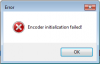
Bug Report OBS + NVENC + 337.50 Driver
- Thread starter M1ke
- Start date
- Status
- Not open for further replies.

Floatingthru
Member
GTX 670 here, and the new 337.50 "wonder" drivers broke NVENC for me too. They did quite a lot of shadowplay changes, though.

nightfire37
New Member


H1VlTG3NZ
New Member
I got it to work again by replacing the "nvEncodeAPI.dll" found in "C:\Windows\SysWOW64" with one of the previous versions of the dll file. You will need to boot in to Safe Mode to replace the file, also be sure to back up the dll file your replacing.
Please Note: For advance users only. Also note this is only a workaround.
Note 2: Previous versions of the dll can be found in "C:\Windows\System32\DriverStore\FileRepository" in folders named "nv_disp.inf_amd64_neutral_"

Please Note: For advance users only. Also note this is only a workaround.
Note 2: Previous versions of the dll can be found in "C:\Windows\System32\DriverStore\FileRepository" in folders named "nv_disp.inf_amd64_neutral_"

Last edited:
- Status
- Not open for further replies.