Move

Move 3.2.0

Hello, @Exeldro Could you pls explane what should execute move action at PROGRAM? When i'm testing the plugin is only active in PREVIEW. The toggling activate the scene at PROGRAM and PREVIEW is not parallely showing this action.
Thanks!
forgot to mention: this problem is when filter is in SCENE. in GROUP it is working properly.
 
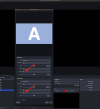
Hi, I have a problem with the transition. Note that I make a very simple use of it, basically I only use it for the transition between scene and scene and in previous versions this thing did not happen. The problem shows both with Decklink Out and in the recording. The problem concerns the audio in case there are two elements, one that disappears and another that appears in two different scenes. If I apply the fade transition basically it doesn't work, that is, the audio goes to zero in the disappearing and at 100 in the next as if it were in cut. If instead I don't select any transition, the audio goes to fade out and fade in correctly (in theory it shouldn't go to fade), but obviously not the video. Has anyone identified this behavior? I use the latest version of MOVE (3.2.0) and the latest version of OBS MACOS Silicon (32.0.3). Thank you.
 

Attachments

  • Screenshot 2025-12-10 alle 14.24.49.png
    Screenshot 2025-12-10 alle 14.24.49.png
    247.1 KB · Views: 50
  • Screenshot 2025-12-10 alle 14.24.31.png
    Screenshot 2025-12-10 alle 14.24.31.png
    243.4 KB · Views: 39
@Exeldro If I'm not mistaken the `NVIDIA AR Move` filter (that I'm using as a face tracker) is causing OBS to freeze. I'm using said filter on a camera source with the following settings:

Screenshot 2025-12-18 154116.png


OBS doesn't crash (so no crash logs available), but I see several of the following entries in the regular logs (see attached sample) leading up to the freeze:
`[Move Transition] Error in Map Resource; error -1099: unknown error`
`[Move Transition] Error in Unmap Resource; error -311: resource not mapped`
 

Attachments

Hi all,
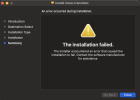
Recently when updating my plugins, the .pkg file failed to install the move plugin. I've tried a number of attempts, system restarts, and even had others share the unzipped .plugin file to put in the appropriate directory. I've had no luck, and really am in need of getting the plugin working again. Despite all my attempts, this is what the plugin manager is showing me:
Screenshot 2025-12-18 at 5.52.43 PM.png

I've checked the two areas I suspect OBS may be looking for the plugin to be, but neither of those directories have the move .plugin file, so I'm really not sure what other options to consider.

I am running an M4 MBPro, OBS 32.02.

Has anyone ever encountered this? Better still - has anyone resolved something like this?
 
i installed Move 3.2.0 on Mac M1 with newest OBS. And i saw plugin in Tools > Plugin Manager
But in screne transitions i did see anything. How to enable Move plugin ???
 
Hello @Exeldro, thanks for the wonderful plugin - would love to get started... but I'm coming across this issue when looking to install the plugin

Your thoughts on working around this?
Here are the things I've tried already:
-reinstall OBS
-Reinstall MacOS from Tahoe down to Sequoia 15.7.3
-Deleted the entire Hardisk setup and reinstalled MacOS.
-lowered the gatekeep installer mechanism (currently at the lowest installation)

Using Mac Studio 2025 M4 Chip 64gb memory

Thanks for all that you do! plus looking into this problem with me.
-Y
 

Attachments

  • Screenshot 2026-01-01 at 2.37.06 AM.png
    Screenshot 2026-01-01 at 2.37.06 AM.png
    128.2 KB · Views: 8
Hello @Exeldro, thanks for the wonderful plugin - would love to get started... but I'm coming across this issue when looking to install the plugin

Your thoughts on working around this?
Here are the things I've tried already:
-reinstall OBS
-Reinstall MacOS from Tahoe down to Sequoia 15.7.3
-Deleted the entire Hardisk setup and reinstalled MacOS.
-lowered the gatekeep installer mechanism (currently at the lowest installation)

Using Mac Studio 2025 M4 Chip 64gb memory

Thanks for all that you do! plus looking into this problem with me.
-Y
I solved the problem - the issue is with the 'authorized user'

Solution:
in the installer app, when the error shows up, I downloaded the log error and I asked chatgpt to ask me what is wrong -

the answer was that the ‘author’ was set to “root” rather than myself as the user and hence it was a permission issue.

I asked chatgpt to prompt me correct terminal instructions, and then after that - I was able to install it.
 
does anyone have any issues with the cache setting only working when it wants to?

i have a couple move source filters on my scenes and i have a couple move value filters on my camera. they are controlling an advanced mask, crop/pad, and a drop shadow filter. doing all three at once when i change scenes for some reason brings my pc to it's knees when i'm recording and streaming. some of the most basic moves.

i also have the transition table plugin to add some transition overrides. so for example instead of a move, i set a cross dissolve from my camera full scene to my brb scene.

i have caching enabled, but when i go to my brb scene to my camera scene then to my game scene, it seems to reset or something. i get heavy encode lag when i do the moves. sometimes i get encode lag when i do a cross dissolve. something as basic as that causes encode lag.

doing the moves a couple times fixes the lag, but when i do the cross dissolve, the lag comes back. i don't know if this is a bug with the plugin or obs or if this is something on my computer or what, but i just wanted to share what i'm experiencing. if anyone has any suggestions, please let me know!
 
Hi @Exeldro

The `move action` and `move value` filters are having problems with vertical scenes.

The `move action` filter doesn't relate vertical scenes in the filter enable option. The `move value` filter doesn't work when I try to adjust the properties of the `move source` filter applied to vertical scenes.

I tested the features on Windows 11 Pro and Linux Mint 22.2 XFCE, obtaining the same results.

Thank you in advance.
 
I have a problem after upgrading from version 2.9.1 to a more recent one. 3.2.0. If there are no sources on another scene, then on the first one they simply disappear into the distance during the transition (visible on the video). How can I fix this? Previously, on 2.9.1, any scene was static during the transition and did not disappear anywhere... Someone help with this issue!

 
Back
Top