Move

Move 3.2.0

Smart Net

Member
Hello, @Exeldro Could you pls explane what should execute move action at PROGRAM? When i'm testing the plugin is only active in PREVIEW. The toggling activate the scene at PROGRAM and PREVIEW is not parallely showing this action.
Thanks!
forgot to mention: this problem is when filter is in SCENE. in GROUP it is working properly.
 

san_drino

New Member
Hi, I have a problem with the transition. Note that I make a very simple use of it, basically I only use it for the transition between scene and scene and in previous versions this thing did not happen. The problem shows both with Decklink Out and in the recording. The problem concerns the audio in case there are two elements, one that disappears and another that appears in two different scenes. If I apply the fade transition basically it doesn't work, that is, the audio goes to zero in the disappearing and at 100 in the next as if it were in cut. If instead I don't select any transition, the audio goes to fade out and fade in correctly (in theory it shouldn't go to fade), but obviously not the video. Has anyone identified this behavior? I use the latest version of MOVE (3.2.0) and the latest version of OBS MACOS Silicon (32.0.3). Thank you.

 

Attachments

  • Screenshot 2025-12-10 alle 14.24.49.png
    Screenshot 2025-12-10 alle 14.24.49.png
    247.1 KB · Views: 12
  • Screenshot 2025-12-10 alle 14.24.31.png
    Screenshot 2025-12-10 alle 14.24.31.png
    243.4 KB · Views: 14

ad1562

New Member
@Exeldro If I'm not mistaken the `NVIDIA AR Move` filter (that I'm using as a face tracker) is causing OBS to freeze. I'm using said filter on a camera source with the following settings:

Screenshot 2025-12-18 154116.png


OBS doesn't crash (so no crash logs available), but I see several of the following entries in the regular logs (see attached sample) leading up to the freeze:
`[Move Transition] Error in Map Resource; error -1099: unknown error`
`[Move Transition] Error in Unmap Resource; error -311: resource not mapped`
 

Attachments

  • 2025-12-18 15-02-41.txt
    86.7 KB · Views: 1

ekor894

New Member
Hi all,
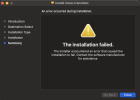
Recently when updating my plugins, the .pkg file failed to install the move plugin. I've tried a number of attempts, system restarts, and even had others share the unzipped .plugin file to put in the appropriate directory. I've had no luck, and really am in need of getting the plugin working again. Despite all my attempts, this is what the plugin manager is showing me:
Screenshot 2025-12-18 at 5.52.43 PM.png

I've checked the two areas I suspect OBS may be looking for the plugin to be, but neither of those directories have the move .plugin file, so I'm really not sure what other options to consider.

I am running an M4 MBPro, OBS 32.02.

Has anyone ever encountered this? Better still - has anyone resolved something like this?
 
Top