Question / Help HELP PLEASE

German Aldeoca

New Member
so i try streaming and it always lags for some reason i put the maxbitrate at 2000 and my upload is 7 i have all the right settings i can do other things like see youtube videos talk on skype play CoD flawlessly so its not my internet...
computer specs:

Intel Core i5-4460 CPU @3.20GHz
DDR3-1600 8Gb
x64 windows 8.1

Do you thinks its my computer...
Maybe its over heating?
 
so i try streaming and it always lags for some reason i put the maxbitrate at 2000 and my upload is 7 i have all the right settings i can do other things like see youtube videos talk on skype play CoD flawlessly so its not my internet...
computer specs:

Intel Core i5-4460 CPU @3.20GHz
DDR3-1600 8Gb
x64 windows 8.1

Do you thinks its my computer...
Maybe its over heating?
Is your stream lagging or you lagging, in-game?
If its in-game lag when streaming, use "minimize network impact" under the broadcast settings tab.
If its the stream then we will have to do another method; see below.

Lets take OBS out of the picture yet still test from your PC to twitch because, somewhere along the line between you, your ISP and twitch, something is going wrong

http://www.teamliquid.net/forum/tech-support/478845-twitchtest-twitch-bandwidth-tester

Use this tool and set it to your region. after that, do the long test, this will show all the ingests and what bitrate and quality of that bitrate you can stream at. your first find out, what the best ingest to stream at based on the "quality column" then if the ingest closest to you (lowest latency" is above 70, then use that.

If for some reason you get below 70% quality on all ingests, use 80% of the bitrate the tool gives and use the ingest with the highest quality. Any questions feel free to ask and/or post a SS of your results.
 
dping so i've tested a little bit more the first 10 mins of my stream are OK then it starts lagging (also my computer was off before that) my ping is 60. i also tried what you suggested and it still kept on lagging. anything else i can do

ALSO: could it be that my computer isn't functioning right Due to overheating?
 
dping so i've tested a little bit more the first 10 mins of my stream are OK then it starts lagging (also my computer was off before that) my ping is 60. i also tried what you suggested and it still kept on lagging. anything else i can do

ALSO: could it be that my computer isn't functioning right Due to overheating?
CPU throttling will directly affect streaming and/or gaming, so yes, it very well could be. especially since you said after a bit of time. I bet that is it.
 
What you should do is run HWiNFO64 in sensors-only mode and stream for ~15 minutes. Haswell CPUs have a built in feature where they downclock beyond a certain heating point (usually 95 degrees celcius) and will begin to throttle their speeds to prevent hitting the 100 degree TJMax (danger zone temperature). Your maximum column (and the columns that say "throttling") will let you know if your CPU has overheated or otherwise throttled. You have a locked i5, and I am unsure how the desktop CPUs work for locked chips, so it may possibly be TDP locked for some reason.

Another possible way of throttling is when the CPU requires a certain amount of "watts" from the PSU and it does not get the requisite amount, so it slows itself down. But that should happen instantly under intense load, so I don't believe that is your issue. It is much more likely to be overheating.

Also, you've not said what KIND of lagging... if the game (and your PC) begins to lag, or if the stream begins to lag, and/or if OBS starts reporting "HIGH CPU USAGE" etc in the bottom left of its window.
 
D2ultima i don't lag in game im fine same with skype the call DOES NOT DROP...the stream skips and it says "HIGH CPU USAGE". My friend and i have the same computer from the same company and his is perfectly fine he streams for 5-8 hrs and we both have the same upload.
 
"HIGH CPU USAGE" means you're overdrawing your CPU, which means you need to reduce what your PC is using your CPU to do while streaming. You want to NOT hit 100% on all cores while streaming.
 
Yea but the first 10-15 mins its fine after that my stream lags HARD same with recording videos and watching streams...My friend has the same computer from the same company with the same settings as me and his is perfectly FINE.
 
Yeah, but are you overheating and is it throttling? If it takes time before your CPU suddenly hits 100% and sits there, then during that time your CPU clock must have decreased. Likely cause is heat.

This is why I told you to get HWiNFO64 and to use XTU's graph to show current limit throttling and power throttling and HWiNFO64 to show temperature throttling.

You have not done that. Go do that and come back.
 
@German Aldeoca please use the edit feature when mousing over youyr original post when at all possible. Please post your logfile from the help menu, this will give us a better look at what is going on with OBS. make sure you grab a log from when you had the "high cpu usage message"
 
Yeah, but are you overheating and is it throttling? If it takes time before your CPU suddenly hits 100% and sits there, then during that time your CPU clock must have decreased. Likely cause is heat.

This is why I told you to get HWiNFO64 and to use XTU's graph to show current limit throttling and power throttling and HWiNFO64 to show temperature throttling.

You have not done that. Go do that and come back.


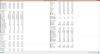
from Core #0-#3 Current Thermal throttling Yes
#0-#3 Minimum Thermal throttling No
#0-#3 maximum Thermal throttling Yes
#0-#3 Average Thermal throttling Yes

Current Temps 95+ current
max 95+
average 83+
but all below 100 degrees celcius
 
from Core #0-#3 Current Thermal throttling Yes
#0-#3 Minimum Thermal throttling No
#0-#3 maximum Thermal throttling Yes
#0-#3 Average Thermal throttling Yes

Current Temps 95+ current
max 95+
average 83+
but all below 100 degrees celcius

so there are two ways to monitor temps. per core (TJ aka terminal junction) or at the heat spreader(Tcase). per core, you dont really want to get within 10-15c of your TJ max on any core which in your case it 100c.

if your monitoring your Tcase temps (its usually a single temp called CPU in the motherboard section of HWinfo, that temps absolute max should be 72.72c so going by the 10-15c rule on this Ideal temps should be:

Tcase(aka CPU) of 62c
TJ on any core should not be going above 85c at any time


TL;DR your CPU is WAY to hot! but you knew this. and yes it will throttle if 1cpu gets close to the TJ max temps and shutdown after 101c.

your CPU is throttling and is affecting your stream over time.
 
D2ultima Here is a better look
 

Attachments

  • upload_2015-3-19_15-16-9.png
    upload_2015-3-19_15-16-9.png
    226.4 KB · Views: 23
  • upload_2015-3-19_15-16-20.png
    upload_2015-3-19_15-16-20.png
    226.4 KB · Views: 19
  • upload_2015-3-19_15-17-38.png
    upload_2015-3-19_15-17-38.png
    226.4 KB · Views: 19
Code:
Number of frames skipped due to encoder lag: 1425 (13.29%)

check to make sure your CPU fan isn't dead or dying. its almost like the heatsync is clogged or you need ot reapply thermal paste. maybe both

Should i just talk to the company where i bought this computer from...i have warranty
 
Back
Top