Question / Help HELP! Pixels start showing when I start moving around

Dimes

New Member
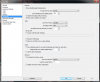
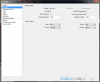
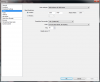
When im streaming and start moving my screen.Stream quality is getting worse,pixels start showing and quality is getting worse. Can someone help me and tell how to get clean quality without any squares ?

My internet: http://www.speedtest.net/my-result/4448624234
 

Attachments
  • video.png
    video.png
    60 KB · Views: 35
  • advanced.png
    advanced.png
    78 KB · Views: 34
  • encording.png
    encording.png
    65.2 KB · Views: 30
Last edited:
Reset the x264 preset back to veryfast, as those presets only affect how much processor time is dedicated to encoding and not the actual quality.

Additionally, you may need more bitrate assigned to video to stream at 60fps.
 
Reset the x264 preset back to veryfast, as those presets only affect how much processor time is dedicated to encoding and not the actual quality.
You might want to read up on that a little more. ^^"

When im streaming and start moving my screen.Stream quality is getting worse,pixels start showing and quality is getting worse. Can someone help me and tell how to get clean quality without any squares ?
You can:

- Increase your bitrate, up to a max of 3500 for Twitch, if you have the bandwidth available. Some viewers may experience playback buffering as you raise the bitrate.
- Downscale your stream resolution, it will be less work for your CPU and give fewer compression artifacts.
- Lower your stream FPS to 30, also less work for your CPU and better looking, but less smooth.
- Use a more demanding preset like superfast or veryfast if your CPU can handle it, which is more likely if you downscale/lower FPS.
 
Back
Top