

Yeah too bad the package doesn't seem to include dxgi dll so you'll have to replace that the manual way. Here's a guide for how to do it http://originaldll.com/file/dxgi.dll/11626.html
You are using an out of date browser. It may not display this or other websites correctly.
You should upgrade or use an alternative browser.
You should upgrade or use an alternative browser.
Question / Help Can not find DXGI adapter
- Thread starter Sycogenesis
- Start date

Sycogenesis
Member
I did everything that guide said to do nothing worked and when i was doing the cmd stuff the first one i got this msg
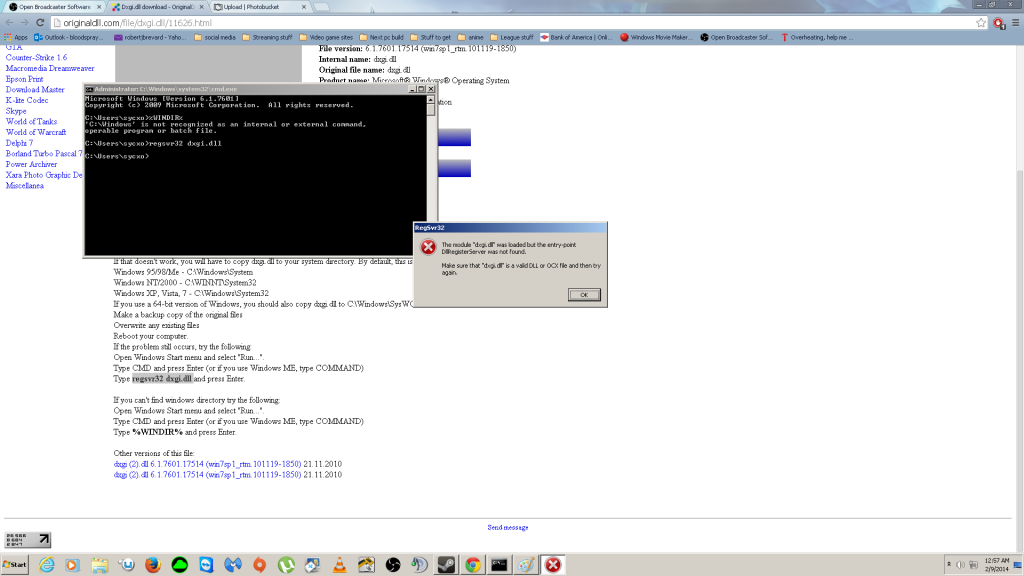 When i tried copying the file to system and wow it said it already existed
Sycogenesis
Member
Wth is going on am i just sol? for obs? i can't pay for xsplit :( plus it sucks
Just like i thought at first i think that the issue lays between the video card driver and DXGI not between DXGI and OBS.
Here's a potential fix.
1-Reboot go to safe mode and run this uninstaller http://ftp.sunet.se/pub/games/PC/guru3d ... com%5D.exe (this will help you get rid of the current and previous nvidia drivers for good)
2-Reboot back to normal mode, cut off your connection to prevent the automated driver installation and install the beta driver instead.
Here's a potential fix.
1-Reboot go to safe mode and run this uninstaller http://ftp.sunet.se/pub/games/PC/guru3d ... com%5D.exe (this will help you get rid of the current and previous nvidia drivers for good)
2-Reboot back to normal mode, cut off your connection to prevent the automated driver installation and install the beta driver instead.
Sycogenesis
Member
didn't work
Sycogenesis
Member
it was done by it self i don't see how the resolution is causing this because it's always been that res and yes i did restart the system how do i check the log file again
Sycogenesis
Member
How
Sycogenesis
Member
Code:
18:04:46: Open Broadcaster Software v0.60b - 32bit (´・ω・`)
18:04:46: -------------------------------
18:04:46: CPU Name: Intel(R) Core(TM) i7-2600K CPU @ 3.40GHz
18:04:46: CPU Speed: 3417MHz
18:04:46: Physical Memory:  4095MB Total, 4095MB Free
18:04:46: stepping id: 7, model 42, family 6, type 0, extmodel 1, extfamily 0, HTT 1, logical cores 8, total cores 4
18:04:46: monitor 1: pos={0, 0}, size={1920, 1080}
18:04:46: Windows Version: 6.1 Build 7601 S
18:04:46: Aero is Disabled
18:04:46: -------------------------------
18:04:46: OBS Modules:
18:04:46: Base Address     Module
18:04:46: 00230000         OBS.exe
18:04:46: 71740000         OBSApi.dll
18:04:46: 72670000         DShowPlugin.dll
18:04:46: 73DC0000         GraphicsCapture.dll
18:04:46: 720A0000         NoiseGate.dll
18:04:46: 72080000         PSVPlugin.dll
18:04:46: ------------------------------------------
18:04:46: Adapter 1
18:04:46:   Video Adapter: NVIDIA GeForce GTX 760
18:04:46:   Video Adapter Dedicated Video Memory: 2087387136
18:04:46:   Video Adapter Shared System Memory: 2147807232
18:04:46:   Video Adapter Output 1: pos={0, 0}, size={1920, 1080}, attached=true
18:04:46: =====Stream Start: 2014-02-09, 18:04:46===============================================
18:04:46:   Multithreaded optimizations: On
18:04:46:   Base resolution: 1920x1048
18:04:46:   Output resolution: 1280x698
18:04:46: ------------------------------------------

Error: Could not get DXGI adapter
Sycogenesis
Member
if the problem isn't obs then why am i not getting the same error when i run evolve
Sycogenesis
Member
nope, nothing
Sycogenesis
Member
Code:
20:02:43: Open Broadcaster Software v0.60b - 32bit (´・ω・`)
20:02:43: -------------------------------
20:02:43: CPU Name: Intel(R) Core(TM) i7-2600K CPU @ 3.40GHz
20:02:43: CPU Speed: 3417MHz
20:02:43: Physical Memory:  1023MB Total, 1023MB Free
20:02:43: stepping id: 7, model 42, family 6, type 0, extmodel 1, extfamily 0, HTT 1, logical cores 8, total cores 4
20:02:43: monitor 1: pos={0, 0}, size={1920, 1080}
20:02:43: Windows Version: 6.1 Build 7600
20:02:43: Aero is Disabled
20:02:43: -------------------------------
20:02:43: OBS Modules:
20:02:43: Base Address     Module
20:02:43: 00F60000         OBS.exe
20:02:43: 61C00000         OBSApi.dll
20:02:43: 61EC0000         DShowPlugin.dll
20:02:43: 62300000         GraphicsCapture.dll
20:02:43: 61EA0000         NoiseGate.dll
20:02:43: 61E80000         PSVPlugin.dll
20:02:43: ------------------------------------------
20:02:43: Adapter 1
20:02:43:   Video Adapter: NVIDIA GeForce GTX 760
20:02:43:   Video Adapter Dedicated Video Memory: 2087387136
20:02:43:   Video Adapter Shared System Memory: 2147807232
20:02:43:   Video Adapter Output 1: pos={0, 0}, size={1920, 1080}, attached=true
20:02:43: =====Stream Start: 2014-02-09, 20:02:43===============================================
20:02:43:   Multithreaded optimizations: On
20:02:43:   Base resolution: 1920x1048
20:02:43:   Output resolution: 1280x698
20:02:43: ------------------------------------------

Error: Could not get DXGI adapter1.) Update windows as much as possible (also try the optional updates as well)
2.) Update your video drivers as much as you can
3.) Download and run the DirectX runtime: http://www.microsoft.com/en-us/download ... px?id=8109
Not sure why it would be happening on that sort of system otherwise. Very unusual.
2.) Update your video drivers as much as you can
3.) Download and run the DirectX runtime: http://www.microsoft.com/en-us/download ... px?id=8109
Not sure why it would be happening on that sort of system otherwise. Very unusual.
Sycogenesis
Member
it's asking me for a place to store the extracted files where do i put them