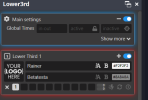
Following the Instruktions in Youtube to get Lower 3rds running I always get a red Frame around my first run.
My Scripts are located on a Folder I have full access to. OBS is newly installed.
I don't see my lower 3rd Banner
Go this YouTube link and see if it helps. Lower Thirds link....
If not, keep looking for the fix from this guy.
I had the same problem as you and he was able to get me through the problems I was having.
I already know his Vids and followed his instructions. Both of my PC's have the same issues. When copying the unziped folder into OBS-Studio on C: I get access violations on the Lua. So I left the Folders outside in Downloads or on a Network Deice and have the same results.
The red frame around the for Scenes and no Show in the Windows.
I'm not sure if I can help you anymore. I had that same issue on 2 different PC's and I was able to fix them both.
Just out of curiosity, did you come across one of his videos regarding Lower Thirds where he talks about copying a web address and pasting it in Notepad because something had changed and doing it this way was the only way to see if that was the issue?
This site uses cookies to help personalise content, tailor your experience and to keep you logged in if you register.
By continuing to use this site, you are consenting to our use of cookies.