Custom HTML, CSS & JS Widgets
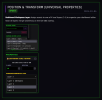
You can now build and display completely custom widgets directly inside Poltergeist! When you spawn a "Custom Code" asset from the left sidebar, you will get a dedicated text editor in the properties panel where you can paste your own HTML, CSS, and JavaScript.
This makes it incredibly easy to add unique visuals to your stream without needing to find an external website to host them.
The Custom Code asset is available now under the "Spawn Assets" menu. Just drop it in, paste your code, and click "Apply & Reload".
- Total Freedom: Write your own CSS animations, design custom goal bars, or paste in widget templates shared by other creators.
- Live Data: Use standard JavaScript to pull live data from the web to build your own weather displays, crypto price tickers, or custom countdowns.
Media Share & Video Queue
You can now let viewers share YouTube videos directly on your stream using Twitch Bits. The new Media Share asset handles queuing, playback, and moderation all in one place.
- Bit-Driven Playback: Set your own "Bits per Second" rate and "Minimum Bits" threshold. Viewers simply add !play [YouTube Link] to their cheer message (e.g., cheer500 !play https://youtu.be/...).
- ️Built-In Moderation: Videos drop into a pending queue on your dashboard. You or your moderators can preview the video link, approve it, deny it, or skip the currently playing media.
- Sub & VIP Protection: An optional toggle allows you to restrict the Media Share feature exclusively to Subscribers, VIPs, and Moderators to prevent spam from unverified viewers.
- Automated Control: Turn on "Auto-Approve" to instantly play queued videos without manual intervention. The server calculates the exact allowed duration based on the bits cheered and automatically cuts the video off when the time is up.
The Media Share asset is available now for Twitch broadcasters and can be found under the "Spawn Assets" menu in the dashboard.
Per Layer Overlay Control
The OBS link generator now includes a layer visibility selector. When you open "Get Link" from the left sidebar, you will find four checkboxes letting you pick which canvas layers are included in the overlay URL before copying it.
The result is a URL like: https://poltergeist.cc/overlay?channel=yourchannel&platform=twitch&interp=true&lerp=0.15&layer=1&layer=3
This makes it possible to run multiple Browser Sources in OBS off a single Poltergeist canvas, each showing only the layers you want.
- ️Targeted Sources: One Browser Source for your background layers, another for your foreground. No duplicate canvases, no extra accounts.
- Scene-Specific Overlays: Give different OBS scenes different layer combinations. A gameplay scene could show all four layers while a BRB screen only renders one.
- No Extra Setup: The layer selection is built into the copied URL, so nothing extra needs to be configured in OBS beyond pasting the link as normal.
All four layers are checked by default when you open the modal, so existing setups will continue to work without any changes.
New Widgets: Progress Goals & Event Lists
Dynamic widgets for community tracking are now available in the Spawn Assets menu, operating completely automatically behind the scenes.
- Live Progress Goals: Dynamic Sub, Follower, and Cheer goal bars can now be added to the canvas. These automatically connect to Twitch events and fill up in real-time. Colors, text, and starting/target numbers are fully customizable to match any channel branding.
- Event Lists (Stream Labels): A beautifully animated, scrolling list of recent supporters (Follows, Subs, Cheers, and Raids) can now be displayed on screen. The list can be configured to display a specific number of recent events and set to scroll up or push down dynamically.
️ Performance & Quality of Life Polish
Several structural upgrades and fixes have been deployed to ensure smoother broadcasts.
- Faster Alert Queues: The timing between back-to-back alerts (like Sub Bombs) has been significantly tightened. When an alert finishes, the next one now triggers instantly, making massive sub-trains feel much snappier without overlapping audio.
- Backend Optimizations: Major structural upgrades have been deployed to the core engine. The server handling animations, games, and real-time events has been completely rebuilt. Overlays now use significantly less CPU and memory, ensuring streams remain perfectly smooth even with hundreds of active assets on screen.
Native Follow Alerts are now Free
The Poltergeist Native Bot is now officially unlocked for all Starter Kit (Free) users.
There is no longer a need to rely on third-party bot names to catch follows. Simply check the "Use Poltergeist Native Bot" box in the Alert Box settings to get instant, reliable follow notifications directly through the system.
The Chatbot Builder Overhaul (Broadcast Suite)
For Broadcast Suite users, the Chatbot Builder has been rebuilt to provide significantly more ways to engage communities and automate streams.
- Channel Point Integrations: Bot responses, sound effects, or even on-screen games can now be triggered using Twitch Channel Points. Just select the new trigger type and type in the exact name of the Twitch reward.
- Smart Auto-Timers: Set up recurring messages to automatically promote Discord servers, socials, or sponsors. A new "Minimum Chat Lines" safety feature ensures the bot only posts when chat is actually active, rather than spamming an empty room.
- Chat-Triggered Sounds: Viewers can now trigger sounds directly. Any chat command, timer, or channel point redemption can be linked to the Soundboard to instantly play audio on stream (e.g., !bonk).
- ️VIP & Subscriber Permissions: Reward top supporters by gatekeeping specific commands, sounds, and games so that only Subscribers, VIPs, or Moderators can use them.
- Command Aliases: Multiple trigger words can now be assigned to a single command by separating them with commas (e.g., !discord, !dc, !server).
- Live Stream Variables: New {game}, {title}, and {uptime} variables have been added. The bot can now dynamically answer common viewer questions about the current game category and how long the stream has been live, removing the need for a secondary chat bot.
Quality of Life Polish
A few interface tweaks have been introduced to make building a bot a smoother experience. The command list will now highlight the specific command currently being edited. New icons have been added to help distinguish Timers from Chat Commands at a glance, and the save button now provides a clear visual confirmation when changes are successfully applied.
You can now use SoundCloud URLs as audio source.
Example Audio URLs:
A Copy Public Gift Link button has been added to the right sidebar of your dashboard.
Your public gift page allows anyone to purchase Broadcast Suite access for your channel directly, without needing to be one of your moderators. This makes it much easier to share with your community.
To use it:
On the gift page, the sender can:
- Open your dashboard and make sure no assets are selected.
- Scroll to the bottom of the right sidebar.
- Click Copy Public Gift Link.
- Share the copied link anywhere, for example your Discord, social media, stream chat, or donation page.
- Choose how many months to gift (1 to 24).
- Leave an optional name and message for you.
- Pay securely via PayPal.
The name and message are only visible if your dashboard is open at the time of purchase. Gifted time stacks on top of any existing access.
The Chatbot Builder is now available as part of the Broadcast Suite.
Create custom chat commands that are handled server-side — no third-party bot required.
To get started:
Command options:
- Open the Chatbot Builder from your dashboard.
- Mod "PoltergeistCC" on your Twitch channel.
- Create a new command and hit Save Settings.
- Trigger Type: Chat Command (e.g. !discord)
- Response: The bot's reply. Supports variables: {user}, {count}, {amount}, {months}, {tier}
- Global Cooldown: Applies to all viewers.
- User Cooldown: Per-user cooldown, independent of the global one.
- Moderator / Broadcaster Only: Restrict a command so only mods and the broadcaster can trigger it.
- Command Enabled: Toggle any command on or off without deleting it.
![]()
Now you can assign individual mods permissions weather they can edit certain things.
![]()
A new quality-of-life feature is live! You no longer have to manually recreate text styles, custom shapes, or complex alert boxes from scratch.
Asset Duplication: You can now instantly clone any asset directly on your canvas.
What gets cloned? Everything. The new asset perfectly copies your fonts, colors, stroke widths, and your Timeline Animation Keyframes.
- Select any asset (or group of assets) on your canvas.
- Scroll to the bottom of the right sidebar and click the Duplicate button.
- An exact clone will spawn directly next to the original.
Pro Tip: You can also Shift+Click multiple assets or an entire Group and duplicate the whole layout at once. To ensure smooth performance, you can duplicate a maximum of 50 assets at a time.
Refresh your dashboard to see the new button.