- Supported Bit Versions
- 64-bit
- Source Code URL
- https://github.com/pixelsolutions/pixelion-captions
- Minimum OBS Studio Version
- 32.0.1
- Supported Platforms
- Windows
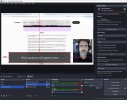
Pixelion Captions adds live transcription and translation captions to OBS Studio. It listens to your OBS program mix and displays captions in a source you can position and style anywhere in your scene. It is useful for streamers and creators who want on-screen captions in their own language or translated captions for a wider audience.
Features
Getting started

AI Disclaimer: AI coding assistants were used for parts of this project, mainly to speed up routine work such as drafting boilerplate, reformatting, and suggesting fixes. The plugin was not written entirely or in large part by AI. Its design, the core transcription, translation, audio, and session logic, and the integration with Pixelion's services were written and reviewed by human developers at Pixel Solutions, who are responsible for the released code. It was also tested by people in OBS Studio before release and believed to be safe and functional.
Features
- Live transcription of your OBS program audio into on-screen captions
- Optional translation to another language (requires a Pixelion Pro plan)
- A caption source you can move, resize, and style (font, color, size, background, alignment, padding)
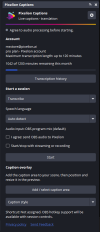
- A dock for sign-in, session controls, caption styling, and transcript history
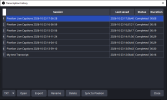
- Save transcripts locally and browse previous sessions
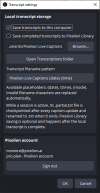
- Export transcripts, and optionally save them to your Pixelion Library
- Remembers your speech and translation language selections between sessions
- Optional start and stop together with streaming or recording
- Close OBS Studio.
- Download the Windows x64 ZIP from the releases page. Choose the plugin package, not the source ZIP.
- Extract the ZIP and copy the pixelion-captions folder into C:\ProgramData\obs-studio\plugins. Keep its bin and data folders together.
- Open OBS Studio, open the Docks menu, and select Pixelion Captions.
Getting started
- Sign in to your Pixelion account from the dock.
- Choose Transcribe or Translate, then select the speech language. For translation, also choose a language under Translate to.
- Check the audio processing consent box.
- Add a Pixelion Captions source from the Sources panel and place it in your scene.
- Press Start in the dock, and Stop when you are finished.
AI Disclaimer: AI coding assistants were used for parts of this project, mainly to speed up routine work such as drafting boilerplate, reformatting, and suggesting fixes. The plugin was not written entirely or in large part by AI. Its design, the core transcription, translation, audio, and session logic, and the integration with Pixelion's services were written and reviewed by human developers at Pixel Solutions, who are responsible for the released code. It was also tested by people in OBS Studio before release and believed to be safe and functional.