

WolfBladeEJ89
New Member
So i recently upgraded to Windows 10 and OBS has never given me problems until then.
I am having major problems with Window Capture (and monitor capture) sizes for apps. such as a speedrun timer or other apps. I have them captured at their natural size, but they all ways appear smaller than they should and have lots of black in the rest of the windows, i cant really adjust the size of the apps easily or at all. and when i try to capture them at a bigger size, the same things happens.
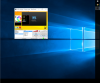
The second issue im having is that the OBS program becomes RIDICULOUSLY tiny on my screen, i have adjusted my resolution sizes on my screen and all the "new" screen adjustment features that windows 10 offers, and its still not working out. I'm not quite sure how to fix these issues.
In the tiny OBS screenshot, when the app loads, it starts off big like 1/4 of the screen, then it adjusts itself to that small. I could adjust the window and such, but the buttons and everything are still very small and hard to see
i will try to include screen shots of both issues.
please help.
thanks.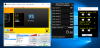


I am having major problems with Window Capture (and monitor capture) sizes for apps. such as a speedrun timer or other apps. I have them captured at their natural size, but they all ways appear smaller than they should and have lots of black in the rest of the windows, i cant really adjust the size of the apps easily or at all. and when i try to capture them at a bigger size, the same things happens.
The second issue im having is that the OBS program becomes RIDICULOUSLY tiny on my screen, i have adjusted my resolution sizes on my screen and all the "new" screen adjustment features that windows 10 offers, and its still not working out. I'm not quite sure how to fix these issues.
In the tiny OBS screenshot, when the app loads, it starts off big like 1/4 of the screen, then it adjusts itself to that small. I could adjust the window and such, but the buttons and everything are still very small and hard to see
i will try to include screen shots of both issues.
please help.
thanks.
