Hi,
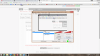
I was just trying to do a window capture, but the scaling was wrong as you can see in the image I've attached. I also tried monitor capture but that just gave me a black screen (and yes, I have the latest DirectX). The only thing I could think of being a possible issue is the fact that my laptop has a 4K resolution, though I tried changing the res to 1080p and it made not difference to the problem. Anyone know how to fix any of this?
I was just trying to do a window capture, but the scaling was wrong as you can see in the image I've attached. I also tried monitor capture but that just gave me a black screen (and yes, I have the latest DirectX). The only thing I could think of being a possible issue is the fact that my laptop has a 4K resolution, though I tried changing the res to 1080p and it made not difference to the problem. Anyone know how to fix any of this?