

Hello peeps! Hope one of you is able to help me out :(
I am trying to capture a part of AIMP3 (music player, only takes a ) as a window, sounds simple enough but here we go...
Before we start - yes I only use one monitor on my PC and I only have a single GFX card (AMD) & run OBS v0.656b 64bit on Windows 7.
I have a monitor capture on the same scene however AIMP3 will always be minimized during stream.
However if I add it (with default settings & properties) it will just show as a black window.
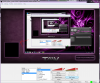
Using compatibility or capture layers doesn't make a difference btw.
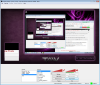
When disabling aero on OBS video settings I can see it (screenshot 3!!) as long as it isn't by any other window (Screenshot 2 - which is EXTREMELY inconvenient as I only have one monitor, lol)
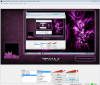
I'm open to all suggestions for having it permanently like screenshot 3 (or at least until I decide to change it :) )
Thanks!!
Ari~
I am trying to capture a part of AIMP3 (music player, only takes a ) as a window, sounds simple enough but here we go...
Before we start - yes I only use one monitor on my PC and I only have a single GFX card (AMD) & run OBS v0.656b 64bit on Windows 7.
I have a monitor capture on the same scene however AIMP3 will always be minimized during stream.
However if I add it (with default settings & properties) it will just show as a black window.
Using compatibility or capture layers doesn't make a difference btw.
When disabling aero on OBS video settings I can see it (screenshot 3!!) as long as it isn't by any other window (Screenshot 2 - which is EXTREMELY inconvenient as I only have one monitor, lol)
I'm open to all suggestions for having it permanently like screenshot 3 (or at least until I decide to change it :) )
Thanks!!
Ari~

