
Question / Help Visual GUI Issue

Argent6978

New Member
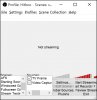
I'm suddenly having an issue with OBS. All the text is very squished up and I can't get it to snap back to normal. I tried uninstalling the program and reinstalling it, but it's still messed up and I'm not sure what setting is making it do that. Can someone please hep me figure out how to reset the visual of my OBS GUI? I can't operate it like this, I can't read the status bar on the bottom, and the scenes and sources boxes are all kinds of messed up. :(
 

Attachments

  • Untitled-1.jpg
    Untitled-1.jpg
    157.4 KB · Views: 42
I've adjusted display settings, and nothing is fixing OBS's issue. My 2 screens are drastically different in resolution (Main: 3840x2160 Second: 1280x1024). OBS used to automatically resize itself when I would move it onto my second screen so I could use it while I stream, but it's not doing that anymore. It's stuck like this for some reason, and I can't get it back. :(
 
Nothing I do is fixing this issue. When I first had the problem, I was able to uninstall OBS, then re-install and it seemed to fix it for a moment until I changed something, but I'm not sure what I changed. Now I can't even get that to fix the issue. Someone please help. I'm running Windows 10, and it seems like scaling isn't working. Please, I need to fix this so I can see the information on my window to be able to switch scenes, see my dropped frames display, etc. Thanks.
 
Nevermind... I finally looked in the properties and found a setting under Compatibility for scaling that was checked and shouldn't have been. It is scaling properly to my display now, and I can read the text and everything on my OBS again... I feel kinda stupid.
 
Back
Top