Bug Report Updated OBS and now I can't stream

Nite

New Member
I don't know what is going on. It starts, the numbers are fine, but then it randomly starts to drop frames and then the connection starts to fail until it completely disconnects.

I can click on test and everything is fine.

I didn't change anything and it has worked forever as it was. Just recently applied the update and now it is not working.

And I have restarted my PC and internet and all of that jazz. Even uninstalled and reinstalled the OBS program.

As for the log, mine doesn't look like other peoples log... don't think I am doing it right. Also, I am very careful with stuff like that so IDK.
 
It's all well and good for you to say that yours doesn't look like other peoples.

But we STILL NEED IT
 
Well, for some reason, it is stable now. I don't know what happened.

What do those logs contain? What exactly do they tell you guys and what do you look for?
 
And it started to crash again. I have no idea what is going on.
Again, it is not my internet. IDK what to say. I will try in the morning. GN.
 
So even if nothing has changed, that would be an issue?

I have used the same information for over 6 months I would say, maybe even over a year, and it never did this.

The day before I experienced this, it was working fine. The next day, I updated the software and started to have this issue.

What does RTT mean? You said it was irrelevant, but I have no idea what that even is.
 
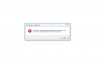
I didn't down load anything and it gave me that message.

I down loaded the x64 one and installed it.

It gave me that message again.

I tried to install the arm one and it said was not a valid winx32 application.

Not sure what to say about that because my PC is a 64 bit.

I would download the x32 bit but that seems pointless and possibly harmful because, as stated, my pc is a 64 bit.
 

Attachments

  • this is what I get.png
    this is what I get.png
    16.3 KB · Views: 21
I would download the x32 bit but that seems pointless and possibly harmful because, as stated, my pc is a 64 bit.
Your argument is wrong. The installation of those runtimes isn't dependent on the bitness of your operating system.

It is dependent on the bitness of the program you're trying to run.

Install the 32-bit one.
 
Also, there is no 32 bit. There is an 86 bit. And again, I tried the one that says "arm", but it didn't work.
 
I noticed now that I said that their was one, I forgot that it was an 86 bit and not a 32 bit, my mistake. I guess I mislead you into thinking that their was one.

But either way, I guess you can take it as a form of becoming further educated on the matter.
 
Back
Top