Question / Help Trying to use VST audio filter

Ricardo, where are you selecting the architecture? When I download it there is no option for 32 or 64bit. When I install I don't see anything there, either..
 
You don't have "OBS Studio (32bit)" and "OBS Studio (64bit)" icons? Linking to, respectively, "bin\32bit\obs32.exe" and "bin\64bit\obs64.exe" in the place where OBS Studio is installed?
 
Ahh, OBS, not the plugin. His statement ("You should make sure that you're pointing to the 64bit version when running OBS") had me confused as I was thinking I should be pointing OBS to a particular plugin, not pointing to a particular OBS executable.... he was talking about the program - I get it now!

Thanks for your help!
Mike
 
I think I may have misunderstood what was going on as well, but the basic point is the same: if you're using 64bit plugins, you need to be running 64bit OBS, or they won't work. Now that I know a bit more about logs, the original log you posted suggests that you were running 32bit OBS when trying to use the 64bit plugins. Hopefully now all of the confusion is cleared up and everything is working for you. :)
 
Ok, so I'm having very consistent crashes on Win 10 and the RealPlugs plugins. Sometimes it'll get into a situation that I have to uninstall RealPlugs in order for obs (18.0.1) to start without crashing.

Not sure if the log files will help, but here they are
 

Attachments

Can you please upload unzipped logs? It makes life easier for people who are trying to help. It would probably also be a good idea to start your own thread for your problem.
 
Looks like this plug-in only looks in the system default VST folder, and it doesn't even tell you where that is. Not great. Most applications would have a setting for this - most applications would let you specify more than one folder as well.

Either way, your system default VST folder could be literally anywhere - it depends on which audio software you installed first, different apps have their own opinions about where this folder should be.

If you open "regedit.exe" (via the "run" dialog in the start menu) you can find the path under this registry key:

Computer\HKEY_LOCAL_MACHINE\SOFTWARE\WOW6432Node\VST

Once you know the path, most VST plugins can be copied there.

Sadly, that does not include WAVES - they have some kind of iffy licensing system fronting the actual plugins, and apparently that cause some apps to fail, including OBS.

I did manage to load a few different VST 2 plugins after copying them there though - it does work.
 
We're aware the VST situation isn't ideal, but it was determined to roll out the functionality as-is for people to start playing with rather than waiting for more spit and polish. All the concerns noted in this thread are well heard, but no ETA on when they will be addressed.

The filters guide (which has been linked several times already) contains all the relevant information and limitations for current VST support.
 
You might consider using the AudioPluginFormat abstraction in JUCE:

https://www.juce.com/doc/classAudioPluginFormat

This would provide cross-platform support for modern VST plugins (as well as LADSPA and AU) through a unified interface - which is likely a lot simpler than working with the bare VST APIs, which aren't exactly famous for being awesome and wonderful to work with ;-)

I haven't used this, but I've heard good things.
 
I just installed the latest version of OBS 18.0 and I add a VST filter to my audio input and it asks me to select a plugin so I select "WaveShell-VST 9.2_x64". I then click the "open plug-in console" button and nothing happens.

Is there a way to specify the location of my VST plugins as I have some others (non waves plugins) that I'd like to use? In Reaper (DAW) I can tell it what folders to look in to find my plugins and then they're accessible as FX to add to tracks. I tried throwing some of those vst plug-ins in the obs-vst folder, but they weren't available in OBS.

I looked on the site and the forum and I didn't see any info on how to work with VST plug-ins - any help would be much appreciated!

Thanks,
Mike

Sorry this is a late reply and am sure you have already found the solution, but basically the plug ins required are VST2 ... here is a page I just found and loaded up: https://zynewave.com/recommended-freeware-plugins/

Hope that is of some use.
 
Ricardo, where are you selecting the architecture? When I download it there is no option for 32 or 64bit. When I install I don't see anything there, either..


OBS looks for vst plugins only in the directory ( program files/vstplugins ) .. sometimes when installing plug ins they are installed in a different directory location such as "Steinberg" or "Reaper" .. create a new directory "vstplugins" and copy paste other plugins to this directory and OBS will find them and provide all options to select and open interface as stand alones. :) Also make sure the spelling is all one word... i had a directory "vst plugins" and it did not work because of the space in the name .. :(
 
I got problem with WaveShell-VST 9.2_x64 plugin too.

Btw I'm starting to use VST plugins and Sound Effects from

Lucid Samples

Really satisfied.

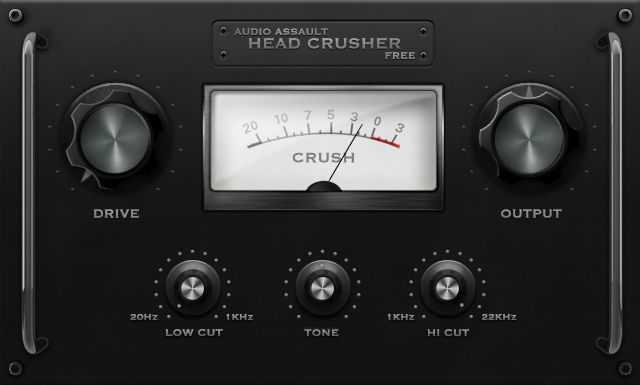
headcrusher-free.jpg
 
For some reason the 64 bit and 32 bit versions of ReaPlugs install in different folder names. OBS only pulls properly from the one called VSTPlugins.

The folder named VST is the 64 bit plugins. Those work on the 64 bit version of OBS. Move the VST folder from x86 Program Files to the one names only Program Files, and rename the folder VSTPlugins.
 
Anyone find a fix for this yet? I'm having this exact issue. I can get the VSTs for ReaPlugs to show up in OBS by doing as the comment above states, but the "Open Plug-in Interface" does not work to bring the effect up to modify it.

Thanks everyone who has chimed in here to figure this out. :)
 
Back
Top